Square D
Z-Wave Plus Plug-in
SQR62102WHZ
Binary Switch
HW: 1 FW: 1.05
ZGM130
7.13.6
0x0447 (1095)
0x000E (14)
0x1108 (4360)
ZC12-21050231
2021-05-17 10:34:24.595221
N/A
Enhanced 232 Slave
Always On Slave
ZWAVE PLUG-IN OUTLET, ENERGY MONITORING, 15A
The Square D 15 Amp Z-Wave Plus Energy Monitoring Plug-In Duplex Receptacle is the professionals choice for secure reliable lighting control. Easily upgrade a standard receptacle to offer control, excellent for temporary applications like Christmas lighting. Perfect for monitoring energy usage of the device plugged into the controlled outlet. It works with any Z-Wave hub and can be grouped with up to 5 other Z-Wave Plus devices.
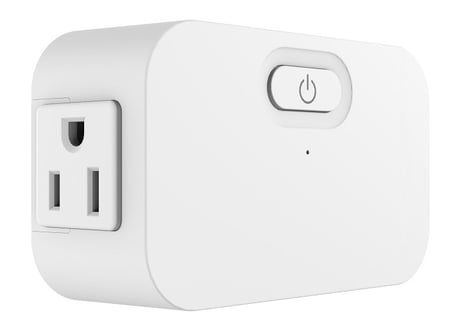
Product Image


1 - LED indicator Status
Synchronization of load power and LED indicator.Size: 1 byte
Default: 1
Minimum: 0
Maximum: 1
Possible values
| From | To | Desription |
|---|---|---|
| 0 | 0 | Power On, LED Off; Power Off, LED On |
| 1 | 1 | Power On, LED On;Power Off, LED Off |
2 - Delayed OFF Time
Delay off means when users press button to turn off the load, there’s a reaction time.Size: 1 byte
Default: 0
Minimum: 0
Maximum: 240
Possible values
| From | To | Desription |
|---|---|---|
| 0 | 240 | Delay off means when users press button to turn off the load, there’s a reaction time. |
3 - Power On Status
Size: 1 byte
Default: 1
Minimum: 0
Maximum: 3
Possible values
| From | To | Desription |
|---|---|---|
| 1 | 1 | Off |
| 2 | 2 | On |
| 3 | 3 | Last State |
4 - Child Lockout Enable
Child lockout feature can enabled and disabled local control.Size: 1 byte
Default: 0
Minimum: 0
Maximum: 1
Possible values
| From | To | Desription |
|---|---|---|
| 0 | 0 | Disable |
| 1 | 1 | Enable |
A. SmartStart inclusion: The feature assumes the gateway has implemented SmartStart. Users could use the APP of the gateway or the gateway camera to scan the QR code (located on the device or on the enclosed label in the package) before powering on the device, and then when the device is powered on, it shall be automatically added to the gateway. B. Manual inclusion (Figure 4): When the gateway is in adding mode (please refer to the instruction of the Z-Wave gateway for the operations on gateway itself). Press the program button 3 times within 1.5s (the interval between each press is less than 0.5s).
Exclusion from a Z-Wave network (Figure 4): When the gateway is in removing mode (please refer to the instruction of the Z-Wave gateway for the operations on gateway itself). Press the program button 3 times within 1.5s (the interval between each press is less than 0.5s).
Long press the reset button for >20 seconds till the blue LED blink 5 times within one second.
The DSK can be found on the product and its packaging.
| Type | Value(s) |
|---|
| Meter type |
|---|
| Electric Meter Consumption |