Ultraloq
Ultraloq U-Bolt Pro Z-Wave Smart Lock
U-BOLT-PRO-ZWAVE
Lock
HW: 1 FW: 1.01
ZGM130
7.14.3
0x0452 (1106)
0x0004 (4)
0x0001 (1)
ZC12-21040213
2021-03-18 16:42:08.811168
N/A
Enhanced 232 Slave
Listening Sleeping Slave
Yes
Ultraloq U-Bolt Pro Z-Wave smart lock works with your smart home system with a compatible Z-Wave Hub and allows you to control access from anywhere.
Ultraloq U-Bolt Pro Z-Wave smart lock works with your smart home system with a compatible Z-Wave Hub and allows you to lock, unlock or share access to your home from anywhere. You can also unlock with your fingerprint, code, key or smartphone via Bluetooth for ultimate security and convenience. The simple installation takes minutes and only four screws.
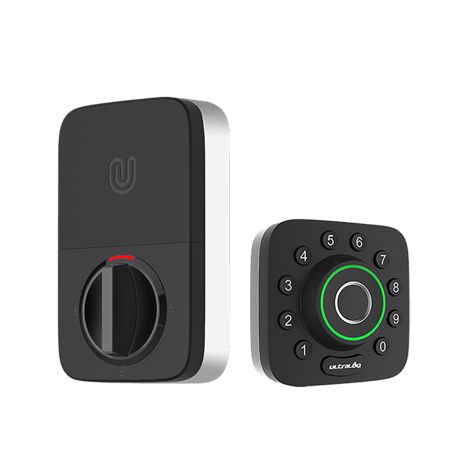
Product Image
.png)
.png)
.png)
.png)
.png)
Step1 Set the Z-Wave network main controller or hub into inclusion mode. Step2 Press the button 5 on the lock keypad, until you hear beep sound and the indicator light flashes blue. If your Z-Wave hub is Security 2 enabled and requires the Z-Wave QR code or pin code to add the lock automatically, please find it on the back of the battery cover of your smart lock. Step3 Follow the instructions of your Z-Wave hub to finish the inclusion process.
Step1 Set the Z-Wave network main controller or hub into exclusion mode. Step2 Press the button 5 on the lock keypad, until you hear the beep sound and the indicator light flashes red. Step3 Follow the instructions of your Z-Wave hub to finish the exclusion process.
Product Wake up 1.Touch the keypad on outdoor body. 2. Turn the knob on Indoor body. 3. Touch unlock button in the U-tec App
CAUTION: Resetting a Z-Wave device without notifying the hub may cause performance problems. Use this procedure only when the Z-Wave hub is missing or otherwise inoperable. If you are using U-tec App as Owner, please click “Delete and Reset” to remove the lock from your U-tec Account, then use a Reset Needle to push the Reset Button (at the bottom of Interior Assembly) for around 3 seconds until you hear one long beep and two short beeps. If U-Bolt Pro Z-Wave is working as Standalone Mode without the App, please use a Reset Needle to push the Reset Button (at the bottom of Interior Assembly) for around 3 seconds until you hear one long beep and two short beeps.
If your Z-Wave hub is Security 2 enabled and requires the Z-Wave QR code or pin code to add the lock automatically, please find it on the back of the battery cover of your smart lock.
| Type | Value(s) |
|---|
| Group | Type |
|---|---|
| Power Management | Battery maintenance status: Replace battery soon |