.vivint
Z-Wave Secondary Keypad
M/N: KP01
Entry Control Keypad Device
HW: 1 FW: 1.00
ZGM130
7.14.3
0x0156 (342)
0x4B50 (19280)
0x0001 (1)
ZC12-21030206
2021-03-24 12:55:49.552865
N/A
Enhanced 232 Slave
Listening Sleeping Slave
Yes
The Vivint Keypad is a wireless Z-Wave control device that provides remote access to the security features for a Vivint Smart Home™ system, including enabling and disabling both the Arm Away and Arm Stay security modes.
The Vivint Keypad is a wireless Z-Wave control device that provides remote access to the security features for a Vivint Smart Home™ system, including enabling and disabling both the Arm Away and Arm Stay security modes. The keypad can also be used to transmit a signal to Vivint Monitoring for fire, panic, and general emergency conditions such as a home intrusion. The keypad has an easy-to-use interface with identified and illuminated buttons, as well as indicator icons that show when the device is offline, or battery power is low. It also displays security system status with a downcast light.
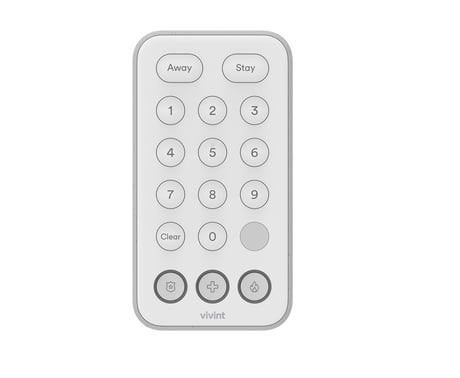
Product Image
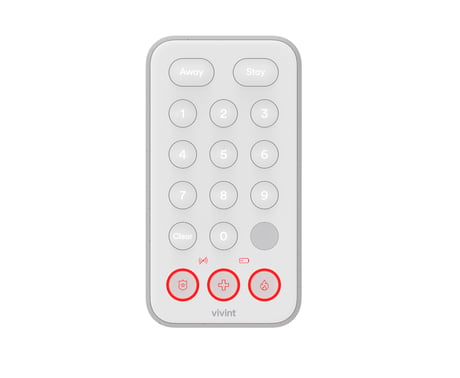
keypad front


1 - Motion Detector
Whether or not motion detector is enabled. 1: Enabled (default) / 0: Disabled.Size: 1 byte
Default: 1
Minimum: 0
Maximum: 1
Possible values
| From | To | Desription |
|---|---|---|
| 1 | 0 | Enabling motion detector |
| 0 | 0 | disable motion detector |
2 - Sound
Enable beeper feedback. 1: Enabled (default) / 0: Disabled.Size: 1 byte
Default: 1
Minimum: 0
Maximum: 1
Possible values
| From | To | Desription |
|---|---|---|
| 1 | 0 | enable sound/buzzer |
| 0 | 0 | disable sound/buzzer |
3 - Down-Cast Light
Enable the down-cast light. 1: Enabled (default) / 0: Disabled.Size: 1 byte
Default: 1
Minimum: 0
Maximum: 1
Possible values
| From | To | Desription |
|---|---|---|
| 1 | 0 | enable down-cast lighting |
| 0 | 0 | disable down-cast lighting |
4 - Application-Level Retries
Number of attempts on top of the stack-level retries to try to reach the controller/hub with Z-Wave messages.Size: 1 byte
Default: 3
Minimum: 0
Maximum: 10
Possible values
| From | To | Desription |
|---|---|---|
| 0 | 10 | how many retries device does to reach controller/hub |
5 - Battery-Poll Timer
Amount of time in minutes between timed battery checks.Size: 2 bytes
Default: 70
Minimum: 5
Maximum: 1440
Possible values
| From | To | Desription |
|---|---|---|
| 5 | 1140 | the amount of time in minute between timed battery checks. |
• Vivint panel/hub via Z-Wave (Classic Inclusion): Use this standard method for adding Z-Wave devices at the panel or hub. Use the "PAIR/RESET" button next to the battery tray. Follow the onscreen prompts to add the keypad.
Removing Keypad from System To remove the device, place the panel Use this standard method for excluding Z-Wave devices at the panel or hub. Use the "PAIR/RESET" button next to the battery tray. Follow the onscreen prompts to add the keypad.
This device is frequently listening device so the device is always reachable.
Please use this procedure only when the network primary controller is missing or otherwise inoperable. To restore the keypad to factory settings which removes it from any network as well: 1. Locate the button labeled Pair/Reset underneath the back battery cover. 2. Insert a paperclip into the hole until you feel the button depress. 3. Hold the button down for ten seconds. The green downcast indicator will blink rapidly while the reset button is pressed and go out after ten seconds. 4. The device’s downcast indicator will turn red when the reset operation is complete. The device is now ready to be added back to a Z-Wave network.
page 1 under network inclusion
| Type | Value(s) |
|---|
| Group | Type |
|---|---|
| Home Security |
|
| Power Management |
|