Minoston
Smart Dimmer Switch
MS11ZS
Multilevel Switch
HW: 1 FW: 1.00
ZGM130
7.13.6
0x0312 (786)
0x0004 (4)
0xEE02 (60930)
ZC12-21040209
2021-04-02 11:30:20.767747
N/A
Enhanced 232 Slave
Always On Slave
This light switch features: - Manual or remote on/off control and dimming from your mobile device or computer (when included to a Z-Wave gateway controller)
This light switch features: - Manual or remote on/off control and dimming from your mobile device or computer (when included to a Z-Wave gateway controller) - Z-Wave Plus with improved 500 chip for faster and safer wireless communication - Works with most high-quality DIMMABLE LED, CFL, and incandescent bulbs - Based on universal command classes - supported by most Z-Wave controllers - May be associated and grouped with other Z-Wave devices for advanced home automation - LED indicator to help locate the switch in dark space - Simple elegant design with screwless snap-on wall plate included - Built-in Z-Wave signal repeater for a stronger and more reliable network Z-Wave Signal Frequency: 908.42 MHz Power: 120 VAC, 60 Hz Maximum Loads: 600W Single-gang, 500W Double-gang, 400W Triple-gang Incandescent, 150W CFL or LED Minimum Load: 20W for LED and CFL bulbs Range: Up to 100 feet line of sight Operating Temperature: 32-104° F (0-40° C) Installation and Use: Indoor only
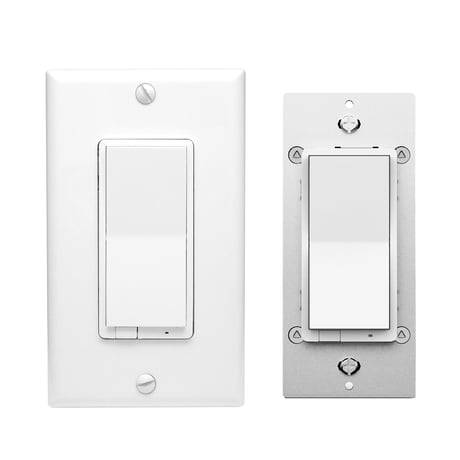
Product Image


1 - Locally Button function
Parameter=1,Size=1,Value=0 Up Button: On Down Button: Off Value=1 Up Button: Off Down Button: On Value=2 Up Button: On/Off Down Button: On/Off Default = 0Size: 1 byte
Default: 0
Minimum: 0
Maximum: 2
Possible values
| From | To | Desription |
|---|---|---|
| 0 | 0 | Up Button ON,Down Button OFF |
| 1 | 1 | Up Button OFF,Down Button ON |
| 2 | 2 | Up Button ON/OFF,Down Button ON/OFF |
2 - LED Indicator
Parameter=2,Size=1,Value=0 On when Off and Off when On Value=1 On when On and Off when Off Value=2 Always Off Value=3 Always On Default =0Size: 1 byte
Default: 0
Minimum: 0
Maximum: 3
Possible values
| From | To | Desription |
|---|---|---|
| 0 | 0 | On when Off and Off when On |
| 1 | 1 | On when On and Off when Off |
| 2 | 2 | Always OFF |
| 3 | 3 | Always ON |
3 - Auto Turn-Off Timer
Auto Turn-Off Timer--- Values: 0 – 65535 (minutes)Size: 4 bytes
Default: 0
Minimum: 0
Maximum: 65535
Possible values
| From | To | Desription |
|---|---|---|
| 0 | 65535 | Auto Turn-Off Timer |
5 - Auto Turn-On Timer
Auto Turn-On TimerSize: 4 bytes
Default: 0
Minimum: 0
Maximum: 65535
Possible values
| From | To | Desription |
|---|---|---|
| 0 | 65535 | Auto Turn-On this Timer |
8 - Restores state after power failure
Restores state after power failure Parameter=8,Size=1,Value=0 output off Value=1 output on Value=2 out put the state after power Default =2Size: 1 byte
Default: 2
Minimum: 0
Maximum: 2
Possible values
| From | To | Desription |
|---|---|---|
| 0 | 0 | Output OFF |
| 1 | 1 | Output ON |
| 2 | 2 | out put the state after power |
9 - Ramp rate
Ramp rate(Local Button + Z-Wave)> change to local and Z-Wave like in the latest ZEN30 firmware, also applies to any multilevel changes (so there should be soft transition between 20 and 80% brightness if changed from the hub for example) Parameter=9,Size=1, Value=1 from 0x63 to 0x00 or from 0x00 to 0x63 need 1s Value=2 from 0x63 to 0x00 or from 0x00 to 0x63 need 2s . . Value=99 from 0x63 to 0x00 or from 0x00 to 0x63 need 99s Default = 1Size: 1 byte
Default: 1
Minimum: 1
Maximum: 99
Possible values
| From | To | Desription |
|---|---|---|
| 1 | 99 | from 0x63 to 0x00 or from 0x00 to 0x63 need this value |
10 - Multilevel minimum value can be set
Multilevel minimum value can be set(Local Button)> this should apply to both for local or Z-Wave operation Parameter=10,Size=1,Value=0 disable Value=1 . . Value=99 Default = 1Size: 1 byte
Default: 1
Minimum: 0
Maximum: 99
Possible values
| From | To | Desription |
|---|---|---|
| 0 | 99 | Multilevel minimum value |
11 - Multilevel maximum value can be set
Multilevel maximum value can be set(Local Button)> this should apply to both for local or Z-Wave operation Parameter=11,Size=1,Value=0 disable Value=1 . . Value=100 - NOT ACCEPTED BY HUB Default = 99Size: 1 byte
Default: 99
Minimum: 0
Maximum: 100
Possible values
| From | To | Desription |
|---|---|---|
| 0 | 100 | Multilevel maximum value can be set |
12 - Double Tap Behavior
Double Tap Behavior: when switch is off and quickly press UPPER paddle 2 times, switch turns on to x brightness (Local Button) Parameter=12,Size=1, Value = 0 enable double tap to full brightness (99) Value = 1 custom value set in parameter 18 Value = 2 enable double tap to maximum brightness (turn on to the value relate with parameter 11) Value = 3 disable double tap to full brightness Default = 0Size: 1 byte
Default: 0
Minimum: 0
Maximum: 3
Possible values
| From | To | Desription |
|---|---|---|
| 0 | 0 | enable double tap to full brightness (99) |
| 1 | 1 | custom value set in parameter 18 |
| 2 | 2 | enable double tap to maximum brightness (turn on to the value relate with parameter 11) |
| 3 | 3 | disable double tap to full brightness, |
15 - Enable or Disable local / Z-Wave control
Enable or Disable local / Z-Wave control Parameter=15,Size=1,Value=0 disable (when paddle pressed switch will not turn light on or off BUT it will still control the light via z-wave and it will change LED indicator status and on/off/multilevel status when paddle is pressed) Value=1 enable (normal operation like now) Value = 2 disable local and Z-Wave control (LED and on/off status will still change if paddle pressed) >> make sure that status is still reported and LED indicator changes when Z-Wave control is disabled Default = 1Size: 1 byte
Default: 1
Minimum: 0
Maximum: 2
Possible values
| From | To | Desription |
|---|---|---|
| 0 | 0 | disable (when paddle pressed switch will not turn light on or off BUT it will still control the light via z-wave and it will change LED indicator status and on/off/multilevel status when paddle is pressed) |
| 1 | 1 | enable (normal operation like now) |
| 2 | 2 | disable local and Z-Wave control (LED and on/off status will still change if paddle pressed) >> make sure that status is still reported and LED indicator changes when Z-Wave control is disabled |
16 - dimmer speed
dimmer speed (only for local press & hold): amount of seconds it takes to go from 0 to 100% brightness when pressing and holding the paddle Parameter=16,Size=1, Value=1 from 0x63 to 0x00 or from 0x00 to 0x63 need 1s Value=2 from 0x63 to 0x00 or from 0x00 to 0x63 need 2s . . Value=99 from 0x63 to 0x00 or from 0x00 to 0x63 need 99s Default = 5Size: 1 byte
Default: 5
Minimum: 1
Maximum: 99
Possible values
| From | To | Desription |
|---|---|---|
| 1 | 99 | from 0x63 to 0x00 or from 0x00 to 0x63 need this value |
18 - Custom brightness level
Custom brightness level - in this parameter define default brightness level the switch will turn on to from main switch or regular switch in 3-way when pressed upper paddle once. Parameter: 18 Size: 1 byte dec Values 0-99 0 - last brightness level 1-99 custom brightness level default = 0Size: 1 byte
Default: 0
Minimum: 0
Maximum: 99
Possible values
| From | To | Desription |
|---|---|---|
| 0 | 0 | last brightness level |
| 1 | 99 | Custom brightness level |
19 - 3-way switch type
3-way switch type Parameter=19,Size=1,Value=0 toggle switch(device changes status when switch changes status,it can only turn on or turn off lamp,it can’t dimmer)(default); Value = 1 toggle switch(press 1x change device status;quickly press 2x the result depend on Par11/Par12; quickly Press 3x it trigger dimmer in loop(dimmer up/dimmer down ) Value=2 momentary switch (press 1x change device status;quickly press 2x the result depend on Par11/Par12;hold trigger dimmer in loop(dimmer up/dimmer down ) Value=3 momentary switch (press 1x change device status;quickly press 2x the result depend on Par11/Par12;hold trigger dimmer in loop(dimmer up/dimmer down – BUT after double click to full brightness, hold will dim DOWN always instead of trying to increase brightness) >> This value is missing, please add to setting Notice: when the value=1,or value=2,the switch can’t respond immediately,because it need to recognize multiple press.Size: 1 byte
Default: 0
Minimum: 0
Maximum: 3
Possible values
| From | To | Desription |
|---|---|---|
| 0 | 0 | toggle switch(device changes status when switch changes status) |
| 1 | 1 | toggle switch(press 1x change device status;quickly press 2x the result depend on Par11/Par12; quickly Press 3x it trigger dimmer in loop(dimmer up/dimmer down ) |
| 2 | 2 | momentary switch (press 1x change device status;quickly press 2x the result depend on Par11/Par12;hold trigger dimmer in loop(dimmer up/dimmer down ) |
| 3 | 3 | momentary switch (press 1x change device status;quickly press 2x the result depend on Par11/Par12;hold trigger dimmer in loop(dimmer up/dimmer down – BUT after double click to full brightness, hold will dim DOWN always instead of trying to increase brightness) >> This value is missing, please add to setting |
20 - Association reports
Association reports Parameter=20,Size=1 Values: 0 – Z-Wave control:Multilevel report (without each level,just final level) Manual control (short press): Basic report(without each level,just final level) Manual control(long press & relay enable): Basic report(without each level,just final level) Manual control(long press & relay disable): Multilevel report (each level will be reported) 1 – Z-Wave control:Multilevel report (without each level,just final level) Manual control (short press): Basic report (without each level,just final level) Manual control(long press & relay enable OR disable): Basic report (without each level,just final level) 2 – Z-Wave control:Multilevel report (without each level, just final level) Manual control (short press): Multilevel report (without each level, just final level) Manual control (long press & relay enable): Multilevel report (without each level, just final level) Manual control (long press & relay disable): Multilevel report (each level will be reported) default = 2Size: 1 byte
Default: 2
Minimum: 0
Maximum: 2
Possible values
| From | To | Desription |
|---|---|---|
| 0 | 0 | Z-Wave control:Multilevel report (without each level,just final level) Manual control (short press): Basic report(without each level,just final level) Manual control(long press & relay enable): Basic report(without each level,just final level) Manual control(long press & relay disable): Multilevel report (each level will be reported) |
| 1 | 1 | Z-Wave control:Multilevel report (without each level,just final level) Manual control (short press): Basic report (without each level,just final level) Manual control(long press & relay enable OR disable): Basic report (without each level,just final level) |
| 2 | 2 | Z-Wave control:Multilevel report (without each level, just final level) Manual control (short press): Multilevel report (without each level, just final level) Manual control (long press & relay enable): Multilevel report (without each level, just final level) Manual control (long press & relay disable): Multilevel report (each level will be reported) |
21 - Disabled Relay Behavior
Disabled Relay Behavior Parameter=21,Size=1 Value=0 report on/off and multilevel status when paddle is pressed and change LED indicator status and Parameter 15 is set to value 0 or 2 (output control disabled) according to setting in Parameter 20. Value=1 DON’t report on/off or multilevel status or and change LED indicator status when paddle is pressed and Parameter 15 is set to value 0 or 2 (output control disabled). Default = 0Size: 1 byte
Default: 0
Minimum: 0
Maximum: 1
Possible values
| From | To | Desription |
|---|---|---|
| 0 | 0 | report on/off and multilevel status when paddle is pressed and change LED indicator status and Parameter 15 is set to value 0 or 2 (output control disabled) according to setting in Parameter 20. |
| 1 | 1 | DON’t report on/off or multilevel status or and change LED indicator status when paddle is pressed and Parameter 15 is set to value 0 or 2 (output control disabled). |
22 - Night Mode Brightness Level
Night Mode Brightness Level Set the level of brightness the dimmer will turn on to when off and lower paddle held DOWN for 2 seconds. Parameter=22,Size=1 Values: 0- disable function; 1-99 % Default:: 20Size: 1 byte
Default: 20
Minimum: 0
Maximum: 99
Possible values
| From | To | Desription |
|---|---|---|
| 0 | 99 | Night Mode Brightness Level |
23 - LED Indicator Color
LED Indicator Color Parameter=23,Size=1,Value=0 White Value=1 Blue Value=2 Green Value=3 Red Default = 1Size: 1 byte
Default: 1
Minimum: 0
Maximum: 3
Possible values
| From | To | Desription |
|---|---|---|
| 0 | 0 | White |
| 1 | 1 | Blue |
| 2 | 2 | Green |
| 3 | 3 | Red |
24 - LED Indicator Brightness
LED Indicator Brightness Parameter=24,Size=1,Value=0 Bright (100%) Value=1 Medium (60%) Value=2 Low (30%) Default =1Size: 1 byte
Default: 1
Minimum: 0
Maximum: 2
Possible values
| From | To | Desription |
|---|---|---|
| 0 | 0 | Bright (100%) |
| 1 | 1 | Medium (60%) |
| 2 | 2 | Low (30%) |
25 - Single Tap Behavior
Single Tap Behavior: when switch is off and press UPPER paddle 1 time, switch turns on to x brightness (Local Button) Parameter=25,Size=1, Value = 0 last brightness level Value = 1 custom value set in parameter 18 Value = 2 maximum brightness set in parameter 11 Value = 3 full 100% brightness Default = 0Size: 1 byte
Default: 0
Minimum: 0
Maximum: 3
Possible values
| From | To | Desription |
|---|---|---|
| 0 | 0 | last brightness level |
| 1 | 1 | custom value set in parameter 18 |
| 2 | 2 | maximum brightness set in parameter 11 |
| 3 | 3 | full 100% brightness |
The device support two methods of inclusion,When using a Z-Wave Plus™ certified controller choose Network Wide Inclusion or SmartStart, Network Wide Inclusion To A Z-Wave™ Network 1,Refer to your primary controller instructions to process the inclusion / exclusion setup procedure. 2,When prompted by your primary controller, click the Up or Down button three times in one second.
The device support two methods of inclusion,When using a Z-Wave Plus™ certified controller choose Network Wide Inclusion or SmartStart, Network Wide Inclusion To A Z-Wave™ Network 1,Refer to your primary controller instructions to process the inclusion / exclusion setup procedure. 2,When prompted by your primary controller, click the Up or Down button three times in one second.
Press and hold lower paddle for 10 seconds, then LED starts blinking, release paddle and within 2 seconds, click lower paddle 5 times (Node:Please use this procedure only when the network primary controller is missing or otherwise inoperable.)
The device is compatible with SmartStart SmartStart enabled products can be added into a Z-Wave network by scanning the Z-Wave™ QR Code found on the top of the outlet or the back of the box with a controller providing SmartStart inclusion.No further action is required and the SmartStart product will be added automatically within 10 minutes of being switched on and in the network vicinity. QR CODE the QR code are sticked to the side of the case,DSK is included in the QR code. DSK The DSK code can be found on the DSK label which is attached on the packaging box.
| Type | Value(s) |
|---|