Ring
Range Extender v2 EU
Range Extender v2 EU
Repeater
HW: 1 FW: 1.10
EFR32Z
7.12.1
0x0346 (838)
0x0401 (1025)
0x0301 (769)
ZC12-21040217
2021-04-22 13:01:45.22593
N/A
Enhanced 232 Slave
Always On Slave
Ring Alarm Range Extender is a wireless repeater for the Ring Alarm system which helps to improve the range and reliability of the Ring Alarm network by listening for and repeating network communication between the Ring Alarm Base Station and other Ring Alarm end devices.
Ring Alarm Range Extender is a wireless repeater for the Ring Alarm system which helps to improve the range and reliability of the Ring Alarm network by listening for and repeating network communication between the Ring Alarm Base Station and other Ring Alarm end devices. After installing the Range Extender and setting up the Range Extender in the Ring app, the devices added to Ring Alarm’s network can utilize the Range Extender’s routing and repeating to communicate effectively with the Base Station. The Ring Alarm Base Station is required to enable Range Extender features and functions within the Ring app.
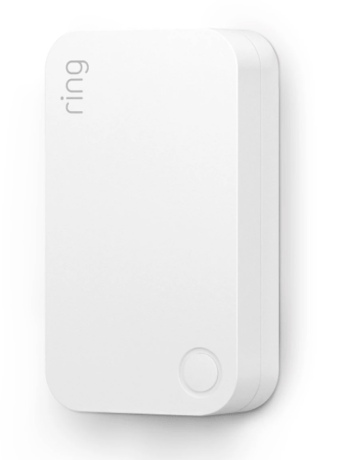
Product Image
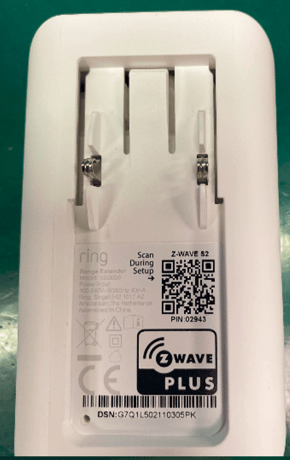
back plate


1 - Hearbeats
This parameter is the number minutes between heartbeats. Heartbeats are automatic battery reports on a timer after the last event.Size: 1 byte
Default: 70
Minimum: 1
Maximum: 70
Possible values
| From | To | Desription |
|---|---|---|
| 1 | 70 | This parameter is the number of minutes between heartbeats. |
2 - Application Retries:
Number of application level retries attempted for messages either not ACKed or messages encapsulated via supervision get that did not receive a report.Size: 1 byte
Default: 1
Minimum: 0
Maximum: 5
Possible values
| From | To | Desription |
|---|---|---|
| 0 | 5 | This parameter is the Number of application level retries. |
3 - Application Level Retry Base Wait Time Period:
The number base seconds used in the calculation for sleeping between retry messages.Size: 1 byte
Default: 5
Minimum: 1
Maximum: 60
Possible values
| From | To | Desription |
|---|---|---|
| 1 | 60 | This parameter is the number base seconds used in the calculation for sleeping between retry messages. |
4 - LED Indicator
Allows LED indications on the device to be turned on or offSize: 1 byte
Default: 1
Minimum: 0
Maximum: 2
Possible values
| From | To | Desription |
|---|---|---|
| 0 | 2 | This parameter is the LED indications on the device to be turned on or off |
5 - Supervisory Report Timeout
The number of milliseconds waiting for a Supervisory Report response to a Supervisory Get encapsulated command from the sensor before attempting a retry.Size: 2 bytes
Default: 1500
Minimum: 500
Maximum: 5000
Possible values
| From | To | Desription |
|---|---|---|
| 500 | 5000 | The number of milliseconds waiting for number of milliseconds waiting for a Supervisory Report response to a Supervisory Get . |
After powering on the device, press and hold the button on the front of the device for ~3 seconds. Release the button and the device will enter Classic inclusion mode which implements both classic inclusion with a Node Information Frame, and Network Wide Inclusion. During Classic Inclusion mode, the green LED will blink three times followed by a brief pause, repeatedly. When Classic inclusion times-out, the device will blink alternating red and green a few times.
Exclusion Instructions: 1. Initiate remove “Ring Alarm Range Extender” flow in the Ring Alarm mobile application – Select the settings icon from device details page and choose Remove Device to remove the device. This will place the controller into Remove or “Z-Wave Exclusion” mode. 2. Locate the pinhole reset button on the back of the device. 3. With the controller in Remove (Z-Wave Exclusion) mode, use a paper clip or similar object and tap the pinhole button. The device’s red LED turns on solid to indicate the device was removed from the network.
Not applicable. Ring Alarm Range Extender is an Always On Slave (AOS) and does not support Wake Up Command Class.
Factory Default Instructions 1. To restore Ring Alarm Range Extender to factory default settings, locate the pinhole reset button on the device. This is found on the back of the device after unplugging the device from the outlet. 2. Using a paperclip or similar object, insert it into the pinhole, press and hold the button down for 10 seconds. 3. The device will rapidly blink green continuously for 10 seconds. After about 10 seconds, when the green blinking stops, release the button. The red LED will turn on solid to indicate the device was removed from the network. Note: Use this procedure only in the event that the network primary controller is missing or otherwise inoperable.
The 5-digit DSK pin found on the package of the Ring Alarm Range Extender or the 5-digit DSK pin found under the QR code on the device.
| Group | Type |
|---|---|
| Power Management |
|
| System |
|