Zooz
700 Toggle Switch
ZEN73
Binary Switch
HW: 1 FW: 1.00
ZGM130
7.13.6
0x027A (634)
0x7000 (28672)
0xA003 (40963)
ZC12-21050228
2021-05-05 12:04:35.468193
N/A
Enhanced 232 Slave
Always On Slave
Toggle Style S2 On/Off Switch with Direct 3-Way / 4-Way Solution.
FEATURES: - Manual or Z-Wave on/off control with instant status updates - NEW: 700 series Z-Wave chip for better range and faster control - Simple Direct 3-Way: connect with existing on/off switches in 3-way, 4-way, and 5-way set-ups, no add-on needed - Scene control: trigger actions with multi-tap (select hubs only) - Smart bulb mode: disable relay and control the light via Z-Wave - Remembers and restores on/off status after power failure - NEW: discreet LED indicator for easy set-up and troubleshooting - Works with LED and incandescent bulbs (don’t use with tubes)
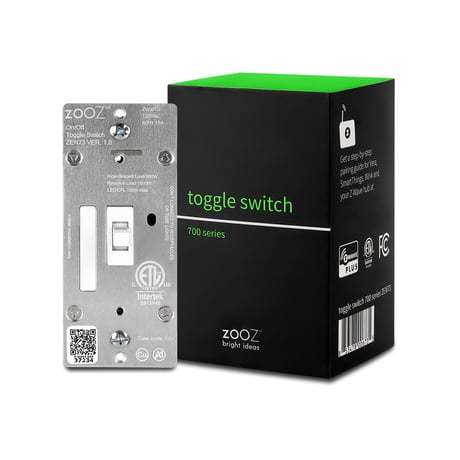
Product Image


1 - On/Off Toggle Orientation
Choose if you want to turn the light on or turn the light off when you toggle up the switch.Size: 1 byte
Default: 0
Minimum: 0
Maximum: 2
Possible values
| From | To | Desription |
|---|---|---|
| 0 | 0 | Toggle up turns the light on, toggle down turns it off (default) |
| 1 | 1 | Toggle up turns the light off, toggle down turns it on |
| 2 | 2 | Toggle any direction to turn the light on/off (change state) |
2 - LED Indicator
Choose how to use the LED indicator.Size: 1 byte
Default: 0
Minimum: 0
Maximum: 3
Possible values
| From | To | Desription |
|---|---|---|
| 0 | 0 | LED indicator is on when switch is off, LED indicator is off when switch is on (default) |
| 1 | 1 | LED indicator is on when switch is on, LED indicator is off when switch is off |
| 2 | 2 | LED indicator is always OFF |
| 3 | 3 | LED indicator is always ON |
3 - Auto Turn-Off Timer
Use this parameter to enable or disable the auto turn-off timer function (the time after which you want the switch to automatically turn off once it has been turned on).Size: 4 bytes
Default: 0
Minimum: 0
Maximum: 65535
Possible values
| From | To | Desription |
|---|---|---|
| 0 | 0 | timer disabled |
| 1 | 65535 | minutes |
5 - Auto Turn-On Timer
Use this parameter to enable or disable the auto turn-on timer function (the time after which you want the switch to automatically turn on once it has been turned off).Size: 4 bytes
Default: 0
Minimum: 0
Maximum: 65535
Possible values
| From | To | Desription |
|---|---|---|
| 0 | 0 | timer disabled |
| 1 | 65535 | minutes |
8 - On Off Status After Power Failure
Set the on off status for the switch after power failure.Size: 1 byte
Default: 2
Minimum: 0
Maximum: 2
Possible values
| From | To | Desription |
|---|---|---|
| 0 | 0 | forced to OFF (regardless of state prior to power outage |
| 1 | 1 | forced to ON (regardless of state prior to power outage) |
| 2 | 2 | remembers and restores on/off status after power failure (default) |
10 - Enable/Disable Scene Control
Enable or disable scene control functionality for quick double tap triggers.Size: 1 byte
Default: 0
Minimum: 0
Maximum: 1
Possible values
| From | To | Desription |
|---|---|---|
| 0 | 0 | scene control disabled (default) |
| 1 | 1 | scene control enabled |
13 - Smart Bulb Mode Behavior
Set reporting behavior for disabled physical control.Size: 1 byte
Default: 0
Minimum: 0
Maximum: 1
Possible values
| From | To | Desription |
|---|---|---|
| 0 | 0 | switch reports on/off status and change LED indicator state even if physical and Z-Wave control is disabled (default). |
| 1 | 1 | switch doesn't report on/off status or change LED indicator state when physical (and Z-Wave) control is disabled. |
16 - Association Reports
Choose how the switch reports its status back to the hub.Size: 1 byte
Default: 1
Minimum: 0
Maximum: 1
Possible values
| From | To | Desription |
|---|---|---|
| 0 | 0 | Binary switch report for Z-Wave control, basic set report for toggle (physical) control |
| 1 | 1 | binary switch report for both Z-Wave and toggle control (default) |
INCLUSION 1. Initiate inclusion (pairing) in the app (or web interface). 2. TAP UP 3 TIMES QUICKLY if using traditional Z-Wave inclusion. 3. The LED indicator will blink blue to signal communication and turn green for 3 seconds if inclusion is successful or turn red for 3 seconds if the pairing attempt fails.
EXCLUSION 1. Bring your Z-Wave gateway (hub) close to the switch if possible 2. Put the Z-Wave hub into exclusion mode (not sure how to do that? [email protected]) 3. Tap the switch down 3 times quickly (the LED indicator will start blinking blue) 4. Your hub will confirm exclusion, the LED indicator on the switch will turn green for 3 seconds, and the device will disappear from your controller's device list reset
If your primary controller is missing or inoperable, you may need to reset the device to factory settings. To reset the switch, hold the toggle down for 10 seconds until the LED indicator starts blinking. Release the toggle, and immediately after, toggle the switch down 5 times to complete the reset. The LED indicator will flash blue 3 times and turn red for 3 seconds to confirm successful reset.
This device is equipped with a unique authentication code for trusted wireless communication. Find the full DSK key for the device on the QR sticker located on the green inner box the product came in.
| Type | Value(s) |
|---|