Minoston
Door/Window Temperature & Humidity Sensor
MSE30Z
Notification Sensor
HW: 1 FW: 1.00
ZGM130
7.13.9
0x0312 (786)
0x0713 (1811)
0xD100 (53504)
ZC12-21070245
2021-07-01 10:05:35.843824
N/A
Enhanced 232 Slave
Reporting Sleeping Slave
This product can be operated in any Z-Wave™ network with other Z-Wave Plus™ certified devices from other manufacturers. This product is a Multipurpose Sensor, it have door/window sensor and Temperature Humidity sensor. This product is a battery power ,It's sleep most of the time.
This product can be operated in any Z-Wave™ network with other Z-Wave Plus™ certified devices from other manufacturers. This product is a Multipurpose Sensor, it have door/window sensor and Temperature Humidity sensor. This product is a battery power ,It's sleep most of the time. MSE30Z is a security enabled Z-Wave Plus™ device. A security Enabled Z-Wave Plus™ Controller must be used in order to fully utilize the product.
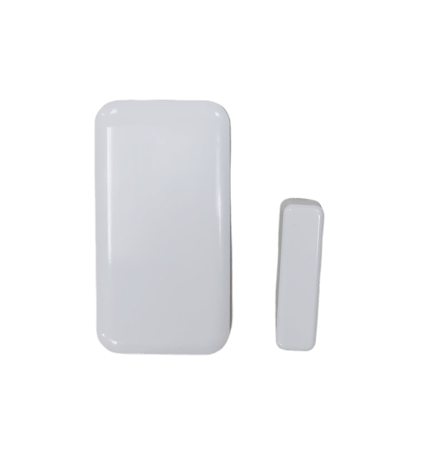
Product Image


1 - Battery report threshold
When battery level exceeds threshold, the unit need to report to hub.Size: 1 byte
Default: 10
Minimum: 1
Maximum: 20
Possible values
| From | To | Desription |
|---|---|---|
| 1 | 20 | Battery report threshold % |
2 - Low battery alarm report threshold
Setting the threshold for low battery alarm report.Size: 1 byte
Default: 5
Minimum: 5
Maximum: 20
Possible values
| From | To | Desription |
|---|---|---|
| 5 | 20 | Low battery alarm report threshold % |
3 - state of the door sensor
Parameter defines state of the sensor when the magnet closes the reedSize: 1 byte
Default: 0
Minimum: 0
Maximum: 1
Possible values
| From | To | Desription |
|---|---|---|
| 0 | 0 | door/window closed when magnet closes the reed |
| 1 | 1 | door/window opened when magnet closes the reed |
4 - Door close send command time
Delay in seconds when door closedSize: 2 bytes
Default: 0
Minimum: 0
Maximum: 3600
Possible values
| From | To | Desription |
|---|---|---|
| 0 | 3600 | Door close send command time |
5 - Door open send command time
Delay in seconds when door openedSize: 2 bytes
Default: 0
Minimum: 0
Maximum: 3600
Possible values
| From | To | Desription |
|---|---|---|
| 0 | 3600 | Door open send command time |
6 - Temperature report threshold
Minimum Temperature change to reportSize: 1 byte
Default: 3
Minimum: 1
Maximum: 9
Possible values
| From | To | Desription |
|---|---|---|
| 1 | 9 | Temperature report threshold |
7 - Humidity report threshold
Minimum humidity change to reportSize: 1 byte
Default: 10
Minimum: 5
Maximum: 20
Possible values
| From | To | Desription |
|---|---|---|
| 5 | 20 | Humidity report threshold |
8 - Temperature Upper
Temperature Upper Watermark valueSize: 1 byte
Default: 0
Minimum: 0
Maximum: 50
Possible values
| From | To | Desription |
|---|---|---|
| 0 | 50 | Temperature Upper Watermark value |
9 - Temperature Lower
Temperature Lower Watermark valueSize: 1 byte
Default: 0
Minimum: 0
Maximum: 50
Possible values
| From | To | Desription |
|---|---|---|
| 0 | 50 | Temperature Lower Watermark value |
10 - Humidity Upper
Humidity Upper Watermark valueSize: 1 byte
Default: 0
Minimum: 0
Maximum: 100
Possible values
| From | To | Desription |
|---|---|---|
| 0 | 100 | Humidity Upper Watermark value |
11 - Humidity Lower
Humidity Lower Watermark valueSize: 1 byte
Default: 0
Minimum: 0
Maximum: 100
Possible values
| From | To | Desription |
|---|---|---|
| 0 | 100 | Humidity Lower Watermark value |
12 - Temperature unit
Switch the unit of Temperature reportSize: 1 byte
Default: 1
Minimum: 0
Maximum: 1
Possible values
| From | To | Desription |
|---|---|---|
| 0 | 0 | Celsius |
| 1 | 1 | Fahrenheit |
13 - Group 2 Funtion
Association Group 2 SettingSize: 1 byte
Default: 1
Minimum: 0
Maximum: 6
Possible values
| From | To | Desription |
|---|---|---|
| 0 | 0 | Disable |
| 1 | 1 | Send Basic SET 0xFF when Magnet is away,and send Basic SET 0x00 when Magnet is near |
| 2 | 2 | Send Basic SET 0x00 when Magnet is away,and send Basic SET 0xFF when Magnet is near. |
| 3 | 3 | Only send Basic SET 0xFF when Magnet is away. |
| 4 | 4 | Only send Basic SET 0x00 when Magnet is near. |
| 5 | 5 | Only send Basic SET 0x00 when Magnet is away. |
| 6 | 6 | Only send Basic SET 0xFF when Magnet is near |
Adding Your Device To A Hub The device support two methods of inclusion,When using a Z-Wave Plus™ certified controller choose Network Wide Inclusion or SmartStart, Network Wide Inclusion To A Z-Wave™ Network 1,Refer to your primary controller instructions to process the inclusion / exclusion setup procedure. 2,When prompted by your primary controller, click the z-wave button three times in one second.
Adding Your Device To A Hub The device support two methods of inclusion,When using a Z-Wave Plus™ certified controller choose Network Wide Inclusion or SmartStart, Network Wide Inclusion To A Z-Wave™ Network 1,Refer to your primary controller instructions to process the inclusion / exclusion setup procedure. 2,When prompted by your primary controller, click the z-wave button three times in one second.
Function 2: quickly press 5x button :Wake-up the device
Press click Z-Wave button 3 times quickly,and hold the third time for at least 10 seconds. to restore the device to the factory. (Node:Please use this procedure only when the network primary controller is missing or otherwise inoperable.)
The device is compatible with SmartStart SmartStart enabled products can be added into a Z-Wave™ network by scanning the Z-Wave QR Code found on the top of the outlet or the back of the box with a controller providing SmartStart inclusion.No further action is required and the SmartStart product will be added automatically within 10 minutes of being switched on and in the network vicinity.
| Type | Value(s) |
|---|
| Group | Type |
|---|---|
| Heat Alarm |
|
| Access Control |
|
| Weather Alarm | Moisture alarm status: Moisture alarm |
| Sensor type |
|---|
| Air Temperature |
| Humidity |