Philio
2 Wire Dimmer
PAD15-CN
Multilevel Switch
HW: 1 FW: 1.01
ZGM130
7.13.5
0x013C (316)
0x0005 (5)
0x007e (126)
ZC12-21070250
2021-07-09 10:29:25.199469
N/A
Enhanced 232 Slave
Always On Slave
PAD15 is a 2 Wire dimmer. It only needs to connect two wires, single wire (L) and load (NO1).
The device should only need two wires for dimming, easy to install. This device is a security enabled Z-Wave Plus™ product that uses encrypted Z-Wave Plus™ messages to communicate to other security enabled Z-Wave Plus™ products. Z-Wave™ enabled devices displaying the Z-Wave™ logo can also be used with this device regardless of the manufacturer, and this device can also be used in other manufacturer’s Z-Wave™ enabled networks.
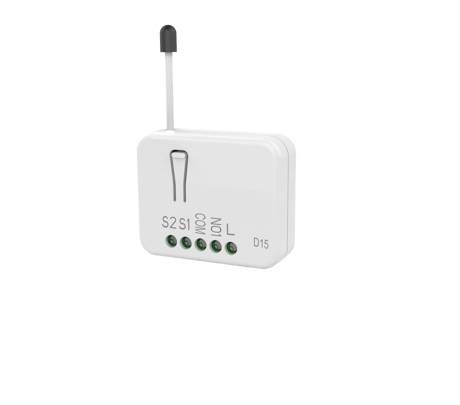
Product Image


1 - Switch set
To select connected switch function. Setting value: 0: Only S1 is effective 1: Both S1 and S2 are effective. 2: S1 dimmer up S2 dimmer downSize: 1 byte
Default: 1
Minimum: 0
Maximum: 2
Possible values
| From | To | Desription |
|---|---|---|
| 0 | 0 | 0: Only S1 is e ective |
| 1 | 1 | 1: Both S1 and S2 are e ective. |
| 2 | 2 | 2: S1 dimmer up S2 dimmer down |
2 - Power-on recovery status set
To set dimmer level when AC power on. Setting value: 0: OFF-0% 1: ON-last level 2: ON-100%Size: 1 byte
Default: 0
Minimum: 0
Maximum: 2
Possible values
| From | To | Desription |
|---|---|---|
| 0 | 0 | 0: OFF-0% |
| 1 | 1 | 1: ON-last level |
| 2 | 2 | 2: ON-100% |
3 - RF report set
To set if device send Multilevel Switch report to gateway when dimming finished. Setting value: 1: report ON 0: report OFFSize: 1 byte
Default: 1
Minimum: 0
Maximum: 1
Possible values
| From | To | Desription |
|---|---|---|
| 0 | 0 | 0: report OFF |
| 1 | 1 | 1: report ON |
4 - Maximum level
To set dimming level maximum value. Dimming level will not over the setting value. Setting value: Cannot be lower than the Minimum levelSize: 1 byte
Default: 99
Minimum: 1
Maximum: 99
Possible values
| From | To | Desription |
|---|---|---|
| 1 | 99 | 1~99 : 1% ~ 99% |
5 - Minimum level
To set dimming level minimum value. Dimming level will directly go to 0% when dimming value is lower than the setting value. Setting value: Cannot be higher than the Maximum levelSize: 1 byte
Default: 0
Minimum: 0
Maximum: 98
Possible values
| From | To | Desription |
|---|---|---|
| 0 | 98 | 0~98 : 0% ~ 98% |
6 - Basic duration set
Unit: second To set dimming finished duration time when physical switch used. Ex: When setting is 2, it will take 2 seconds from switch on action to dimming finished.Size: 1 byte
Default: 2
Minimum: 0
Maximum: 127
Possible values
| From | To | Desription |
|---|---|---|
| 0 | 127 | Unit: second ,0 ~127second |
Add(Classic Inclusion) : 1. Put your Z-Wave™ controller into inclusion mode by following the instructions provided by the controller manufacturer. 2. Press the include button three times within 3 seconds to enter inclusion mode.
Remove (Exclusion) 1. Put your Z-Wave™ controller into exclusion mode by following the instructions provided by the controller manufacturer. 2. Press the include button three times within 3 seconds to enter exclusion mode. 3. Node ID will be excluded.
Reset : 1. Press the include button four times within 3 seconds and hold on the button press without releasing. 2. Keep pressing the button for 3 seconds then LED will be o ,release the button within 2 seconds. 3. Device has been reset. ※Function Reset : Please use this procedure only when the network primary controller is missing or otherwise inoperable.
1. The product has a DSK string. Key in the first five digits to initiate the SmartStart process, or scan QR code. Ex: DSK: 18112-24021- 48001-62259-57092-27453-08187-47408 2. SmartStart enabled products can be added into a Z-Wave™ network by scanning the Z-Wave™ QR Code on the product, with a controller providing martStart inclusion. No further action is required and the SmartStart product will be added automatically to the closest network within 10 minutes of being switched on. Notice:The QR Code can be foundon the device PAD15 or in the box.
| Type | Value(s) |
|---|
| Group | Type |
|---|---|
| Power Management | Over-load status: Over-load detected |