Aeotec
illumino WallMote 7
ZWA022-A
Central Scene Device
HW: 1 FW: 1.04
ZGM130
7.13.9
0x0371 (881)
0x0102 (258)
0x0016 (22)
ZC12-21080284
2021-08-04 10:47:58.516788
N/A
Enhanced 232 Slave
Reporting Sleeping Slave
Yes
Aeotec WallMote 7 is an intelligent Z-Wave™ remote/ scene controller.
Aeotec WallMote 7 is an intelligent Z-Wave™ remote/ scene controller that can be mounted on a wallbox. It has 2 push buttons that you can easily control the Z-Wave devices in your home network via tapping, long pressing the buttons. It has a RGB LED to indicate the button actions. The WallMote 7 is also a security Z-Wave Plus™ device and supports Over The Air (OTA) feature for the products firmware upgrade.
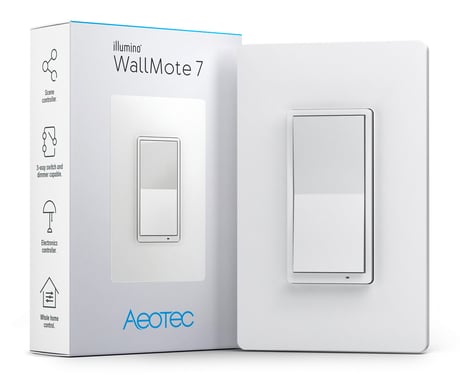
Product Image
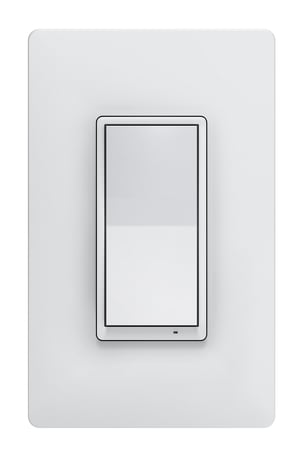


1 - Define button output
Enable or disable association group command and central scene command.Size: 1 byte
Default: 2
Minimum: 0
Maximum: 2
Possible values
| From | To | Desription |
|---|---|---|
| 0 | 0 | Group Association only |
| 1 | 1 | Central Scene only |
| 2 | 2 | Group Association and Central Scene |
2 - Definite Switch Group Control
Select association group 2/4/6's reports type: basic or binary set.Size: 1 byte
Default: 0
Minimum: 0
Maximum: 1
Possible values
| From | To | Desription |
|---|---|---|
| 0 | 0 | Basic Set |
| 1 | 1 | Binary Switch Set |
3 - Define Dimmer Group Control
Select the association group 3/5/7's behavior when double tap the paddle.Size: 1 byte
Default: 1
Minimum: 0
Maximum: 2
Possible values
| From | To | Desription |
|---|---|---|
| 0 | 0 | Disable |
| 1 | 1 | 2x Tap = toggle full 100% or full 0% |
| 2 | 2 | 2x Tap = toggle custom brightness level or 0% (Parameter 4) |
4 - Define custom brightness
Setting the custom brightness level for parameter 3.Size: 1 byte
Default: 50
Minimum: 0
Maximum: 99
Possible values
| From | To | Desription |
|---|---|---|
| 0 | 99 | 0-99% brightness level |
39 - Low battery level
Setting the low battery level.Size: 1 byte
Default: 20
Minimum: 5
Maximum: 50
Possible values
| From | To | Desription |
|---|---|---|
| 5 | 50 | 5-50% battery level |
81 - Wake up LED
Enable or disable the LED displaying when wake up the device.Size: 1 byte
Default: 1
Minimum: 0
Maximum: 1
Possible values
| From | To | Desription |
|---|---|---|
| 0 | 0 | Disable |
| 1 | 1 | Enable |
82 - Communication failure LED
Communication failure LED.Size: 1 byte
Default: 1
Minimum: 0
Maximum: 1
Possible values
| From | To | Desription |
|---|---|---|
| 0 | 0 | Disable |
| 1 | 1 | Enable |
84 - Indicator Display
Enable or disable the LED indicator.Size: 1 byte
Default: 1
Minimum: 0
Maximum: 1
Possible values
| From | To | Desription |
|---|---|---|
| 0 | 0 | Disable |
| 1 | 1 | Enable |
85 - Upper indicator color
Select the color when upper paddle pressed.Size: 1 byte
Default: 9
Minimum: 0
Maximum: 9
Possible values
| From | To | Desription |
|---|---|---|
| 0 | 0 | Disable |
| 1 | 1 | Red |
| 2 | 2 | Blue |
| 3 | 3 | Green |
| 4 | 4 | Pink |
| 5 | 5 | Cyan |
| 6 | 6 | Purple |
| 7 | 7 | Orange |
| 8 | 8 | Yellow |
| 9 | 9 | White |
86 - Lower indicator color
Select the color when lower paddle pressed.Size: 1 byte
Default: 5
Minimum: 0
Maximum: 9
Possible values
| From | To | Desription |
|---|---|---|
| 0 | 0 | Disable |
| 1 | 1 | Red |
| 2 | 2 | Blue |
| 3 | 3 | Green |
| 4 | 4 | Pink |
| 5 | 5 | Cyan |
| 6 | 6 | Purple |
| 7 | 7 | Orange |
| 8 | 8 | Yellow |
| 9 | 9 | White |
87 - Enable/ disable FLiRs
Enable/ disable FLiRsSize: 1 byte
Default: 0
Minimum: 0
Maximum: 1
Possible values
| From | To | Desription |
|---|---|---|
| 1 | 1 | Enable |
| 0 | 0 | Disable |
1. Turn your Z-Wave gateway/ controller into adding mode. 2. Tap once the top/ bottom button, then the device will enter pairing mode.
1. Turn your Z-Wave gateway/ controller into removing mode. 2. Tap 6 times the top/ bottom button, then the device will enter unpairing mode.
7x tap the top/buttom button.
Press and hold the top/buttom button for 20s
1. Page 5 in the Engineering Spec manual. 2. Page 5 in the user manual.
| Type | Value(s) |
|---|