Philio
In Wall Dual relay switch module
PAN30-CN
Binary Switch
HW: 1 FW: 1.01
ZGM130
7.15.1
0x013C (316)
0x0001 (1)
0x0077 (119)
ZC12-21070269
2021-07-21 12:56:13.571888
N/A
Enhanced 232 Slave
Always On Slave
This in-wall dual relay switch module is a transceiver which is a Z-Wave PlusTM enabled device and is fully compatible with any Z-WaveTM enabled network.
This in-wall dual relay switch module is a transceiver which This in-wall dual relay switch module is a transceiver which is a Z-Wave PlusTM enabled device and is fully compatible is a Z-Wave PlusTM enabled device and is fully compatible with any Z-WaveTM enabled network. Mini size design let with any Z-WaveTM enabled network. Mini size design let the module can easily hide itself into the wall box and that the module can easily hide itself into the wall box and that will be good for the house decoration. will be good for the house decoration. There are many kind of application by using the module to There are many kind of application by using the module to switch AC power On and Off, one main application is the switch AC power On and Off, one main application is the light control. The new smart relay calibration technology light control. The new smart relay calibration technology can reduce the inrush current caused by the load and let the can reduce the inrush current caused by the load and let the module work perfectly with many kind of light like module work perfectly with many kind of light like incandescent, fluorescent and LED light. incandescent, fluorescent and LED light. This in-wall switch module is able to detect Instant power This in-wall switch module is able to detect Instant power wattage and overload current (7.5A with resistive load) of wattage and overload current (7.5A with resistive load) of connected light or appliances. When detecting overload connected light or appliances. When detecting overload state, the Module will be disabled and its On/Off button will state, the Module will be disabled and its On/Off button will be lockout of which LED will flash quickly. However, be lockout of which LED will flash quickly. However, disconnect and re-connect the Module will reset its overload disconnect and re-connect the Module will reset its overload condition to normal status. condition to normal status.
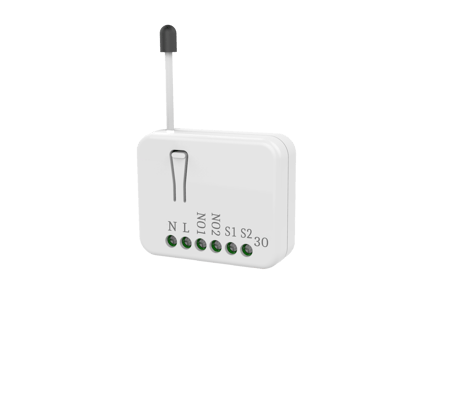
Product Image
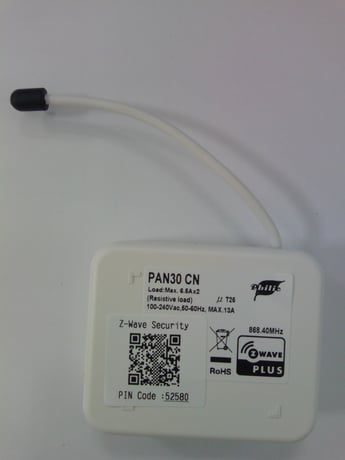
Front and side view
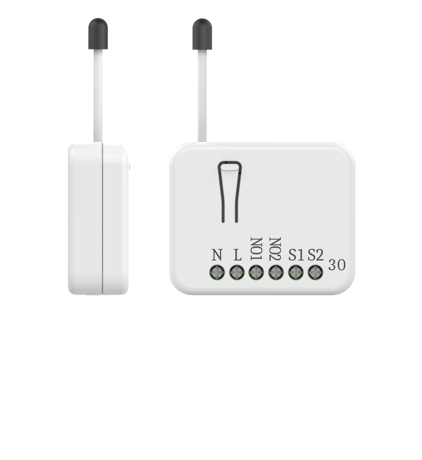
Front view


1 - Watt Meter Report Period
If the setting is configured for 1hour (set value =720), the PAN30 will report its instant power consumption every 1 hour to the node of correspond Group. The maximum interval to report its instant power consumption is 45 hours (5s*32767/3600=45hr). If the setting value is 0, the auto report function of meter Watt will be disabled.Size: 2 bytes
Default: 720
Minimum: 0
Maximum: 32767
Possible values
| From | To | Desription |
|---|---|---|
| 0 | 0 | The auto report function of meter Watt will be disabled. |
| 1 | 32767 | 720*5s=3600s= 1 hour |
2 - KWH Meter Report Period
If the setting is configured for 1hour (set value =6), the PAN30 will report its Accumulated Power Consumption (KW/h) every 1 hour to the node of correspond Group. The maximum interval to report its Accumulated Power Consumption (KW/h) is 227.55 days (10min*32767/1440=227.55 days). If the setting value is 0, the auto report function of meter KWh will be disabled.Size: 2 bytes
Default: 6
Minimum: 0
Maximum: 32767
Possible values
| From | To | Desription |
|---|---|---|
| 0 | 0 | The auto report function of meter KWh will be disabled. |
| 1 | 32767 | 6*10min= 1 hour |
3 - Threshold of current for Load Caution
This is a warning when the current of load over the preset threshold value, if the setting value is 750, when the load current of Relay1 or Relay2 over this value, PAN30 will send current meter report to the node of correspond Group, the Range of the setting value is from 10 to 750, and the default value is 750.Size: 2 bytes
Default: 750
Minimum: 10
Maximum: 750
Possible values
| From | To | Desription |
|---|---|---|
| 10 | 750 | 750*0.01A = 7.5A |
4 - Threshold of KWh for Load Caution
This is a warning when the KWh of load over the preset threshold value, If the setting value is 10000, when the Accumulated Power Consumption of Relay1 or Relay2 over this value, PAN30 will send KWh Meter Report command to the node of correspond Group, minimum value is 1KWh and default value is 10000 kWh.Size: 2 bytes
Default: 10000
Minimum: 1
Maximum: 10000
Possible values
| From | To | Desription |
|---|---|---|
| 1 | 10000 | 1KWh ~ 10000KWh |
5 - External switch mode
Manual switch S1 and S2 can set to Edge mode or Pulse mode or Edge-Toggle mode, default value is Edge mode.Size: 1 byte
Default: 1
Minimum: 1
Maximum: 3
Possible values
| From | To | Desription |
|---|---|---|
| 1 | 0 | Edge mode |
| 2 | 0 | Pulse mode |
| 3 | 0 | Edge-Toggle mode |
6 - Restore switch state mode
Whenever the AC power return from lost, PAN30 will restore the switch state which could be SWITCH OFF、LAST SWITCH STATE、SWITCH ON. The default setting is LAST SWITCH STATE.Size: 1 byte
Default: 1
Minimum: 0
Maximum: 2
Possible values
| From | To | Desription |
|---|---|---|
| 0 | 0 | Switch off |
| 1 | 0 | Last switch state |
| 2 | 0 | Switch on |
7 - Watt differential report mode
It will trigger a Watt report when the variation of watt value is over the preset percentage.Size: 1 byte
Default: 1
Minimum: 0
Maximum: 4
Possible values
| From | To | Desription |
|---|---|---|
| 0 | 0 | The function of Watt differential report will be disabled. |
| 1 | 0 | 5% |
| 2 | 0 | 10% |
| 3 | 0 | 15% |
| 4 | 0 | 20% |
1. Put your Z-Wave controller into inclusion mode by following the instructions provided by the controller manufacturer. 2. Pressing INCLUDE_BUTTON three times within 2 seconds will enter inclusion mode.
1. Put your Z-Wave controller into exclusion mode by following the instructions provided by the controller manufacturer. 2. Pressing INCLUDE_BUTTON three times within 2 seconds will enter exclusion mode. 3. Node ID has been excluded.
1. Pressing INCLUDE_BUTTON three times within 2 seconds will enter inclusion mode. 2. Within 1 second, press On/Off button again for 5 seconds. 3. IDs are excluded.
1. To initiate the SmartStart process, plase type in the first five digits of DSK string or scan the QR code. The QR Code can be found on PAN30 or in the box. Ex:DSK: 18112-24021-58001-62259-57092-27453-08187-47408 2. PAN30 is supported with SmartStart, it can be added to Z-Wave™ network by scanning the Z-Wave™ QR code on the product. 3. Without further actions, PAN30 will be automatically included in a certified Z-Wave™ Controller with SmartStart inclusion ability in 10 minutes after it turned on.
| Type | Value(s) |
|---|
| Group | Type |
|---|---|
| Power Management |
|
| Meter type |
|---|
| Electric Meter Consumption |