Aeotec
illumino Dimmer Switch
ZWA037-A
Multilevel Switch
HW: 1 FW: 1.01
ZGM130
7.13.9
0x0371 (881)
0x0103 (259)
0x0025 (37)
ZC12-21080285
2021-08-05 09:48:35.553344
N/A
Enhanced 232 Slave
Always On Slave
Aeotec illumino Dimmer Switch is a Z-Wave™ Dimmer Switch.
Aeotec illumino Dimmer Switch is a Z-Wave™ Dimmer Switch used to enable Z-Wave command and control (on/off/dim) of any incandescent bulbs, dimmable LED bulbs, halogen bulbs with or without transformers. In the event of power failure, non-volatile memory retains all programmed information relating to the unit’s operating status. illumino Dimmer Switch is also a security Z-Wave Plus™ device and supports Over The Air (OTA) feature for the products firmware upgrade.
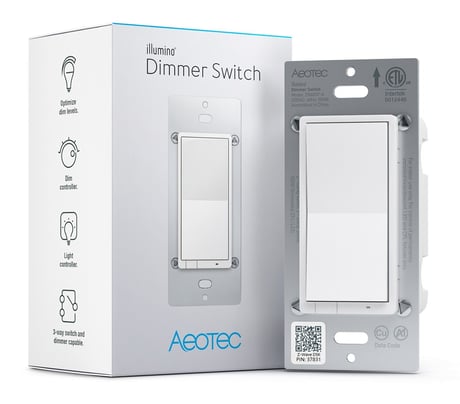
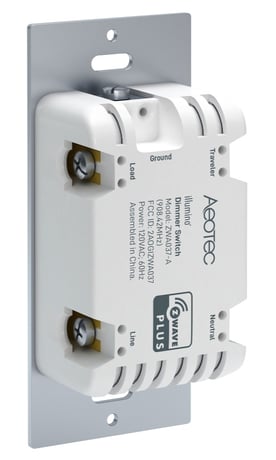
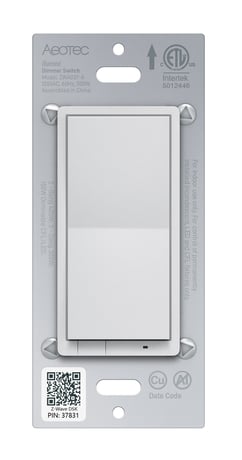
Product Image


20 - Power Restore
Status after power failure.Size: 1 byte
Default: 2
Minimum: 0
Maximum: 2
Possible values
| From | To | Desription |
|---|---|---|
| 0 | 0 | return to OFF |
| 1 | 1 | return to ON |
| 2 | 2 | return to last known state when repowered |
40 - Auto Turn Off Timer
Timer that auto turn off once turned on.Size: 4 bytes
Default: 0
Minimum: 0
Maximum: 65535
Possible values
| From | To | Desription |
|---|---|---|
| 0 | 0 | Disable |
| 1 | 65535 | auto turn off after 1-65535s once turned on. |
41 - Auto Turn On Timer
Timer that auto turn on once turned off.Size: 4 bytes
Default: 0
Minimum: 0
Maximum: 65535
Possible values
| From | To | Desription |
|---|---|---|
| 0 | 0 | Disable |
| 1 | 65535 | auto turn on after 1-65535s once turned off. |
80 - Instant Status Report
The command for status report.Size: 1 byte
Default: 2
Minimum: 0
Maximum: 2
Possible values
| From | To | Desription |
|---|---|---|
| 0 | 0 | Nothing |
| 1 | 1 | Basic Report |
| 2 | 2 | Binary Switch Report |
82 - Association Control Settings
Setting command for association group.Size: 1 byte
Default: 1
Minimum: 1
Maximum: 2
Possible values
| From | To | Desription |
|---|---|---|
| 1 | 1 | Basic Set |
| 2 | 2 | Binary Switch Set |
83 - Led Indicator Settings
Select the indicator function for output.Size: 1 byte
Default: 2
Minimum: 0
Maximum: 2
Possible values
| From | To | Desription |
|---|---|---|
| 0 | 0 | Disable |
| 1 | 1 | Momentary blink |
| 2 | 2 | LED follows status of output |
84 - Led Indicator Color For Output
Select the indicator color for output.Size: 1 byte
Default: 9
Minimum: 0
Maximum: 9
Possible values
| From | To | Desription |
|---|---|---|
| 0 | 0 | Disable |
| 1 | 1 | Red |
| 2 | 2 | Blue |
| 3 | 3 | Green |
| 4 | 4 | Pink |
| 5 | 5 | Cyan |
| 6 | 6 | Puple |
| 7 | 7 | Orange |
| 8 | 8 | Yellow |
| 9 | 9 | White |
85 - Led Indicator Color For Scene
Select the indicator color for scene.Size: 1 byte
Default: 2
Minimum: 0
Maximum: 9
Possible values
| From | To | Desription |
|---|---|---|
| 0 | 0 | Disable |
| 1 | 1 | Red |
| 2 | 2 | Blue |
| 3 | 3 | Green |
| 4 | 4 | Pink |
| 5 | 5 | Cyan |
| 6 | 6 | Purple |
| 7 | 7 | Orange |
| 8 | 8 | Yellow |
| 9 | 9 | White |
86 - Led Brightness
Setting the brightness of indicator.Size: 1 byte
Default: 60
Minimum: 0
Maximum: 100
Possible values
| From | To | Desription |
|---|---|---|
| 0 | 0 | Disable |
| 1 | 100 | 1%-100% level |
110 - Single Tap behavior
Select behavior when single tap.Size: 1 byte
Default: 0
Minimum: 0
Maximum: 3
Possible values
| From | To | Desription |
|---|---|---|
| 0 | 0 | Last brightness level |
| 1 | 1 | Custom value from Param 133 |
| 2 | 2 | Max brightness from Param 132 |
| 3 | 3 | Full brightness at 100% |
111 - Double Tap behavior
Select behavior when double tap.Size: 1 byte
Default: 0
Minimum: 0
Maximum: 3
Possible values
| From | To | Desription |
|---|---|---|
| 0 | 0 | Full brightness at 99 |
| 1 | 1 | Custom value from Param 133 |
| 2 | 2 | Max brightness from Param 132 |
| 3 | 3 | Disable |
119 - External Switch Scene
Enable or disable the scene function of external(3-way) switch.Size: 1 byte
Default: 1
Minimum: 0
Maximum: 1
Possible values
| From | To | Desription |
|---|---|---|
| 0 | 0 | Disable |
| 1 | 1 | Enable |
120 - External Switch Type
Select the external(3- way) switch's type.Size: 1 byte
Default: 1
Minimum: 0
Maximum: 3
Possible values
| From | To | Desription |
|---|---|---|
| 0 | 0 | toggle on or off only |
| 1 | 1 | toggle switch/1x to toggle /2x use Param 132 or 133 /3x toggle dimmer loop ramp -> toggle once more to stop dim |
| 2 | 2 | momentary switch / 1x to toggle / 2x user Param 132 or 133/ Press and hold to dim up and down |
| 3 | 3 | momentary switch / 1x quick toggle / 2x user Param 132 or 133 / Press and hold to dim up and down (but after a double click to full brightness, then press and hold will always go down instead of increasing) |
121 - Output Control
Enable or disable output.Size: 1 byte
Default: 3
Minimum: 0
Maximum: 3
Possible values
| From | To | Desription |
|---|---|---|
| 1 | 1 | enable local control |
| 2 | 2 | enable central scene |
| 3 | 3 | enable local and central scene |
| 0 | 0 | Disable |
122 - Button Function
Select the paddle button functions.Size: 1 byte
Default: 0
Minimum: 0
Maximum: 2
Possible values
| From | To | Desription |
|---|---|---|
| 0 | 0 | up/ON, down/OFF |
| 1 | 1 | down/ON, up/OFF |
| 2 | 2 | toggle (up or down are the same) |
123 - Report Behavior
Select behavior for report and indicator when output is disable.Size: 1 byte
Default: 0
Minimum: 0
Maximum: 1
Possible values
| From | To | Desription |
|---|---|---|
| 0 | 0 | report on/off status and change LED indicator when parameter 121 is set to 0 or 2 |
| 1 | 1 | Don't report on/off status is pressed and parameter 121 is set to 0 or 2 |
125 - Ramp Rate for Tap and Hub control
Setting ramp rate when tap to on off or controlled by HUB.Size: 1 byte
Default: 2
Minimum: 0
Maximum: 99
Possible values
| From | To | Desription |
|---|---|---|
| 0 | 0 | instant |
| 1 | 99 | Ramp Rate 1-99s |
126 - Ramp Rate for press and hold
Setting ramp rate when press and hold the paddle.Size: 1 byte
Default: 4
Minimum: 1
Maximum: 99
Possible values
| From | To | Desription |
|---|---|---|
| 1 | 99 | Ramp Rate 1-99s |
131 - Minimum most dim setting
Setting the minimum value of dimmer.Size: 1 byte
Default: 0
Minimum: 0
Maximum: 99
Possible values
| From | To | Desription |
|---|---|---|
| 0 | 0 | Disable |
| 1 | 99 | Minimum value is 1-99 |
132 - Maximum most dim setting
Setting the maximum value of dimmer.Size: 1 byte
Default: 100
Minimum: 0
Maximum: 100
Possible values
| From | To | Desription |
|---|---|---|
| 0 | 0 | Disable |
| 1 | 100 | Minimum value is 1-100 |
133 - Custom brightness
Setting user custom brightness.Size: 1 byte
Default: 0
Minimum: 0
Maximum: 99
Possible values
| From | To | Desription |
|---|---|---|
| 0 | 0 | Disable |
| 1 | 99 | custom brightness level is 1-99 |
1. Turn the primary controller/ gateway into adding mode. 2. 1x tap the Top/ Bottom button of Dimmer Switch.
1. Turn the primary controller/ gateway into removing mode. 2. 3x tap the Top/ Bottom button of Dimmer Switch .
Press and hold the Top/ Bottom button for 20 seconds.
Page 2 and 10 in the user manual.
| Type | Value(s) |
|---|