LEEDARSON
Z-WAVE 700 Keypad
7BA-KP-V-B-A0
Entry Control Keypad Device
HW: 1 FW: 1.01
ZGM130
7.12.2
0x0300 (768)
0x0301 (769)
0x0044 (68)
ZC12-21080305
2021-08-26 10:05:23.353449
N/A
Enhanced 232 Slave
Listening Sleeping Slave
Security Keypad Z Wave™ 700
The keypad provides a convenient user interface to arm or disarm the security system with a PIN code.
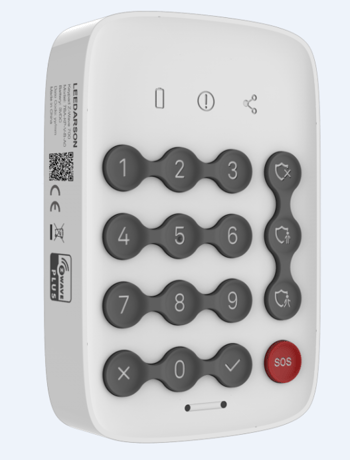
Product Image


1 - EntryExitDelay
CACHED_KEYS is sent when the cache size or the cache timeout is exceededSize: 1 byte
Default: 10
Minimum: 0
Maximum: 30
Possible values
| From | To | Desription |
|---|---|---|
| 0 | 30 | The Entry/Exit Delay Times |
2 - LowBatteryPercent
1 to 32 ASCII encoded characters. ASCII codes MUST be in the value range 0x00-0xF7. The string MUST be padded with the value 0xFF to fit 16 byte blocks when sent in a notification.Size: 1 byte
Default: 10
Minimum: 5
Maximum: 50
Possible values
| From | To | Desription |
|---|---|---|
| 5 | 50 | 1 to 32 ASCII encoded characters. ASCII codes MUST be in the value range 0x00-0xF7. The string MUST be padded with the value 0xFF to fit 16 byte blocks when sent in a notification. |
3 - PS Switch
Turn on/off Proximity Sensor. Turn on: 1 Turn off: 0Size: 1 byte
Default: 1
Minimum: 0
Maximum: 1
Possible values
| From | To | Desription |
|---|---|---|
| 0 | 1 | Turn on/off Proximity Sensor. Turn on: 1 Turn off: 0 |
4 - PS Timeout
The wait time of PS for clear the motionSize: 1 byte
Default: 5
Minimum: 2
Maximum: 30
Possible values
| From | To | Desription |
|---|---|---|
| 2 | 30 | The wait time of PS for clear the motion |
5 - PS Sensitivity
The sensitivity of PSSize: 1 byte
Default: 0
Minimum: 0
Maximum: 1
Possible values
| From | To | Desription |
|---|---|---|
| 0 | 1 | The sensitivity of PS |
6 - L-Sensor Switch
Turn on/off Light Sensor Turn on: 1 Turn off: 0Size: 1 byte
Default: 1
Minimum: 0
Maximum: 1
Possible values
| From | To | Desription |
|---|---|---|
| 0 | 1 | Turn on/off Light Sensor Turn on: 1 Turn off: 0 |
7 - Day/Night threshold
The illuminance threshold to distinguish day and nightSize: 1 byte
Default: 50
Minimum: 0
Maximum: 255
Possible values
| From | To | Desription |
|---|---|---|
| 0 | 255 | The illuminance threshold to distinguish day and night(unit: lumen) Eg: 50 -> Will turn key backlight if current illuminance is less than 50 lux, or close the key backlight. |
8 - KeyBeep Switch
Turn on/off key tone Turn on: 1 Turn off: 0Size: 1 byte
Default: 1
Minimum: 0
Maximum: 1
Possible values
| From | To | Desription |
|---|---|---|
| 0 | 1 | Turn on/off key tone Turn on: 1 Turn off: 0 |
9 - ArmStatusIndicate Switch
Turn on/off arm status indicate after wake up Turn on: 1 Turn off: 0Size: 1 byte
Default: 1
Minimum: 0
Maximum: 1
Possible values
| From | To | Desription |
|---|---|---|
| 0 | 1 | Turn on/off arm status indicate after wake up Turn on: 1 Turn off: 0 |
Add the Keypad into the Z-Wave network via SmartStart: 1. Add Keypad DSK into the primary controller SmartStart Provisioning List (If you don’t know how to do this, refer to its manual). 2. Power on the Keypad again. 3. The Keypad will send “Z-Wave protocol Command Class” frame to start SmartStart Inclusion. 4. Network green LED will flashing at every 1 second to indicate that the inclusion is working, and solid green LED 3 seconds for indicate the inclusion is successful, otherwise the LED will be soild yellow in which you need to repeat the process from step 2 Note: Keypad will reset itself to factory default by sending “Device Reset Locally CC” when it is included into a non-security Z-wave network. DSK QR code is on the left side of the product with laser printing. User should follow the procedure in the section below if the controller does not support SmartStart inclusion. Add the Keypad into the Z-Wave network: 1. Set the Z-Wave network main controller into learning mode (see Z-Wave network controller operating manual). 2. Trigger this action. 3. Network green LED will flashing at every 1 second to indicate that the inclusion is working, and solid green LED 3 seconds for indicate the inclusion is successful, otherwise the LED will be soild yellow in which you need to repeat the process from step 2.
Remove the Keypad from a Z-Wave network: 1. Set the Z-Wave network main controller into removing mode (see Z-Wave controller operating manual). 2. Trigger this button action. the Network LED will flashing at every 1 second. 3. If the removing is successful, the LED will solid green for 3 seconds. If the removing is failed then LED display yellow for 3 seconds, otherwise you need to repeat the process from step 2. Note: Keypad will start SmartStart Inclusion when it is removed from a Z-wave network.
Turn on/off arm status indicate after wake up
Reset the Keypad to factory default. 1. Device will reset itself to factory default by sending a “Device Reset Locally Notification” to gateway. 2. If triggered the factory reset, the network connection led will solid green while factory reset is completed. Note: Please use this procedure only when the network primary controller is missing or otherwise inoperable.
on the side of the product
NA
NA
| Group | Type |
|---|---|
| Home Security |
|