Sunricher
Thermostat-Heating
SR-ZV9092A-EU
Thermostat - HVAC
HW: 1 FW: 1.24
ZM5101
6.82.00
0x0330 (816)
0x0200 (512)
0xD013 (53267)
ZC10-21097049
2021-09-09 08:23:58.576911
N/A
Enhanced 232 Slave
Always On Slave
The Z-Wave™ HVAC controller is a wireless thermostat for heating system, which complies to Z-Wave Plus™ wireless protocol standards. The thermostat has 4 operation modes which can be controlled manually and locally or through remote controlled through Z-Wave primary controller (gateway)
Product features: ● OLED display and touch buttons ● also as remote control other thermostats for heating ● Internal sensor for room temperature , external Internal sensor for floor temperature ● Max Load 3680W @ 230V (resistive load),16A ● Alarm: over current, room temperature over heat ● Electric power measurement ● Internal overheating protection
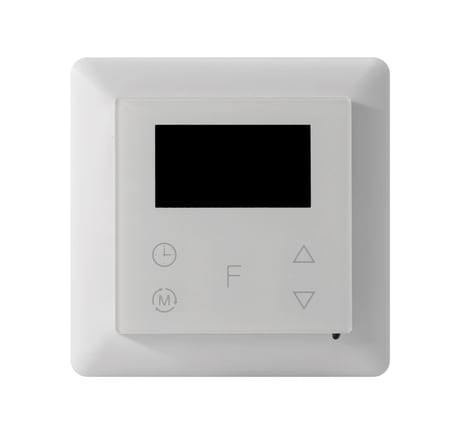
Product Image
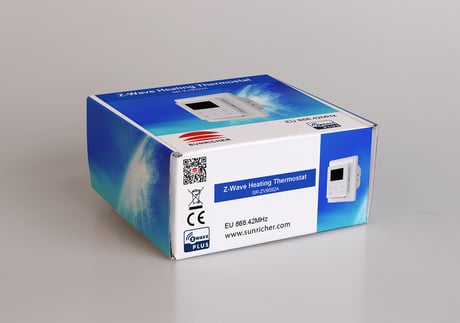
Back Side Picture
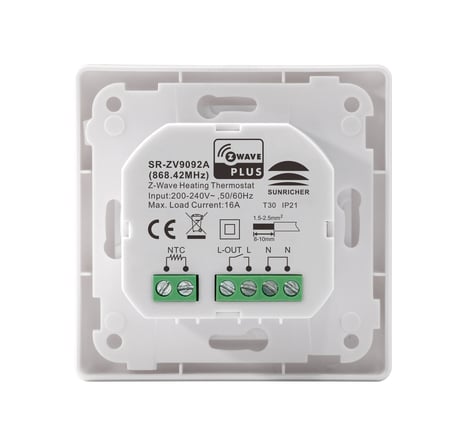
Front Side Picture


2 - Parameter 2
Over current detection max. value, unit is A. When detected current is over this value, the device will turn off the relay and send NOTIFICATION CC.Size: 1 byte
Default: 16
Minimum: 0
Maximum: 16
Possible values
| From | To | Desription |
|---|---|---|
| 0 | 0 | disable over current detection |
| 5 | 16 | over current detection max value |
3 - Parameter 3
Vibration level triggered by pressing buttonsSize: 1 byte
Default: 1
Minimum: 0
Maximum: 2
Possible values
| From | To | Desription |
|---|---|---|
| 0 | 0 | disable vibration and buzzer |
| 1 | 1 | Low Level |
| 2 | 2 | High Level |
4 - Parameter 4
Whether to recover to settings before power failure or power reset.Size: 1 byte
Default: 1
Minimum: 0
Maximum: 1
Possible values
| From | To | Desription |
|---|---|---|
| 0 | 0 | use default settings |
| 1 | 1 | recover to settings before power failure or power reset |
6 - Parameter 6
High temperature detection max. value, unit is ℃, when either temperature sensor is higher than this value, the device will turn off the relay and send NOTIFICATION CC.Size: 1 byte
Default: 45
Minimum: 0
Maximum: 60
Possible values
| From | To | Desription |
|---|---|---|
| 0 | 0 | disable this function |
| 20 | 60 | air temperature over value |
7 - Parameter 7
Temperature control hysteresis value setting, setting range 0.5℃-2℃, unit is 0.1℃Size: 1 byte
Default: 5
Minimum: 5
Maximum: 20
Possible values
| From | To | Desription |
|---|---|---|
| 5 | 20 | hysteresis value : 0.5℃~2℃ |
8 - Parameter 8
Auto mode (Energy save mode) temperature schedule.Size: 1 byte
Default: 0
Minimum: 0
Maximum: 1
Possible values
| From | To | Desription |
|---|---|---|
| 0 | 0 | use schedule set by user |
| 1 | 1 | use Energy_Save_Heating temperature set by THERMOSTAT_SETPOINT_SET |
9 - Parameter 9
Select floor temperature sensor typeSize: 1 byte
Default: 1
Minimum: 1
Maximum: 4
Possible values
| From | To | Desription |
|---|---|---|
| 1 | 1 | NTC/10K B(25/50℃)=3950 |
| 2 | 2 | NTC/15K B(25/50℃)=3950 |
| 3 | 3 | NTC/50K B(25/50℃)=3950 |
| 4 | 4 | NTC/100K B(25/50℃)=3950 |
10 - Parameter 10
Temperature control reference selectionSize: 1 byte
Default: 1
Minimum: 1
Maximum: 3
Possible values
| From | To | Desription |
|---|---|---|
| 1 | 1 | room sensor |
| 2 | 2 | floor sensor |
| 3 | 3 | room+floor sensor |
11 - Parameter 11
ROOM SENSOR temperature compensation setting,unit is 0.5℃Size: 1 byte
Default: 0
Minimum: -10
Maximum: 10
Possible values
| From | To | Desription |
|---|---|---|
| -10 | 10 | value is -5℃~5℃ |
12 - Parameter 12
FLOOR SENSOR temperature compensation setting,unit is 0.5℃Size: 1 byte
Default: 0
Minimum: -10
Maximum: 10
Possible values
| From | To | Desription |
|---|---|---|
| -10 | 10 | value is -5℃~5℃ |
13 - Parameter 13
Set how long the drying mode lasts, unit is minuteSize: 1 byte
Default: 5
Minimum: 5
Maximum: 100
Possible values
| From | To | Desription |
|---|---|---|
| 5 | 100 | value is 5~100 minutes |
14 - Parameter 14
Set the mode after the drying mode endsSize: 1 byte
Default: 2
Minimum: 0
Maximum: 3
Possible values
| From | To | Desription |
|---|---|---|
| 0 | 0 | OFF |
| 1 | 1 | Manual mode (comfort mode) |
| 2 | 2 | Auto mode (energy save mode) |
| 3 | 3 | Away mode |
16 - Parameter 16
When to report temperature relative change threshold value actively, unit is 0.1℃Size: 1 byte
Default: 2
Minimum: 0
Maximum: 10
Possible values
| From | To | Desription |
|---|---|---|
| 0 | 0 | disable to report |
| 2 | 10 | report when the threshold value is 0.2℃ - 1℃ |
17 - Parameter 17
Time interval value for periodic report of temperature, humidity, unit is S.Size: 2 bytes
Default: 300
Minimum: 0
Maximum: 28800
Possible values
| From | To | Desription |
|---|---|---|
| 0 | 0 | disable to report |
| 30 | 28800 | report when time interval value is 30~28800 s |
18 - Parameter 18
When to report power change absolute threshold, unit is WSize: 1 byte
Default: 5
Minimum: 0
Maximum: 100
Possible values
| From | To | Desription |
|---|---|---|
| 0 | 0 | disable to report |
| 1 | 100 | report when absolute threshold is 1W~100W |
19 - Parameter 19
When to report current change absolute threshold, unit is 0.1ASize: 1 byte
Default: 10
Minimum: 0
Maximum: 10
Possible values
| From | To | Desription |
|---|---|---|
| 0 | 0 | disable to report |
| 1 | 10 | report when absolute threshold is 0.1A~1A |
20 - Parameter 20
When to report voltage change absolute threshold, unit is 1 VSize: 1 byte
Default: 2
Minimum: 0
Maximum: 10
Possible values
| From | To | Desription |
|---|---|---|
| 0 | 0 | disable to report |
| 1 | 10 | report when absolute threshold is 1~10 V |
21 - Parameter 21
Time interval value for periodic active report of Meter,unit is SSize: 4 bytes
Default: 600
Minimum: 60
Maximum: 2678400
Possible values
| From | To | Desription |
|---|---|---|
| 60 | 2678400 | value is 60~2678400 s |
22 - Parameter 22
The OLED display brightness when operate the device.Size: 1 byte
Default: 1
Minimum: 0
Maximum: 2
Possible values
| From | To | Desription |
|---|---|---|
| 0 | 2 | low level、mid level、high level |
23 - Parameter 23
is parameter defines which sensor temperature will be displayed on Home pageSize: 1 byte
Default: 0
Minimum: 0
Maximum: 1
Possible values
| From | To | Desription |
|---|---|---|
| 0 | 0 | indoor air temperature |
| 1 | 1 | external temperature (floor temperature) |
24 - Parameter 24
The time zone that the time parameters command adopts is UTC, the time zone need to be set.Size: 1 byte
Default: 0
Minimum: -12
Maximum: 12
Possible values
| From | To | Desription |
|---|---|---|
| -12 | 12 | value is -12~12 |
26 - Parameter 26
Window open detect function temperature threshold: the Celsius degrees that the temperature decreases within 3 minutes, unit is 0.1 Celsius degree.Size: 1 byte
Default: 0
Minimum: 0
Maximum: 40
Possible values
| From | To | Desription |
|---|---|---|
| 0 | 0 | disbaled |
| 15 | 40 | the set temperature threshold |
Adding to a Z-Wave Network (Inclusion) Method 1: Select “Add”, then short press button , the device will send out inclusion request, “Status” will show “Inclusion...”. If there is no response from a gateway within 30 seconds, or inclusion failed, “Status” will show “Fail”. If included successfully, “Status” will show “Inclusion OK” and device ID. Method 2: Operate the gateway into inclusion mode, make sure the device is already removed from previous network, reset power of the device, the device will be included to the gateway automatically
Removing from a Z-Wave Network (Exclusion) Select “Remove”, then short press button , the device will send out exclusion request, “Status” will show “Exclusion...”. If there is no response from a gateway within 30 seconds, or exclusion failed, “Status” will show “Fail”. If excluded successfully, “Status” will show “Exclusion OK” and device ID will be showed as 0.
Factory Reset (Reset) Select “Reset”, then short press button F , the device will start reset, “Status” will show “Reset...”. If there is no response from a gateway within 6 seconds, or exclusion failed, “Status” will show “Fail”. If reset successfully, “Status” will show “Reset OK”
page 4 :Z-Wave Set Introduction lf the user's gateway also supports smartstart, add the device by scanning the QR code,Smartstart allows users to quickly add devices to the gateway by scanning the device's QR code. After scanning to add the device, reset power of the device or waiting for a while, the device will be added to the gateway automatically. Please find the QR code on the casing of the device.
| Type | Value(s) |
|---|
| Group | Type |
|---|---|
| Heat Alarm | Heat sensor status: Overheat detected |
| Power Management | Over-current status: Over-current detected |
| Sensor type |
|---|
| Air Temperature |
| Meter type |
|---|
| Electric Meter Consumption |