Sunricher
Z-Wave Smart Plug
SR-ZV9021A-EU
On/Off Power Switch
HW: 1 FW: 2.05
ZM5101
6.82.00
0x0330 (816)
0x0200 (512)
0xD004 (53252)
ZC10-21097050
2021-09-03 09:54:16.738713
N/A
Enhanced 232 Slave
Always On Slave
The Z-Wave™ Smart Plug is a Z-Wave™ device that is used to power connected lighting using Z-Wave Plus™ and can be controlled by other Z-Wave devices. The device supports metering function (voltage, current, energy consumption and power), it also supports thermostat’s Heat Mode, Energy Heat Mode, OFF Mode.
The Z-Wave™ Smart Plug is a Z-Wave™ device that is used to power connected lighting using Z-Wave Plus™ and can be controlled by other Z-Wave devices. The device supports metering function (voltage, current, energy consumption and power), it also supports thermostat’s Heat Mode, Energy Heat Mode, OFF Mode. The device cannot act as Z-Wave network controller (primary or secondary) and will always need a Z-Wave network controller to be included into a Z-Wave network The encryption modes that the smart plug supports are S0, S2 Unauthenticated. When the smart plug is being included into a Z-Wave network, you can use your primary controller/gateway to enable one encryption mode or disable encryption. (The primary controller/gateway shall support encryption mode configuration).
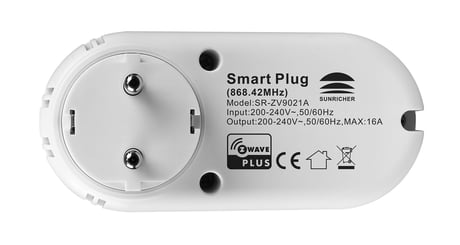
Product Image
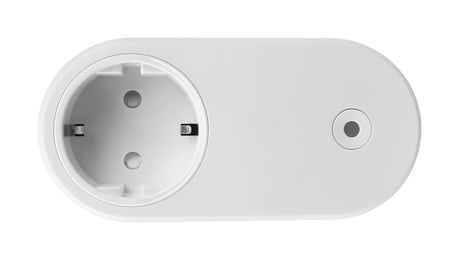
Back Side


7 - Parameter 7
Device operating mode: Switch mode enables to control relay output directly using basic set or binary set. Thermostat mode will control relay output automatically according to the temperature value setSize: 1 byte
Default: 0
Minimum: 0
Maximum: 1
Possible values
| From | To | Desription |
|---|---|---|
| 0 | 1 | 0 - Switch mode; 1 - Thermostat mode |
8 - Parameter 8
When configured as Thermostat mode: if Thermostat setpoint or mode changes, whether to report activelySize: 1 byte
Default: 0
Minimum: 0
Maximum: 1
Possible values
| From | To | Desription |
|---|---|---|
| 0 | 0 | not report |
| 1 | 1 | report actively |
9 - Parameter 9
Temperature compensation valueSize: 1 byte
Default: 0
Minimum: -50
Maximum: 50
Possible values
| From | To | Desription |
|---|---|---|
| -50 | 50 | set a threshold,unit is 0.1 Celsius degree |
10 - Parameter 10
Whether to enable over temperature protection. When temperature achieves the set value, the relay output will be forced to offSize: 1 byte
Default: 36
Minimum: 0
Maximum: 60
Possible values
| From | To | Desription |
|---|---|---|
| 0 | 0 | disable over temperature protection |
| 30 | 60 | set a threshold,unit is 1 Celsius degree |
11 - Parameter 11
Temperature change report threshold, report to gateway when change value is lower or higher than the thresholdSize: 1 byte
Default: 2
Minimum: 0
Maximum: 50
Possible values
| From | To | Desription |
|---|---|---|
| 0 | 0 | 0: disable report |
| 2 | 50 | set a threshold,unit is 0.1 Celsius degree |
12 - Parameter 12
Time interval for periodical temperature report, unit is SSize: 2 bytes
Default: 300
Minimum: 0
Maximum: 32767
Possible values
| From | To | Desription |
|---|---|---|
| 0 | 0 | 0: disable report |
| 10 | 32767 | time interval for periodical temperature report |
13 - Parameter 13
Power change absolute threshold, unit is W, report when power change value lower or higher than the threshold.Size: 1 byte
Default: 5
Minimum: 0
Maximum: 127
Possible values
| From | To | Desription |
|---|---|---|
| 0 | 0 | disable report |
| 1 | 127 | absolute threshold |
14 - Parameter 14
Voltage change absolute threshold, unit is V, report when voltage change value lower or higher than the threshold.Size: 1 byte
Default: 2
Minimum: 0
Maximum: 127
Possible values
| From | To | Desription |
|---|---|---|
| 0 | 0 | disable report |
| 1 | 127 | absolute threshold |
15 - Parameter 15
Current change absolute threshold, unit is 0.1A, report when current change value lower or higher than the threshold.Size: 1 byte
Default: 10
Minimum: 0
Maximum: 127
Possible values
| From | To | Desription |
|---|---|---|
| 0 | 0 | disable to report |
| 1 | 127 | absolute threshold |
17 - Parameter 17
Time interval for periodically active report of voltage value, current value, power value, energy consumption unit is S.Size: 4 bytes
Default: 600
Minimum: 60
Maximum: 2678400
Possible values
| From | To | Desription |
|---|---|---|
| 60 | 2678400 | unit is S |
18 - Parameter 18
Device state after a power resetSize: 1 byte
Default: 2
Minimum: 0
Maximum: 2
Possible values
| From | To | Desription |
|---|---|---|
| 0 | 0 | Switch Mode: 00, turn off relay ;Thermostat Mode:00,HVAC OFF Mode |
| 1 | 1 | Switch Mode: 01, turn on relay ;Thermostat Mode:01,HVAC Heat Mode |
| 2 | 2 | Switch Mode: 02,save relay state before power reset ;Thermostat Mode:02,save HVAC state before power reset |
19 - Parameter 19
Enable/disable to send SWITCH_BINARY_REPORT to the Lifeline when the plug (under switch mode) state changes, reset power of the plug and factory reset the the plugSize: 1 byte
Default: 1
Minimum: 0
Maximum: 1
Possible values
| From | To | Desription |
|---|---|---|
| 0 | 0 | disable to report |
| 1 | 1 | enable to send |
20 - Parameter 20
Enable/disable current protection threshold function, for instance, set the value as 15, then the over current protection will be triggered at 15.2A.Size: 1 byte
Default: 16
Minimum: 0
Maximum: 16
Possible values
| From | To | Desription |
|---|---|---|
| 0 | 0 | disable |
| 10 | 16 | set a threshold, unit is A |
Triple press the action button on the smart plug, it will set the plug into inclusion mode.The LED indicator will flash a white LED fast then stay solid white for 3 seconds to indicate successful inclusion. If there is no Z-Wave network available, the LED indicator will flash white fast for 30 seconds and the plug will quit inclusion mode automatically.
Triple press the action button, the smart plug will be set to exclusion mode, the LED indicator will flash a white LED fast and then flash white slowly for 3 times to indicate successful exclusion. If exclusion fails, the LED indicator will flash fast for 30 seconds and the plug will quit exclusion mode automatically
Press and hold down action button for over 10 seconds, LED indicator stays solid white for 3s to indicate successful factory reset, release action button, the smart plug will restart automatically.
page 4 :Z-Wave Set Introduction lf the user's gateway also supports smartstart, add the device by scanning the QR code,Smartstart allows users to quickly add devices to the gateway by scanning the device's QR code. After scanning to add the device, reset power of the device or waiting for a while, the device will be added to the gateway automatically. Please find the QR code on the casing of the device.
| Type | Value(s) |
|---|
| Group | Type |
|---|---|
| Heat Alarm | Heat sensor status: Overheat detected |
| Power Management | Over-current status: Over-current detected |
| Sensor type |
|---|
| Air Temperature |
| Meter type |
|---|
| Electric Meter Consumption |
| Heating Meter Consumption |