Zooz
Zooz 4-in-1 Sensor 700 Series
ZSE40 700
Notification Sensor
HW: 1 FW: 32.32
ZGM130
7.13.6
0x027A (634)
0x2021 (8225)
0x2101 (8449)
ZC12-21090312
2021-09-14 12:37:20.411925
N/A
Enhanced 232 Slave
Reporting Sleeping Slave
Yes
The new 700 Series of the best selling Zooz 4-in-1 Sensor.
PRODUCT FEATURES: - 4 different sensors in 1 smart device: motion, light, temperature, and humidity - Customize your sensor with adjustable motion and reporting settings - NEW 700 Series Z-Wave™ Chip - SmartStart and S2 Security - Built-in tamper protection SPECIFICATIONS: - Power: 1 CR123A battery (included) - Wireless Range: Up to 300 feet line of sight - Operating Temperature: 5° - 104°F - Weight: 2.0 oz - Dimensions: 2.25" x 2.25" x 1" - Installation: Indoor Use Only
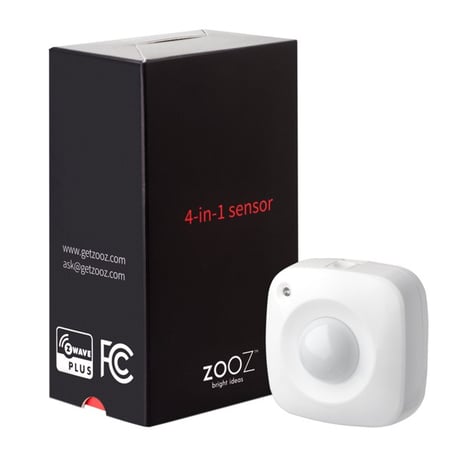
Product Image


1 - Temperature Scale
Use this parameter to switch from Fahrenheit to Celsius scale.Size: 1 byte
Default: 0
Minimum: 0
Maximum: 1
Possible values
| From | To | Desription |
|---|---|---|
| 0 | 0 | Celsius |
| 1 | 1 | Fahrenheit |
2 - Temperature Reporting Threshold
Use it to set temperature change to be reported by the sensor (where 1 stands for 0.1 degree and 50 stands for 5 degrees).Size: 1 byte
Default: 30
Minimum: 1
Maximum: 50
Possible values
| From | To | Desription |
|---|---|---|
| 1 | 50 | 0.1 - 5 degrees |
3 - Humidity Reporting Threshold
Use it to set humidity percentage change to be reported by the sensor.Size: 1 byte
Default: 20
Minimum: 1
Maximum: 50
Possible values
| From | To | Desription |
|---|---|---|
| 1 | 50 | % |
4 - Light Reporting Threshold
Use it to choose light percentage change to be reported by the sensor.Size: 1 byte
Default: 25
Minimum: 5
Maximum: 50
Possible values
| From | To | Desription |
|---|---|---|
| 5 | 50 | % |
5 - Motion Re-trigger Duration
Use it to set trigger interval - the time when motion is reported again after initial triggerSize: 1 byte
Default: 15
Minimum: 15
Maximum: 255
Possible values
| From | To | Desription |
|---|---|---|
| 15 | 255 | seconds |
6 - Motion Sensitivity Level
Use it to adjust PIR sensor sensitivity, where 1 = very high sensitivity and 7 = very low sensitivity.Size: 1 byte
Default: 4
Minimum: 1
Maximum: 7
Possible values
| From | To | Desription |
|---|---|---|
| 1 | 7 | 1 = very high sensitivity and 7 = very low sensitivity |
7 - LED Indicator Mode
Use it to choose between LED indicator modes.Size: 1 byte
Default: 3
Minimum: 1
Maximum: 3
Possible values
| From | To | Desription |
|---|---|---|
| 1 | 1 | LED indicator is turned off (no visual notifications). |
| 2 | 2 | temperature and motion indicated with flashing light. Flashes every 3 minutes for temperature. |
| 3 | 3 | no indication for temperature, motion indicated with red flashing light. |
8 - Retry Count
Set 0~10 Retry Count, default:3Size: 1 byte
Default: 3
Minimum: 0
Maximum: 10
Possible values
| From | To | Desription |
|---|---|---|
| 0 | 10 | retries |
Initiate inclusion (pairing) in the app (or web interface). Click the Z-Wave button with a paperclip twice. The LED indicator will start flashing.
Initiate exclusion in the app (or web interface). Click the Z-Wave button with a paperclip twice. The LED indicator will start flashing.
The sensor’s wake-up interval is set to 12 hours by default to save battery life. You can change the wake-up interval using your controller’s advanced settings if available. During wake-up, the sensor receives communication from the hub (setting updates or network information). Long wake-up interval will not affect how oen the sensor reports motion and other values to your gateway controller. MANUAL WAKE-UP Press and release the Z-Wave button once to wake the device up. The LED indicator will flash once (blue or orange). You may need to wake the sensor up manually IF: 1. It doesn’t fully configure during set-up (values are not displayed or errors pop up in your hub’s interface). 2. You change advanced settings for the sensor and want them to update.
If your primary controller is missing or inoperable, you may need to reset the device to factory settings. To complete the reset process manually, remove the back cover to trigger tamper switch. Press and release the Z-Wave button using a paperclip 10 TIMES quickly (within 10 seconds).
Under the back cover of the sensor.
| Type | Value(s) |
|---|
| Group | Type |
|---|---|
| Home Security |
|
| Sensor type |
|---|
| Air Temperature |
| Illuminance |
| Humidity |