Zooz
Titan Water Valve Actuator
ZAC36
Binary Switch
HW: 3 FW: 3.03
ZGM130
7.13.2
0x027A (634)
0x0101 (257)
0x0036 (54)
ZC12-22010332
2022-01-20 16:07:00.703955
N/A
Enhanced 232 Slave
Always On Slave
The Titan Water Valve Actuator is the ultimate DIY retrofit solution for flood prevention in the event of a water leak. Install on ball valves only.
PRODUCT HIGHLIGHTS: Automatic shut-off actuator for your main water valve Connect it to your Z-Wave™ hub for full smart home control Use it offline with the included leak sensor probe Built-in temperature detection for instant freeze detection Retrofit installation with no tools required Use with 1/2” - 1 1/4” ball valves only (close prior to installation) Indoor & outdoor installation with IP66 rating (avoid direct sunlight) NEW 700 series Z-Wave™ chip for better range and faster control S2 Security and SmartStart for easier inclusion PRODUCT SPECS: Model Number: ZAC36 Z-Wave Signal Frequency: 908.42 MHz Power: 12 V DC (1 A) power supply (included) Temperature Sensor Range: -40° to 257° F Sound Indicator: up to 85 dB Z-Wave Range: Up to 400 feet line of sight (up to 130 feet indoors) Operating Temperature: 14-122° F (-10-50° C) Installation and Use: Indoor & outdoor (IP66) Standby Power Consumption: 0.12 W Full Operation Power Consumption: 8.4 W
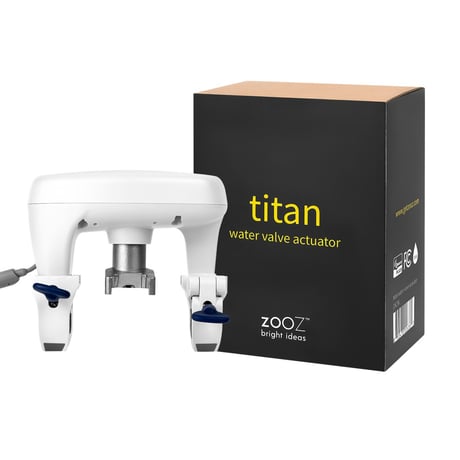
Product Image


17 - Water Valve Command and Reporting Behavior
Decide which Z-Wave commands and reports you'd like to use to display when the device is open or closed (or to open / close the device). Default value: 1.Size: 1 byte
Default: 1
Minimum: 0
Maximum: 1
Possible values
| From | To | Desription |
|---|---|---|
| 0 | 0 | reports on when the valve is open (opens the valve when an "on" report is sent from the hub), reports off when the valve is closed (closes the valve when an "off" report is sent from the hub) |
| 1 | 0 | reports off when the valve is open (opens the valve when an "off" report is sent from the hub), reports on when the valve is closed (closes the valve when an "on" report is sent from the hub) |
18 - Association Group 2 Reports (Open / Close)
Decide which report is sent to Group 2 when parameter 17 is set to value 1 and the valve is closing.Size: 1 byte
Default: 1
Minimum: 0
Maximum: 2
Possible values
| From | To | Desription |
|---|---|---|
| 0 | 0 | reports to Group 2 disabled |
| 1 | 0 | Basic Set on (default) |
| 2 | 0 | Basic Set off |
19 - Association Group 2 Reports (Open)
Decide which report is sent to Group 2 when parameter 17 is set to value 1 and the valve is opening.Size: 1 byte
Default: 2
Minimum: 0
Maximum: 2
Possible values
| From | To | Desription |
|---|---|---|
| 0 | 0 | reports to Group 2 disabled |
| 1 | 0 | Basic Set on |
| 2 | 0 | Basic Set off (default) |
33 - Temperature Reporting Unit
Choose which scale you'd like the device to report temperature in.Size: 1 byte
Default: 2
Minimum: 0
Maximum: 2
Possible values
| From | To | Desription |
|---|---|---|
| 0 | 0 | temperature reports disabled |
| 1 | 0 | Celsius |
| 2 | 0 | Fahrenheit (default) |
34 - Temperature Reporting Threshold
Set the temperature reporting threshold.Size: 2 bytes
Default: 260
Minimum: 0
Maximum: 511
Possible values
| From | To | Desription |
|---|---|---|
| 0 | 511 | degrees |
35 - Temperature Report Offset
Set the temperature reporting offsetSize: 2 bytes
Default: 256
Minimum: 0
Maximum: 4607
Possible values
| From | To | Desription |
|---|---|---|
| 0 | 4607 | degrees |
36 - Overheat Trigger Value
Set the overheat alarm trigger value. Default: 104.Size: 2 bytes
Default: 360
Minimum: 0
Maximum: 511
Possible values
| From | To | Desription |
|---|---|---|
| 0 | 511 | degrees |
37 - Overheat Recover value
Set the overheat alarm cancellation trigger value. Default: 86.Size: 2 bytes
Default: 342
Minimum: 0
Maximum: 511
Possible values
| From | To | Desription |
|---|---|---|
| 0 | 511 | degrees |
38 - Association Group 4 Overheat Trigger
Decide which report is sent to Group 4 when the overheat alarm (set in parameter 36) is triggered.Size: 1 byte
Default: 0
Minimum: 0
Maximum: 2
Possible values
| From | To | Desription |
|---|---|---|
| 0 | 0 | reports to Group 4 disabled (default) |
| 1 | 0 | Basic Set on |
| 2 | 0 | Basic Set off |
39 - Association Group 4 Overheat Cancel
Decide which report is sent to Group 4 when the overheat alarm is cancelled.Size: 1 byte
Default: 0
Minimum: 0
Maximum: 2
Possible values
| From | To | Desription |
|---|---|---|
| 0 | 0 | reports to Group 4 disabled (default) |
| 1 | 0 | Basic Set on |
| 2 | 0 | Basic Set off |
40 - Freeze Trigger Value
Set the freeze alarm trigger value.Size: 2 bytes
Default: 288
Minimum: 0
Maximum: 511
Possible values
| From | To | Desription |
|---|---|---|
| 0 | 511 | degrees |
41 - Freeze Recover Value
Set the freeze alarm cancellation trigger value. Default: 36.Size: 2 bytes
Default: 292
Minimum: 0
Maximum: 511
Possible values
| From | To | Desription |
|---|---|---|
| 0 | 511 | degrees |
42 - Freeze Alarm Operation Mode
Decide if you want to allow the valve actuator to open and close during freeze alarm mode. If the actuator is disabled, it won't react to Z-Wave or manual triggers to open or close until the freeze alarm is cleared.Size: 1 byte
Default: 1
Minimum: 0
Maximum: 1
Possible values
| From | To | Desription |
|---|---|---|
| 0 | 0 | operation disabled |
| 1 | 0 | operation enabled (default) |
43 - Association Group 5 Freeze Trigger
Decide which report is sent to Group 5 when the freeze alarm (set in parameter 40) is triggered.Size: 1 byte
Default: 0
Minimum: 0
Maximum: 2
Possible values
| From | To | Desription |
|---|---|---|
| 0 | 0 | reports to Group 5 disabled (default) |
| 1 | 0 | Basic Set on |
| 2 | 0 | Basic Set off |
44 - Association Group 5 Freeze Cancel
Decide which report is sent to Group 5 when the freeze alarm is cancelled.Size: 1 byte
Default: 0
Minimum: 0
Maximum: 2
Possible values
| From | To | Desription |
|---|---|---|
| 0 | 0 | reports to Group 5 disabled (default) |
| 1 | 0 | Basic Set on |
| 2 | 0 | Basic Set off |
49 - Association Group 3 Water Leak Trigger
Decide which report is sent to Group 3 when a leak alarm is triggered (from the connected leak detection probe). Values:Size: 1 byte
Default: 1
Minimum: 0
Maximum: 2
Possible values
| From | To | Desription |
|---|---|---|
| 0 | 0 | reports to Group 3 disabled |
| 1 | 0 | Basic Set on (default) |
| 2 | 0 | Basic Set off |
50 - Association Group 3 Water Leak Cancel
Decide which report is sent to Group 3 when the leak alarm is cleared (water is no longer detected by the connected probe).Size: 1 byte
Default: 0
Minimum: 0
Maximum: 2
Possible values
| From | To | Desription |
|---|---|---|
| 0 | 0 | reports to Group 3 disabled (default) |
| 1 | 0 | Basic Set on |
| 2 | 0 | Basic Set off |
| 2 | 0 | Basic Set off |
| 2 | 0 | Basic Set off |
51 - Water Leak Detection Valve Control
Decide if you want to allow the valve actuator to open and close during a leak alarm event. If the actuator is disabled, it won't react to Z-Wave or manual triggers to open or close until the leak alarm is cleared.Size: 1 byte
Default: 1
Minimum: 0
Maximum: 1
Possible values
| From | To | Desription |
|---|---|---|
| 0 | 0 | operation disabled |
| 1 | 0 | operation enabled (default) |
65 - Buzzer
Decide if you'd like to receive sound (beep) feedback when operating the actuator as well as sound alarms for different modes and alarms the actuator goes into when installed.Size: 1 byte
Default: 1
Minimum: 0
Maximum: 1
Possible values
| From | To | Desription |
|---|---|---|
| 0 | 0 | sound notifications disabled |
| 1 | 0 | sound notifications enabled (default) |
66 - LED Brightness Level
Decide how bright you'd like the LED indicator to be on your actuator. If you set it to value 0, the LED indicator will be disabled. Default: 80.Size: 1 byte
Default: 80
Minimum: 0
Maximum: 99
Possible values
| From | To | Desription |
|---|---|---|
| 0 | 99 | % |
67 - Z-Wave Button Lock Protection
Enable Z-Wave button lock protection if you'd like to prevent the Z-Wave button from being locked accidentally.Size: 1 byte
Default: 0
Minimum: 0
Maximum: 1
Possible values
| From | To | Desription |
|---|---|---|
| 0 | 0 | Z-Wave button lock disabled (default) |
| 1 | 0 | Z-Wave button lock enabled |
81 - Notification Report
Configure Notification Report (Bitmask)Size: 1 byte
Default: 13
Minimum: 0
Maximum: 15
Possible values
| From | To | Desription |
|---|---|---|
| 0 | 0 | Water Valve Open / Close Disabled / Enabled |
| 5 | 0 | Overheat Detection Disabled / Enabled |
| 10 | 0 | Freeze Detection Disabled / Enabled |
| 13 | 0 | All enabled |
| 15 | 0 | Wired Leak Probe Detection Disabled / Enabled |
1. Initiate inclusion in the hub 2. Tap the Z-Wave button 3 times
1. Put the Z-Wave hub into exclusion mode 2. Tap the Z-Wave button 3 times
If your primary controller is missing or inoperable, you may need to reset the device to factory settings. Please make sure that your Z-Wave button is unlocked before you proceed. To reset the Titan hold the Z-Wave button until 10 beeps sound. Release the button, and immediately after, tap the Z-Wave button 5 times. The LED indicator will flash yellow, then it will turn green for 2 seconds and will sound a long beep to confirm a successful reset.
Outdoor Installation.
Scan the QR Code on the back of the product / enter the 5 digit PIN.
| Group | Type |
|---|---|
| Heat Alarm |
|
| Water Alarm |
|
| Water Valve | Valve operation status: Valve operation |
| Sensor type |
|---|
| Air Temperature |