MITSUMI
Smart Lock
FGT-0003
Lock
HW: 1 FW: 7.14:00.09
ZGM130
7.14.3
0x0112 (274)
0x0011 (17)
0x0001 (1)
ZC12-22010330
2021-10-18 10:18:11.336298
N/A
Enhanced 232 Slave
Listening Sleeping Slave
This product can remotely lock and unlock the door and check the status by remote operation.
This product is an electronic door lock "FGT-0003" that supports Z-Wave Plus™ as standard. This is attached to the thumb turn and unlocked / locked using the controller.
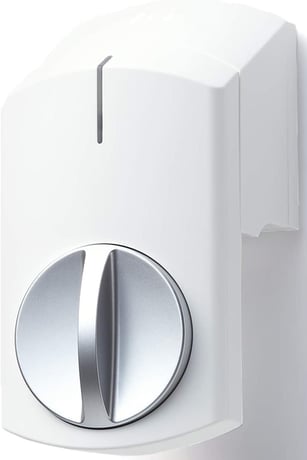
Product Image


1 - Buzzer On/Off
Buzzer On/OffSize: 1 byte
Default: 1
Minimum: 0
Maximum: 1
Possible values
| From | To | Desription |
|---|---|---|
| 0 | 1 | Buzzer disable/enable |
3 - Threshold battery level
Threshold battery levelSize: 1 byte
Default: 28
Minimum: 1
Maximum: 50
Possible values
| From | To | Desription |
|---|---|---|
| 1 | 50 | battery alert level. |
1. Set the controller in "Add (Inclusion)" mode. (For the operation procedure, see the instruction manual of the controller.) 2. Press the lock operation switch once with a thin stick and release it immediately. The registration operation starts with a single beeping sound. 3. The connection is complete when the LED blinks from blue to green. Check the connection using the controller or a dedicated application.
1. Set the controller in "Remove (Exclusion)" mode. 2. Remove the top cover and press the lock operation switch once with a thin stick and release it immediately. The LED turns yellow once with a beeping sound. 3. The disconnection is complete when the LED blinks blue. Check the Exclusion using the controller or the dedicated application.
Set the lock position and unlock position of the thumb turn knob. ■Insert the batteries Remove the top cover, remove the battery holder, and insert four batteries. Attach the battery holder with the battery inserted to the lock body. The LED flashes green with a confirmation sound. Leave the top cover removed. * Be sure to use 4 batteries. Also, do not use batteries that are in use and new batteries together. ■Setting the thumb turn knob rotation direction ◇Start setting Press and release the operation switch on the left side of the lock body with a thin stick for 5 seconds or longer. The LED will light up light blue once and long beep. After that, the LED will blink light blue. ◇Unlocking position setting Turn the thumb turn knob of this unit to the unlocked position. Press and release the operation switch on the left side of the lock body with a thin stick for 5 seconds or longer. The LED will red once and beep twice. After that, the LED will blink light blue. ◇Locking position setting Turn the thumb turn knob of this unit to the locked position. Press and release the operation switch on the left side of the lock body with a thin stick for 5 seconds or longer. The LED will blue once and beep once. After that, the LED will blink light blue. ◇Positioning With the thumb turn knob locked, use a thin stick to press and release the operation switch on the left side of the lock body for 5 seconds or longer. The LED will light blue once and beep three times.
Remove the top cover, press and release the operation switch on the left side of the lock body with a thin stick for 5 seconds or longer. The Factory Reset is complete when the LED blinks blue. Please use this procedure only in the event that the primary controller is lost. All the settings and the controller information are cleared to return to the factory default.
You can check the DSK code and QR code on the label by removing the Top cover of this product.