MITSUMI
Window Sensor
FGT-0001
Notification Sensor
HW: 1 FW: 7.14:01.00
ZGM130
7.14.3
0x0112 (274)
0x0015 (21)
0x0001 (1)
ZC12-22010331
2021-10-18 10:21:57.909457
N/A
Enhanced 232 Slave
Reporting Sleeping Slave
This product is detects and notifies the opening or closing of a door or window.
This product is "FGT-0001" that detects the opening and closing of doors and windows that support Z-Wave Plus™ as standard. Detects changes in the state of the place where the product is installed and notifies the controller.
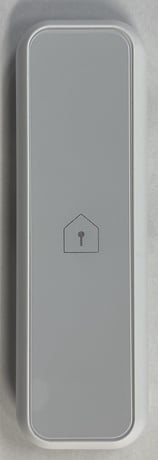
Product Image


1 - Periodic check interval
Periodic check intervalSize: 2 bytes
Default: 120
Minimum: 1
Maximum: 1440
Possible values
| From | To | Desription |
|---|---|---|
| 1 | 1440 | periodic notification interval for the sensor |
2 - Threshold battery level
Threshold battery levelSize: 1 byte
Default: 28
Minimum: 1
Maximum: 50
Possible values
| From | To | Desription |
|---|---|---|
| 1 | 50 | battery alert level. |
3 - Magnetic sensor judgement
Magnetic sensor judgementSize: 1 byte
Default: 0
Minimum: 0
Maximum: 1
Possible values
| From | To | Desription |
|---|---|---|
| 0 | 1 | judgment type of the magnetic sensor |
1 Set the controller in "Add (Inclusion)" mode. (For the operation procedure, see the instruction manual of the controller.) 2 Push the Operation switch once. The LED blinks green and the registration operation start. * If the LED does not brink green, remove the battery, check the insertion direction, and insert it again * If that doesn't work, try inserting a new battery. (The included battery is a sample. Battery life may be shorter than regular batteries on the market.) 3 Check the connection using a controller or a dedicated application.
1 Remove the Bottom cover. 2 Set the controller in "Remove (Exclusion)" mode. (For the operation procedure, see the instruction manual of the controller.) 3 Push the Operation switch once. The LED blinks red and the remove operation start. 4 LED turns off when removed. Check the disconnection using a controller or a dedicated application.
Attach the magnet onto the window glass, and the sensor onto the window sash. ※ Allow a space of 10 mm from the top of this product.
Please use this procedure only in the event that the primary controller is lost. All the settings and the controller information are cleared to return to the factory default. 1 Remove the Bottom cover. 2 Press and hold the Operation SW for about 10 seconds. The LED light up when initialization begins. 3 Push the Operation switch once and release it immediately. The reset is complete when the LED brink green. Push and release the Operation switch again to turn off the LED.
You can check the DSK and QR code on the label by removing the bottom cover of this product.
| Group | Type |
|---|---|
| Access Control |
|