Qolsys
IQ Smart Dimmer
QZ2142-840
Multilevel Switch
HW: 1 FW: 1.00
ZGM130
7.13.6
0x012A (298)
0xFF00 (65280)
0xFF0D (65293)
ZC12-22040337
2022-04-13 13:41:44.7515
N/A
Enhanced 232 Slave
Always On Slave
The IQ Smart Dimmer can be used to turn any outlet into a smart outlet to turn lamps On, Off, or control dimming of any lamps with dimmable light bulbs. Each Z-Wave device also serves as a repeater in the Z-Wave ™ network, extending and improving the mesh network in the installed location.
The IQ Smart Dimmer can be used to turn any outlet into a smart outlet to turn lamps On, Off, or control dimming of any lamps with dimmable light bulbs. Each Z-Wave ™ device also serves as a repeater in the Z-Wave network, extending and improving the mesh network in the installed location. The IQ Smart Dimmer is a Z-Wave Plus ™ certified device and includes S2 security and SmartStart. You can now add this device securely and with ease using QR code on the box or device.
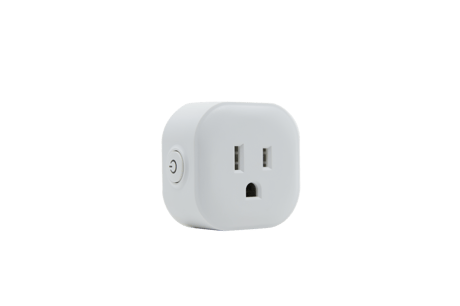
Product Image


2 - LED Indicator
Parameter=2,Size=1,Value=0 On when Off and Off when On Value=1 On when On and Off when Off Value=2 Always Off Value=3 Always On Default =0Size: 1 byte
Default: 0
Minimum: 0
Maximum: 3
Possible values
| From | To | Desription |
|---|---|---|
| 0 | 0 | Output and the LED are in the different state. |
| 1 | 1 | Output and the LED are in the same state. |
| 2 | 2 | LED Always OFF |
| 3 | 3 | LED Always ON |
3 - Auto Turn-Off Timer
Auto Turn-Off Timer--- Values: 0 – 65535 (minutes)Size: 4 bytes
Default: 0
Minimum: 0
Maximum: 65535
Possible values
| From | To | Desription |
|---|---|---|
| 0 | 0 | Default |
| 1 | 65535 | 1 – 65535 (minutes) |
5 - Auto Turn-On Timer
Auto Turn-On TimerSize: 4 bytes
Default: 0
Minimum: 0
Maximum: 65535
Possible values
| From | To | Desription |
|---|---|---|
| 0 | 0 | Default |
| 1 | 65535 | 1 – 65535 (minutes) |
8 - Restores state after power failure
Restores state after power failure Parameter=8,Size=1,Value=0 output off Value=1 output on Value=2 out put the state after power Default =2Size: 1 byte
Default: 2
Minimum: 0
Maximum: 2
Possible values
| From | To | Desription |
|---|---|---|
| 0 | 0 | Output OFF |
| 1 | 1 | Output ON |
| 2 | 2 | The state before a power outage |
9 - Ramp rate
Ramp rate(Local Button + Z-Wave)> change to local and Z-Wave like in the latest ZEN30 firmware, also applies to any multilevel changes (so there should be soft transition between 20 and 80% brightness if changed from the hub for example) Parameter=9,Size=1, Value=1 from 0x63 to 0x00 or from 0x00 to 0x63 need 1s Value=2 from 0x63 to 0x00 or from 0x00 to 0x63 need 2s . . Value=99 from 0x63 to 0x00 or from 0x00 to 0x63 need 99s Default = 1Size: 1 byte
Default: 1
Minimum: 1
Maximum: 99
Possible values
| From | To | Desription |
|---|---|---|
| 1 | 99 | Ramp rate in seconds |
10 - Multilevel minimum value can be set
Multilevel minimum value can be set(Local Button)> this should apply to both for local or Z-Wave operation Parameter=10,Size=1,Value=0 disable Value=1 . . Value=99 Default = 1Size: 1 byte
Default: 1
Minimum: 0
Maximum: 99
Possible values
| From | To | Desription |
|---|---|---|
| 0 | 0 | Disabled |
| 1 | 99 | Minimum multilevel level |
11 - Multilevel maximum value can be set
Multilevel maximum value can be set(Local Button)> this should apply to both for local or Z-Wave operation Parameter=11,Size=1,Value=0 disable Value=1 . . Value=100 - NOT ACCEPTED BY HUB Default = 99Size: 1 byte
Default: 99
Minimum: 0
Maximum: 100
Possible values
| From | To | Desription |
|---|---|---|
| 0 | 0 | Disabled |
| 1 | 100 | Maximum multilevel level |
12 - Double Tap Behavior
Double Tap Behavior: when switch is off and quickly press UPPER paddle 2 times, switch turns on to x brightness (Local Button) Parameter=12,Size=1, Value = 0 enable double tap to full brightness (99) Value = 1 custom value set in parameter 18 Value = 2 enable double tap to maximum brightness (turn on to the value relate with parameter 11) Value = 3 disable double tap to full brightness Default = 0Size: 1 byte
Default: 0
Minimum: 0
Maximum: 3
Possible values
| From | To | Desription |
|---|---|---|
| 0 | 0 | Double tap goes to full brightness |
| 1 | 1 | Double tap goes to custom value in Parameter 18 |
| 2 | 2 | Double tap goes to maximum brightness based on Parameter 11 |
| 3 | 3 | Disable double tap to full brightness |
15 - Enable or Disable local / Z-Wave control
Enable or Disable local / Z-Wave control Parameter=15,Size=1,Value=0 disable (when paddle pressed switch will not turn light on or off BUT it will still control the light via z-wave and it will change LED indicator status and on/off/multilevel status when paddle is pressed) Value=1 enable (normal operation like now) Value = 2 disable local and Z-Wave control (LED and on/off status will still change if paddle pressed) >> make sure that status is still reported and LED indicator changes when Z-Wave control is disabled Default = 1Size: 1 byte
Default: 1
Minimum: 0
Maximum: 2
Possible values
| From | To | Desription |
|---|---|---|
| 0 | 0 | Disable local control |
| 1 | 1 | Enable local Z-Wave control |
| 2 | 2 | Disable local and Z-Wave Control |
16 - dimmer speed
dimmer speed (only for local press & hold): amount of seconds it takes to go from 0 to 100% brightness when pressing and holding the paddle Parameter=16,Size=1, Value=1 from 0x63 to 0x00 or from 0x00 to 0x63 need 1s Value=2 from 0x63 to 0x00 or from 0x00 to 0x63 need 2s . . Value=99 from 0x63 to 0x00 or from 0x00 to 0x63 need 99s Default = 5Size: 1 byte
Default: 5
Minimum: 1
Maximum: 99
Possible values
| From | To | Desription |
|---|---|---|
| 1 | 99 | Dimming speed in seconds |
18 - Custom brightness level
Custom brightness level - in this parameter define default brightness level the switch will turn on to from main switch or regular switch in 3-way when pressed upper paddle once. Parameter: 18 Size: 1 byte dec Values 0-99 0 - last brightness level 1-99 custom brightness level default = 0Size: 1 byte
Default: 0
Minimum: 0
Maximum: 99
Possible values
| From | To | Desription |
|---|---|---|
| 0 | 0 | Last brightness level |
| 1 | 99 | Custom brightness level |
19 - 3-way switch type
3-way switch type Parameter=19,Size=1,Value=0 toggle switch(device changes status when switch changes status,it can only turn on or turn off lamp,it can’t dimmer)(default); Value = 1 toggle switch(press 1x change device status;quickly press 2x the result depend on Par11/Par12; quickly Press 3x it trigger dimmer in loop(dimmer up/dimmer down ) Value=2 momentary switch (press 1x change device status;quickly press 2x the result depend on Par11/Par12;hold trigger dimmer in loop(dimmer up/dimmer down ) Value=3 momentary switch (press 1x change device status;quickly press 2x the result depend on Par11/Par12;hold trigger dimmer in loop(dimmer up/dimmer down – BUT after double click to full brightness, hold will dim DOWN always instead of trying to increase brightness) >> This value is missing, please add to setting Notice: when the value=1,or value=2,the switch can’t respond immediately,because it need to recognize multiple press.Size: 1 byte
Default: 0
Minimum: 0
Maximum: 3
Possible values
| From | To | Desription |
|---|---|---|
| 0 | 0 | toggle switch(device changes status when switch changes status, it can only turn on or turn off lamp |
| 1 | 1 | toggle switch(press 1x change device status; quickly press 2x the result depend on Parameter 11 and 12 |
| 2 | 2 | momentary switch (press 1x change device status; quickly press 2x the result depend on Par11 and 12 |
| 3 | 3 | momentary switch (press 1x change device status; quickly press 2x the result depend on Par11 and Par12 |
20 - Association reports
Association reports Parameter=20,Size=1 Values: 0 – Z-Wave control:Multilevel report (without each level,just final level) Manual control (short press): Basic report(without each level,just final level) Manual control(long press & relay enable): Basic report(without each level,just final level) Manual control(long press & relay disable): Multilevel report (each level will be reported) 1 – Z-Wave control:Multilevel report (without each level,just final level) Manual control (short press): Basic report (without each level,just final level) Manual control(long press & relay enable OR disable): Basic report (without each level,just final level) 2 – Z-Wave control:Multilevel report (without each level, just final level) Manual control (short press): Multilevel report (without each level, just final level) Manual control (long press & relay enable): Multilevel report (without each level, just final level) Manual control (long press & relay disable): Multilevel report (each level will be reported) default = 2Size: 1 byte
Default: 2
Minimum: 0
Maximum: 2
Possible values
| From | To | Desription |
|---|---|---|
| 0 | 0 | Z-Wave control:Multilevel report (without each level,just final level) Manual control (short press): Basic report(without each level,just final level) Manual control(long press & relay enable): Basic report(without each level,just final level) Manual control(long press & relay disable): Multilevel report (each level will be reported) |
| 1 | 1 | Z-Wave control:Multilevel report (without each level,just final level) Manual control (short press): Basic report (without each level,just final level) Manual control(long press & relay enable OR disable): Basic report (without each level,just final level) |
| 2 | 2 | Z-Wave control:Multilevel report (without each level, just final level) Manual control (short press): Multilevel report (without each level, just final level) Manual control (long press & relay enable): Multilevel report (without each level, just final level) Manual control (long press & relay disable): Multilevel report (each level will be reported) |
21 - Disabled Relay Behavior
Disabled Relay Behavior Parameter=21,Size=1 Value=0 report on/off and multilevel status when paddle is pressed and change LED indicator status and Parameter 15 is set to value 0 or 2 (output control disabled) according to setting in Parameter 20. Value=1 DON’t report on/off or multilevel status or and change LED indicator status when paddle is pressed and Parameter 15 is set to value 0 or 2 (output control disabled). Default = 0Size: 1 byte
Default: 0
Minimum: 0
Maximum: 1
Possible values
| From | To | Desription |
|---|---|---|
| 0 | 0 | report on/off and multilevel status when paddle is pressed and change LED indicator status and Parameter 15 is set to value 0 or 2 (output control disabled) according to setting in Parameter 20. |
| 1 | 1 | DON’t report on/off or multilevel status or and change LED indicator status when paddle is pressed and Parameter 15 is set to value 0 or 2 (output control disabled). |
22 - Night Mode Brightness Level
Night Mode Brightness Level Set the level of brightness the dimmer will turn on to when off and lower paddle held DOWN for 2 seconds. Parameter=22,Size=1 Values: 0- disable function; 1-99 % Default:: 20Size: 1 byte
Default: 20
Minimum: 0
Maximum: 99
Possible values
| From | To | Desription |
|---|---|---|
| 0 | 0 | Disabled |
| 1 | 99 | Brightness level |
23 - LED Indicator Color
LED Indicator Color Parameter=23,Size=1,Value=0 White Value=1 Blue Value=2 Green Value=3 Red Default = 1Size: 1 byte
Default: 1
Minimum: 0
Maximum: 3
Possible values
| From | To | Desription |
|---|---|---|
| 0 | 0 | White |
| 1 | 1 | Blue |
| 2 | 2 | Green |
| 3 | 3 | Red |
24 - LED Indicator Brightness
LED Indicator Brightness Parameter=24,Size=1,Value=0 Bright (100%) Value=1 Medium (60%) Value=2 Low (30%) Default =1Size: 1 byte
Default: 1
Minimum: 0
Maximum: 2
Possible values
| From | To | Desription |
|---|---|---|
| 1 | 1 | Medium (60%) |
| 2 | 2 | Low (30%) |
| 0 | 0 | Bright (100%) |
25 - Single Tap Behavior
Single Tap Behavior: when switch is off and press UPPER paddle 1 time, switch turns on to x brightness (Local Button) Parameter=25,Size=1, Value = 0 last brightness level Value = 1 custom value set in parameter 18 Value = 2 maximum brightness set in parameter 11 Value = 3 full 100% brightness Default = 0Size: 1 byte
Default: 0
Minimum: 0
Maximum: 3
Possible values
| From | To | Desription |
|---|---|---|
| 0 | 0 | last brightness level |
| 1 | 1 | custom value set in parameter 18 |
| 2 | 2 | maximum brightness set in parameter 11 |
| 3 | 3 | full 100% brightness |
When prompted by your primary controller, click the button three times in one second
When prompted by your primary controller, click the button three times in one second.
Press click Z-Wave button 3 times quickly, and hold for at least 10 seconds at the third time to restore the device to the factory
On the packaging box and top of the outlet