Everspring
Z-Wave 700 MOS Dimmer
AD370-0
Multilevel Switch DT
HW: 01 FW: 01.01:00.03
ZGM130S037HGN2 / ZGM130S037HGN1
7.16.3
0x0060 (96)
N/A
0x0033 (51)
ZC14-22020066
2022-02-18 11:34:10
N/A
Enhanced 232 Slave
Always On Slave
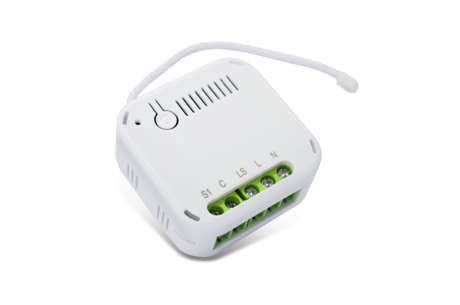
AD370 is an inwall dimmer module to dim lighting appliances by Z-WaveTM wireless control. It uses MOS technology to achieve both Trailing-edge dimming for LED lighting and Leading-edge dimming for older lamps. Compact in design, yet certified for safety makes it suitable for installation in crammed electrical box located behind wall switches.


1 - Switch Type
Size: 2 bytes
Default: 0
Minimum: 0
Maximum: 1
Possible values
| From | To | Desription |
|---|---|---|
| 0 | 0 | Momentary |
| 1 | 1 | Toggle |
2 - Auto-on time
Size: 2 bytes
Default: 0
Minimum: 0
Maximum: 32767
Possible values
| From | To | Desription |
|---|---|---|
| 0 | 0 | not auto-on |
3 - Auto-off time
Size: 2 bytes
Default: 0
Minimum: 0
Maximum: 32767
Possible values
| From | To | Desription |
|---|---|---|
| 0 | 0 | not auto-off |
4 - Remember last status
Size: 2 bytes
Default: 1
Minimum: 0
Maximum: 1
Possible values
| From | To | Desription |
|---|---|---|
| 0 | 0 | do not remember |
| 1 | 1 | remember |
5 - Interval for wattage/kWh auto report
Size: 2 bytes
Default: 600
Minimum: 60
Maximum: 32767
Possible values
Not available
6 - Report when exceed % change of wattage
Size: 2 bytes
Default: 25
Minimum: 10
Maximum: 100
Possible values
Not available
7 - Maximum dimming value
Size: 2 bytes
Default: 100
Minimum: 1
Maximum: 100
Possible values
Not available
8 - Minimum dimming value
Size: 2 bytes
Default: 10
Minimum: 1
Maximum: 100
Possible values
Not available
9 - MOS operation mode
Size: 2 bytes
Default: 2
Minimum: 0
Maximum: 3
Possible values
| From | To | Desription |
|---|---|---|
| 0 | 0 | Disabled, (unknown load) |
| 1 | 1 | On/off only, no dimming |
| 2 | 2 | Trailing edge dimming |
| 3 | 3 | Leading edge dimming |
10 - Calibration Mode
Size: 2 bytes
Default: 0
Minimum: 0
Maximum: 1
Possible values
| From | To | Desription |
|---|---|---|
| 0 | 0 | IDLE |
| 1 | 1 | Calibrate |
11 - Auto Calibration
Size: 2 bytes
Default: 1
Minimum: 0
Maximum: 3
Possible values
| From | To | Desription |
|---|---|---|
| 0 | 0 | not calibrate automatically |
| 2 | 2 | Calibrate after first power on when module is included; |
| 1 | 1 | Calibrate after first power on when module is excluded |
| 3 | 3 | Calibrate after first power on |
12 - Dimming speed
Size: 2 bytes
Default: 4
Minimum: 1
Maximum: 600
Possible values
Not available
13 - Set voltage when in 2-wire
Size: 2 bytes
Default: 230
Minimum: 1
Maximum: 500
Possible values
Not available
14 - Use external switch for Inclusion and Exclusion
Size: 2 bytes
Default: 1
Minimum: 0
Maximum: 1
Possible values
| From | To | Desription |
|---|---|---|
| 0 | 0 | Disable |
| 1 | 1 | Enable |
15 - Lamp type detected
Size: 2 bytes
Default: 0
Minimum: 0
Maximum: 1
Possible values
| From | To | Desription |
|---|---|---|
| 0 | 0 | Unknown |
| 2 | 2 | Lamp recognized as dimmable |
| 1 | 1 | Lamp recognized as non-dimmable |
16 - Wire connection type
Size: 2 bytes
Default: 0
Minimum: 0
Maximum: 3
Possible values
| From | To | Desription |
|---|---|---|
| 0 | 0 | Unknown |
| 1 | 1 | Unknown |
| 2 | 2 | 2-Wire |
| 3 | 3 | 3-Wire |
17 - Power auto report threshold
Size: 2 bytes
Default: 0
Minimum: 0
Maximum: 300
Possible values
Not available
18 - Dimming curve
Size: 2 bytes
Default: 0
Minimum: 0
Maximum: 1
Possible values
| From | To | Desription |
|---|---|---|
| 0 | 0 | Linear |
| 1 | 1 | Logarithmic |
19 - Load type detected
Size: 2 bytes
Default: 0
Minimum: 0
Maximum: 3
Possible values
| From | To | Desription |
|---|---|---|
| 0 | 0 | Unknown |
| 1 | 1 | resistive load |
| 2 | 2 | capacitive load |
| 3 | 3 | inductive load |
1. Put the Z-Wave Controller into inclusion mode. 2. Press the link key or external switch three times within 1.5 seconds to put the unit into inclusion mode.
1. Put the Z-Wave Controller into exclusion mode. 2. Press the link key or external switch three times within 1.5 seconds to put the unit into exclusion mode.
1. Press the link key or external switch three times within 1.5 seconds to put the unit into exclusion mode. 2. Within 1 second of step 1, press link key or external switch again and hold until LED is off (about 5 seconds). 3. Node ID is excluded. The device reverts to factory default state and will be in auto-inclusion mode for 4 minutes. (This procedure should only be used when the network primary controller is inoperable.)
Page 2: Adding to Z-Wave Network Note: If the Z-Wave Controller utilizes S2 security protocol, you may be asked to enter a 5 digit Device Specific Key (DSK) .This can be found in one of two places: - on the QR code label on the back of the unit - on the insert card inside the packaging
| Type | Value(s) |
|---|
| Group | Type |
|---|---|
| Power Management |
|
| System |
|