Philio
Smart Energy Plug
PAN38
Binary Switch DT
HW: 01 FW: 01.01
ZGM130S037HGN2 / ZGM130S037HGN1
7.16.3
0x013C (316)
N/A
0x0001 (1)
ZC14-22030076
2022-03-10 16:09:52
N/A
Enhanced 232 Slave
Always On Slave
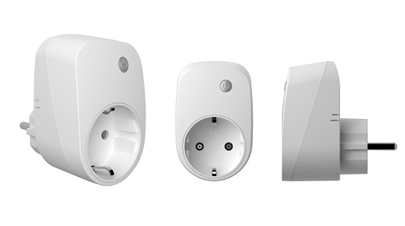
PAN38 is a Smart Energy Plug. The built-in power meter can let you monitor the power consumption of your electric appliances. The product supports an Over the Air (OTA) feature for the products firmware upgrade.


1 - Watt Meter Report Period
If the setting is configured for 1hour (set value =720), PAN38 will report its instant power consumption to Group1 node every 1 hour. The maximum interval to report its instant power consumption is 45 hours (5s*32767/3600=45hr). When the setting is 0, PAN38 will disable Watt auto report function. The default value is 720.Size: 2 bytes
Default: 720
Minimum: 0
Maximum: 32767
Possible values
| From | To | Desription |
|---|---|---|
| 0 | 0 | disable auto reporting |
| 720 | 32767 | N * 5 seconds; For example 720 * 5 seconds = 3600 seconds (1 hour). |
2 - KWH Meter Report Period
If the setting is configured for 1hour (set value =6), the PAN38 will report its Accumulated Power Consumption (KW/h) every 1 hour to the node of correspond Group. The maximum interval to report its Accumulated Power Consumption (KW/h) is 227.55 days (10min*32767/1440=227.55 days). If the setting value is 0, the auto report function of meter KWh will be disabled.Size: 2 bytes
Default: 6
Minimum: 0
Maximum: 32767
Possible values
| From | To | Desription |
|---|---|---|
| 0 | 0 | kWh Meter automatic report disabled |
| 1 | 32767 | N * 10 minutes. For example 6 * 10 minutes = 60 minutes (1 hour). |
3 - Threshold of current for Load Caution
This is a warning when the current of load over the preset threshold value, if the setting value is 1300, when the load current of Relayl over this value, PAN38 will send current meter report to warn the Group1 node, the range of the setting value is from 10 to 1300, and the default value is 1300.Size: 2 bytes
Default: 1300
Minimum: 10
Maximum: 1300
Possible values
| From | To | Desription |
|---|---|---|
| 10 | 1300 | N * 0.01A. Example 1300 * 0.01A = 13A |
4 - Threshold of KWh for Load Caution
This is a warning when the KWh of load over the preset threshold value, If the setting value is 10000, when the Accumulated Power Consumption of Relay1 over this value, PAN38 will send KWH meter report to warn the Group1 node, minimum value is 1KWh and default value is 10000 kWh.Size: 2 bytes
Default: 10000
Minimum: 1
Maximum: 10000
Possible values
| From | To | Desription |
|---|---|---|
| 1 | 10000 | N * 1 kWh. Example: 10000 * 1kWh = 10000 kWh. |
5 - Restore switch state mode
Whenever the AC power return from lost, PAN38 will restore the switch state which could be SWITCH OFF、LAST SWITCH STATE、SWITCH ON. The default setting is LAST SWITCH STATE.Size: 1 byte
Default: 1
Minimum: 0
Maximum: 2
Possible values
| From | To | Desription |
|---|---|---|
| 0 | 0 | Switch off |
| 1 | 1 | Last switch state |
| 2 | 2 | Switch on |
6 - Mode of Switch Off function
When the mode of switch On/Off is set to 0, any command of switch off will be disabled and the Off function of include button will be disabled. The default setting is enable mode. When manual On/Off function is disabled, the RF command and include button can only switch On but not Off. This is useful function for keeping the device in switch on state.Size: 1 byte
Default: 1
Minimum: 0
Maximum: 1
Possible values
| From | To | Desription |
|---|---|---|
| 0 | 0 | Disable |
| 1 | 1 | Enable |
7 - LED indication mode
LED indication mode: The default setting is Show Switch State. 3-7-1 Show Switch State: When switch is on, LED is on. When switch is off, LED is off. 3-7-2 Show Night mode: When switch is on, LED is off. When switch is off, LED is on. 3-7-3 One Flash mode: When the state of switch changes, LED will be on only one second, then LED keeps off.Size: 1 byte
Default: 1
Minimum: 1
Maximum: 3
Possible values
| From | To | Desription |
|---|---|---|
| 1 | 1 | Show switch state |
| 2 | 2 | Show night mode |
| 3 | 3 | One flash mode |
8 - Watt differential report mode
Whenever Watt value of PAN38 changes over 5% of last reading value, it will send Meter report to the group 1 nodes. However, if Watt differential mode as 0, the unsolicited report will be disabled.Size: 1 byte
Default: 1
Minimum: 0
Maximum: 4
Possible values
| From | To | Desription |
|---|---|---|
| 0 | 0 | Disable |
| 1 | 1 | 5% |
| 2 | 2 | 10% |
| 3 | 3 | 15% |
| 4 | 4 | 20% |
9 - Switch status report mode
Whenever PAN38 manually switch on or off, it will send BINARY_SWITCH_ REPORT to the node of group1, disable when set to 0.Size: 1 byte
Default: 1
Minimum: 0
Maximum: 1
Possible values
| From | To | Desription |
|---|---|---|
| 0 | 0 | Disable |
| 1 | 1 | Enable |
1. Put your Z-Wave™ controller into inclusion mode by following the instructions provided by the controller manufacturer. 2. Press the on/off button three times within two seconds to enter inclusion mode.
1. Put your Z-Wave™ controller into exclusion mode by following the instructions provided by the controller manufacturer. 2. Press the on/off button three times within two seconds to enter exclusion mode. 3. Node ID will be excluded.
1. Press the on/off button three times within two seconds. 2. Within 1 second, press on/off button again last for 5 seconds. 3. Device has been reset.
1. The product has a DSK string. Key in the first five digits to initiate the SmartStart process, or scan QR code. 2. SmartStart enabled products can be added into a Z-Wave™ network by scanning the Z-Wave™ QR Code on the product, with a controller providing SmartStart inclusion.No further action is required and the SmartStart product will be added automatically to the closest network within 10 minutes of being switched on.
| Type | Value(s) |
|---|
| Group | Type |
|---|---|
| Power Management |
|