Ring
Glass Break Sensor
Glass Break Sensor
Notification Sensor DT
HW: 01 FW: 01.05:01.01
ZGM130S037HGN2 / ZGM130S037HGN1
7.16.3
0x0346 (838)
N/A
0x0A01 (2561)
ZC14-21120039
2021-12-17 17:01:00
N/A
Enhanced 232 Slave
Listening Sleeping Slave
Yes
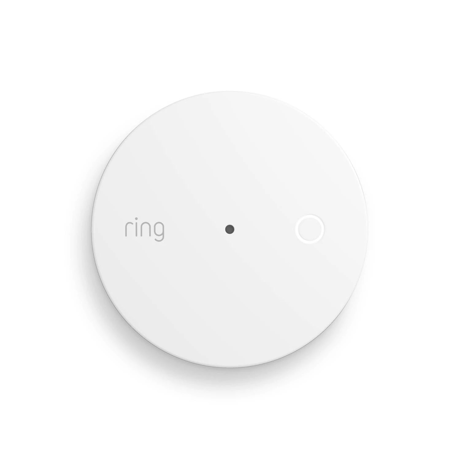
Ring Alarm Glass Break Sensor is a wireless sensor for the Ring Alarm system which provides users the ability to know when a glass break is detected.


1 - Heartbeat Interval
emptySize: 1 byte
Default: 70
Minimum: 1
Maximum: 70
Possible values
| From | To | Desription |
|---|---|---|
| 0 | 0 | 0 |
2 - Application Retries
emptySize: 1 byte
Default: 1
Minimum: 0
Maximum: 5
Possible values
| From | To | Desription |
|---|---|---|
| 0 | 0 | 0 |
3 - Application Level Retry Base Wait Time Period
emptySize: 1 byte
Default: 5
Minimum: 1
Maximum: 60
Possible values
| From | To | Desription |
|---|---|---|
| 0 | 0 | 0 |
4 - Low Battery Threshold (percentage)
emptySize: 1 byte
Default: 25
Minimum: 0
Maximum: 100
Possible values
| From | To | Desription |
|---|---|---|
| 0 | 0 | 0 |
5 - Critical Battery Threshold (percentage)
emptySize: 1 byte
Default: 10
Minimum: 0
Maximum: 100
Possible values
| From | To | Desription |
|---|---|---|
| 0 | 0 | 0 |
6 - Supervisory Report Timeout
emptySize: 2 bytes
Default: 10000
Minimum: 500
Maximum: 30000
Possible values
| From | To | Desription |
|---|---|---|
| 0 | 0 | 0 |
7 - Z-wave Sleep Timeout (secs)
emptySize: 1 byte
Default: 10
Minimum: 0
Maximum: 15
Possible values
| From | To | Desription |
|---|---|---|
| 0 | 0 | 0 |
8 - Glass break Clear delay (in seconds)
emptySize: 1 byte
Default: 15
Minimum: 5
Maximum: 255
Possible values
| From | To | Desription |
|---|---|---|
| 0 | 0 | 0 |
9 - Faults within clear delay flag
emptySize: 1 byte
Default: 0
Minimum: 0
Maximum: 1
Possible values
| From | To | Desription |
|---|---|---|
| 0 | 0 | 0 |
10 - Enable LED
emptySize: 1 byte
Default: 1
Minimum: 0
Maximum: 1
Possible values
| From | To | Desription |
|---|---|---|
| 0 | 0 | 0 |
11 - Enable detection
emptySize: 1 byte
Default: 0
Minimum: 0
Maximum: 1
Possible values
| From | To | Desription |
|---|---|---|
| 0 | 0 | 0 |
12 - SPL Range Optimization
emptySize: 1 byte
Default: 9
Minimum: 0
Maximum: 15
Possible values
| From | To | Desription |
|---|---|---|
| 0 | 0 | 0 |
13 - Minimum mic SPL, part 1
emptySize: 1 byte
Default: 0
Minimum: 0
Maximum: 7
Possible values
| From | To | Desription |
|---|---|---|
| 0 | 0 | 0 |
14 - Minimum mic SPL, part 2
emptySize: 1 byte
Default: 1
Minimum: 0
Maximum: 8
Possible values
| From | To | Desription |
|---|---|---|
| 0 | 0 | 0 |
15 - Automatic Gain Control
emptySize: 1 byte
Default: 0
Minimum: 0
Maximum: 3
Possible values
| From | To | Desription |
|---|---|---|
| 0 | 0 | 0 |
16 - Minimum detection SPL
emptySize: 1 byte
Default: 4
Minimum: 0
Maximum: 7
Possible values
| From | To | Desription |
|---|---|---|
| 0 | 0 | 0 |
17 - Mic-OFF time
emptySize: 1 byte
Default: 6
Minimum: 0
Maximum: 7
Possible values
| From | To | Desription |
|---|---|---|
| 0 | 0 | 0 |
18 - DNN Queue size
emptySize: 1 byte
Default: 9
Minimum: 0
Maximum: 63
Possible values
| From | To | Desription |
|---|---|---|
| 0 | 0 | 0 |
19 - DNN Window
emptySize: 1 byte
Default: 6
Minimum: 0
Maximum: 255
Possible values
| From | To | Desription |
|---|---|---|
| 0 | 0 | 0 |
20 - DNN Backoff
emptySize: 1 byte
Default: 55
Minimum: 0
Maximum: 255
Possible values
| From | To | Desription |
|---|---|---|
| 0 | 0 | 0 |
21 - DNN Decision threshold
emptySize: 2 bytes
Default: 32112
Minimum: 0
Maximum: 65535
Possible values
| From | To | Desription |
|---|---|---|
| 0 | 0 | 0 |
22 - Debug NDR error
emptySize: 2 bytes
Default: 0
Minimum: 0
Maximum: 65535
Possible values
| From | To | Desription |
|---|---|---|
| 0 | 0 | 0 |
Classic Inclusion Steps: 1. Initiate add flow for Security Devices in the Ring mobile application – Follow the guided add flow instructions provided in the Ring mobile application. 2. Select add manually and enter the 5-digit DSK pin found on the package of the Ring Alarm Glass Break Sensor or the 5-digit DSK pin found under the QR code on the device. 3. After powering on the device, press and hold the setup button on the front for 3 seconds. Release the button and the device will enter Classic inclusion mode.
Exclusion Instructions: 1. Initiate remove “Ring Alarm Glass Break Sensor” flow in the Ring Alarm mobile application – Select the settings icon from device details page and choose “Remove Device” to remove the device. This will place the controller into Remove or “Z-Wave Exclusion” mode. 2. With the controller in Remove (Z-Wave Exclusion) mode, use a paper clip or similar object and tap the pinhole button. The device’s red LED turns on solid to indicate the device was removed from the network.
Comm Test / Manual Wake Up A comm test can be triggered by press the button on the front of the device. This will cause the device to send a Comm test Notification. A solid Green LED indicates a successful comm test.
Factory Default Instructions 1. 1. To restore Ring Alarm Glass Break Sensor to factory default settings, locate the pinhole reset button on the device. This is found inside the battery compartment on the back of the device after removing the back bracket. 2. Using a paperclip or similar object, insert it into the pinhole, press and hold the button down for 10 seconds. 3. The device will rapidly blink green continuously for 10 seconds. After about 10 seconds, when the green blinking stops, release the button. The red LED will turn on solid to indicate the device was removed from the network.
Classic Inclusion Steps: 1. Initiate add flow for Security Devices in the Ring mobile application – Follow the guided add flow instructions provided in the Ring mobile application. 2. Select add manually and enter the 5-digit DSK pin found on the package of the Ring Alarm Glass Break Sensor or the 5-digit DSK pin found under the QR code on the device. 3. After powering on the device, press and hold the setup button on the front for 3 seconds. Release the button and the device will enter Classic inclusion mode.
| Type | Value(s) |
|---|
| Group | Type |
|---|---|
| Home Security |
|
| Power Management |
|
| System |
|