AIRZONE
Aidoo Control Z-Wave™ HVAC unit
AZAI6ZWUxxx
Thermostat DT
HW: 01 FW: 10.19
ZGM130S037HGN2 / ZGM130S037HGN1
7.16.1
0x044E (1102)
N/A
0x0004 (4)
ZC14-22030082
2022-03-22 08:24:21
N/A
Enhanced 232 Slave
Always On Slave
Device to manage and integrate HVAC units in Z-Wave™ control systems used in U.S./Canada. Externally powered by the indoor unit.
<ul> <li>HVAC manufacturers' Certified communication protocols.</li> <li>2-way communication with the HVAC equipment.</li> <li>Control of the main parameters of the unit (Status, Operation mode, Fan speed, Set point).</li> <li>Device powered by the indoor unit.</li> <li>Modbus port for hard-wire integration.</li> </ul>
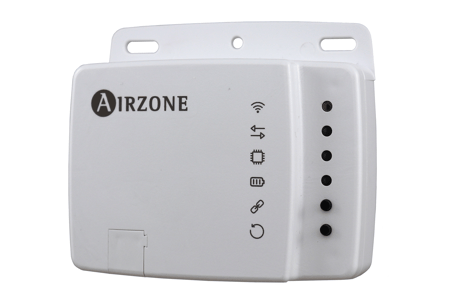
The Aidoo Z-Wave Plus is compatible with all Z-Wave/Z-Wave Plus certified controllers. The device supports both the Network Smartstart inclusion mechanism (which offers the ability to be included in a network, even if the device is not directly connected to the controller) and Standard Inclusion. By default, the inclusion procedure starts in Normal Inclusion mode and after a short timeout the procedure continues in Network Wide Inclusion mode that lasts for about 20 Seconds. If the Aidoo Z-Wave Plus has not been included yet into the Z-Wave network, the Wi-Fi sign LED will remain off. The procedure of inclusion is activated by pressing the Association Button (5) . As soon as the inclusion procedure initiates, the communication LED remains steady red until the device is included in the network.
Only a controller can remove the device from the network. After activating the exclusion function by the controller, the device can be removed by setting it in Learning Mode. If the Aidoo Z-Wave Plus is already included into the Z-Wave network, the Wi-Fi sign LED will remain steady blue. The procedure of exclusion is activated by pressing the Association Button (5). As soon as the exclusion procedure initiates, the communication LED remains steady red until the device is excluded of the network.
Please use this procedure only when the network primary controller is missing or ortherwise inoperable. The Aidoo Z-Wave Plus can be reset to the original factory settings by long pressing over the Factoy Reset button (6) until all of the front side LEDs light up for a second. Note: If the reset is performed while the device is still part of a network, it notifies the other devices in the lifeline group that it has been removed.
The Aidoo Z-Wave Plus supports over-the-air firmware updates that do not require the device to be removed from its location. The firmware update can be activated from all certified controllers supporting version 5 of the Firmware Update function.
The SmartStart QR and the full DSK string code can be found on the front side of the Aidoo Z-Wave Plus. The PIN is the first group of 5 underlined digits of the DSK identified as DSK in the left side of the sticker. If you plan to use the DSK, it is important that you take a picture of the label and keep it in a safe place.
| Type | Value(s) |
|---|
| Group | Type |
|---|---|
| System | HW status: System hardware failure (manufacturer proprietary failure code provided) |
| Sensor type |
|---|
| Air Temperature |