Nice
Smoke-Control
FGSD-002
Notification Sensor
HW: 2 FW: 3.03:03.03
ZM5202
6.51.07
0x010F (271)
0x0C02 (3074)
0x1003 (4099)
ZC10-22047080
2022-04-01 14:07:00.336689
N/A
Enhanced 232 Slave
Reporting Sleeping Slave
Smoke-Control is a universal, optical Z-Wave™ smoke detector. A fire alarm is signaled by sound, visual indicator blinking, and sending Z-Wave alarm and control command
Smoke-Control is a universal, optical Z-Wave™ smoke detector. A fire alarm is signaled by sound, visual indicator blinking, and sending Z-Wave alarm and control commands. The optical sensor detects smoke at an early stage of fire, often before flames appear and the temperature rises significantly. Moreover, the device has a built-in temperature sensor, a programmable indicator of exceeding the set temperature level. Smoke-Control is designed to be placed on a wall or ceiling. Visual indicator signals fire operating mode and are used to see if the device is within the Z-Wave network. Smoke-Control is designed to operate in confined spaces under normal conditions (lacking smoke, dust, condensed water vapor).
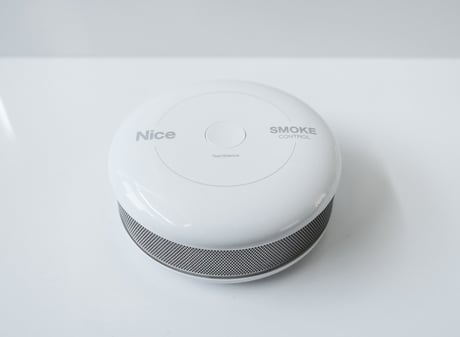
Product Image


1 - Smoke-Control sensitivity
There are 3 levels of sensitivity to smoke presence. Level 1 means the highest sensitivity. Rising the parameter value lowers the sensitivity to smoke presence.Size: 1 byte
Default: 2
Minimum: 1
Maximum: 3
Possible values
| From | To | Desription |
|---|---|---|
| 1 | 3 | Smoke-Control sensitivity |
2 - Z-Wave notifications status
This parameter allows to activate excess temperature and/or casing opening notifications sent to the main controller.Size: 1 byte
Default: 0
Minimum: 0
Maximum: 2
Possible values
| From | To | Desription |
|---|---|---|
| 0 | 2 | Z-Wave notifications status |
3 - Visual indicator notifications status
This parameter allows to activate visual indications but does not apply to major alarms, such as Fire, Trouble and Low battery alarm.Size: 1 byte
Default: 0
Minimum: 0
Maximum: 7
Possible values
| From | To | Desription |
|---|---|---|
| 0 | 7 | Visual indicator notifications status |
4 - Sound notifications status
This parameter allows to activate sound signals but does not apply to major alarms, such as Fire, Trouble and Low battery alarm.Size: 1 byte
Default: 0
Minimum: 0
Maximum: 7
Possible values
| From | To | Desription |
|---|---|---|
| 0 | 7 | Sound notifications status |
5 - Configuration of control frames in BASIC command class
This parameter defines which frames will be sent in the 2-nd Association Group (SMOKE ALARM). The values of BASIC ON and BASIC OFF frames may be defined as described in further parameters.Size: 1 byte
Default: 0
Minimum: 0
Maximum: 2
Possible values
| From | To | Desription |
|---|---|---|
| 0 | 2 | Configuration of control frames in BASIC command class |
6 - BASIC ON frame value
BASIC ON frame is sent in case of smoke presence detection and Fire Alarm triggering. Its value is defined by the parameter.Size: 2 bytes
Default: 255
Minimum: 0
Maximum: 255
Possible values
| From | To | Desription |
|---|---|---|
| 0 | 255 | BASIC ON frame value |
7 - BASIC OFF frame value
BASIC OFF frame is sent in case of Fire Alarm cancellation. Its value is defined by the parameterSize: 2 bytes
Default: 0
Minimum: 0
Maximum: 255
Possible values
| From | To | Desription |
|---|---|---|
| 0 | 255 | BASIC OFF frame value |
8 - Alarm broadcast
A value other than 0 means that alarms are being sent in broadcast mode, i.e. to all devices within Smoke-Control’s range.Size: 1 byte
Default: 0
Minimum: 0
Maximum: 3
Possible values
| From | To | Desription |
|---|---|---|
| 0 | 3 | Alarm broadcast |
9 - Associations in Z-Wave network security mode
This parameter defines how commands are sent in specified association groups: as secure or non-secure. Parameter is active only in Z-Wave network security mode. It doesn’t apply to 1st Lifeline group.Size: 1 byte
Default: 15
Minimum: 0
Maximum: 15
Possible values
| From | To | Desription |
|---|---|---|
| 0 | 15 | Associations in Z-Wave network security mode |
10 - Temperature report interval
Time interval between consecutive temperature reports. Report is sent when new temperature value is different from the one previously reported - according to the set hysteresis (parameter 21). Temperature reports can be also sent as a result of polling.Size: 2 bytes
Default: 1
Minimum: 0
Maximum: 8640
Possible values
| From | To | Desription |
|---|---|---|
| 0 | 8640 | Temperature report interval |
11 - Temperature report hysteresis
The temperature report will only be sent if there is a difference in temperature value from the previous value reported, defined in this parameter (hysteresis). Temperature reports can be also sent as a result of polling.Size: 1 byte
Default: 10
Minimum: 1
Maximum: 100
Possible values
| From | To | Desription |
|---|---|---|
| 1 | 100 | Temperature report hysteresis |
12 - Temperature threshold
Temperature value measured by the built-in temperature sensor above which the excess temperature notification is sent (visual indication/sound/Z-Wave report).Size: 1 byte
Default: 55
Minimum: 1
Maximum: 100
Possible values
| From | To | Desription |
|---|---|---|
| 1 | 100 | Temperature threshold |
13 - Excess temperature signaling interval
Time interval of signaling (visual indication/sound) excess temperature level.Size: 2 bytes
Default: 1
Minimum: 1
Maximum: 8640
Possible values
| From | To | Desription |
|---|---|---|
| 1 | 8640 | Excess temperature signaling interval |
14 - Lack of Z-Wave range indication interval
Time interval of signaling (visual indication/sound) lack of Z-Wave range.Size: 2 bytes
Default: 180
Minimum: 1
Maximum: 8640
Possible values
| From | To | Desription |
|---|---|---|
| 1 | 8640 | Lack of Z-Wave range indication interval |
Adding (Inclusion) - Z-Wave device learning mode, allowing to add the device to existing Z-Wave network. To add the device to the Z-Wave network manually: 1. Install the battery. Visual indicator will signal the Z-Wave network adding status (red - device ready for inclusion, green - device added, remove firstly). 2. Make sure the device is located within direct range of the Z-Wave controller. 3. Set the main controller into the adding mode (see main controller’s operating manual). 4. Quickly, triple click the B-button, located on Smoke-Control’s casing (Fig. 1). 5. Smoke-Control will be detected and added to the Z-Wave network.
Removing (Exclusion) - Z-Wave device learning mode, allowing to remove the device from existing Z-Wave network. To remove the device from the Z-Wave network: 1. Make sure the sensor is connected to battery. 2. Set the main controller into the removing mode (see main controller’s operating manual) 3. Quickly, triple click the B-button, located on Smoke-Control’s casing (Fig. 1).
If the sensor is already included into the Z-Wave network, wake it up by clicking the B-button. Otherwise, add the device as described in chapter 4.
Resetting Smoke-Control erases the device memory, including all information on the Z-Wave network and the main controller. Smoke-Control reset procedure: 1. Make sure the device has the battery installed. 2. Press and hold the B-button for 3 seconds until visual indicator glows white. 3. Short signal will sound. 4. Release the B-button. 5. Wait until the visual indicator glows yellow, signaling entering the 4th menu option. 6. Press the B-button briefly to confirm your choice. Successful reset will be confirmed with the visual indicator changing colour to red and fading. At the same time, short beep will sound, same as at the power connection.
| Group | Type |
|---|---|
| Smoke Alarm |
|
| Heat Alarm | Heat sensor status: Overheat detected |
| Home Security | Cover status: Tampering, product cover removed |
| Power Management | Battery maintenance status: Replace battery soon |
| System | HW status: System hardware failure |
| Sensor type |
|---|
| Air Temperature |
| Smoke Density |