Zooz
Zooz 4-in-1 Sensor 700 Series
ZSE40AU-700
Notification Sensor
HW: 3 FW: 32.32
ZGM130
7.13.6
0x027A (634)
0x2021 (8225)
0x2101 (8449)
ZC12-22040335
2022-04-07 15:19:26.36967
N/A
Enhanced 232 Slave
Reporting Sleeping Slave
Yes
The new 700 Series of the best selling Zooz 4-in-1 Sensor.
PRODUCT FEATURES: - 4 different sensors in 1 smart device: motion, light, temperature, and humidity - Customize your sensor with adjustable motion and reporting settings - NEW 700 Series Z-Wave™ Chip - SmartStart and S2 Security - Built-in tamper protection SPECIFICATIONS: - Power: 1 CR123A battery (included) - Wireless Range: Up to 300 feet line of sight - Operating Temperature: 5° - 104°F - Weight: 2.0 oz - Dimensions: 2.25" x 2.25" x 1" - Installation: Indoor Use Only
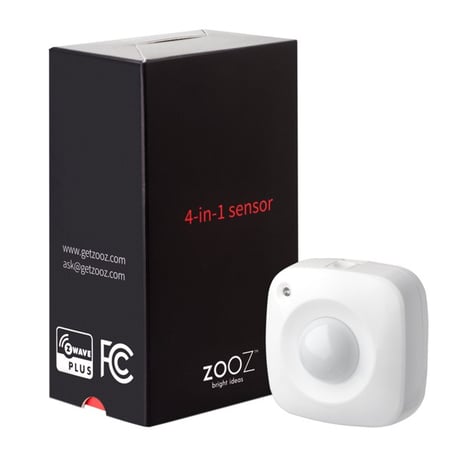
Product Image


1 - Temperature Unit
Use this parameter to switch from Fahrenheit to Celsius scale.Size: 1 byte
Default: 0
Minimum: 0
Maximum: 1
Possible values
| From | To | Desription |
|---|---|---|
| 0 | 0 | Celsius |
| 1 | 1 | Fahrenheit |
2 - Temperature Reporting Threshold
Use it to set temperature change to be reported by the sensor.Size: 1 byte
Default: 30
Minimum: 1
Maximum: 50
Possible values
| From | To | Desription |
|---|---|---|
| 1 | 50 | where 1 stands for 0.1 degree and 50 stands for 5 degrees |
3 - Humidity Reporting Threshold
Use it to set humidity change to be reported by the sensor.Size: 1 byte
Default: 20
Minimum: 1
Maximum: 50
Possible values
| From | To | Desription |
|---|---|---|
| 1 | 50 | % |
4 - Light Reporting Threshold
Use it to set brightness change to be reported by the sensor.Size: 1 byte
Default: 25
Minimum: 5
Maximum: 50
Possible values
| From | To | Desription |
|---|---|---|
| 5 | 50 | where 5 stands for 5% and 50 stands for 50% |
5 - Motion Clear Time
Use it to set trigger interval - the time when motion is reported again after initial trigger.Size: 1 byte
Default: 3
Minimum: 1
Maximum: 127
Possible values
| From | To | Desription |
|---|---|---|
| 1 | 127 | minutes |
6 - Motion Sensitivity
Use it to adjust PIR sensor sensitivity.Size: 1 byte
Default: 4
Minimum: 1
Maximum: 7
Possible values
| From | To | Desription |
|---|---|---|
| 1 | 7 | 1 = very high sensitivity and 7 = very low sensitivity |
7 - LED Mode
Use it to choose between LED indicator modes.Size: 1 byte
Default: 1
Minimum: 1
Maximum: 3
Possible values
| From | To | Desription |
|---|---|---|
| 1 | 1 | LED indicator is turned off (no visual notifications). |
| 2 | 2 | temperature and motion indicated with flashing light. Flashes every 3 minutes for temperature. |
| 3 | 3 | no indication for temperature, motion indicated with red flashing light. |
8 - Retry Count
Set 0~10 Retry Count, default:3Size: 1 byte
Default: 3
Minimum: 0
Maximum: 10
Possible values
| From | To | Desription |
|---|---|---|
| 0 | 10 | retry count |
1. Insert the battery. 2. Place the sensor near the location where it will be mounted. 3. Initiate inclusion in the Z-Wave hub. 4. Click the Z-Wave button on the sensor with a paperclip once. 5. The LED indicator will blink red to signal communication and green once the PIN is entered, then turn off to confirm inclusion.
1. Initiate EXCLUSION and click the Z-Wave button on the sensor once. 2. Make sure the battery cover is closed tightly when adding the sensor. 3. Click the Z-Wave button once every 15 seconds for 2 minutes after the sensor joins the network to keep it awake so it can fully configure. 4. Click the Z-Wave button on the sensor 6-7 times quickly when adding it.
Press and release the Z-Wave button once to wake the device up. The LED indicator will flash once (blue or orange).
If your primary controller is missing or inoperable, you may need to reset the device to factory settings. To complete the reset process manually, remove the back cover to trigger tamper switch. Press and release the Z-Wave button using a paperclip 10 TIMES quickly (within 10 seconds).
Under Z-Wave Control
| Type | Value(s) |
|---|
| Group | Type |
|---|---|
| Home Security |
|
| Sensor type |
|---|
| Air Temperature |
| Illuminance |
| Humidity |