Zooz
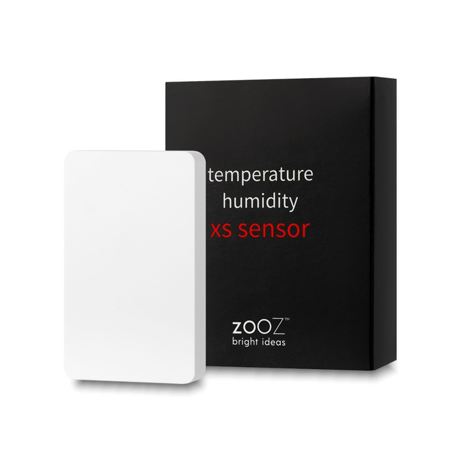
temperature humidity XS SENSOR
ZSE44
Notification Sensor DT
HW: 01 FW: 01.00
ZGM130S037HGN2 / ZGM130S037HGN1
7.16.3
0x027A (634)
N/A
0x7000 (28672)
ZC14-22040101
2022-04-25 08:19:05
N/A
Enhanced 232 Slave
Reporting Sleeping Slave
Yes
Monitor temperature and humidity indoors or outdoors under eve with this 700 series extra small sensor.


1 - Battery report threshold
When battery level exceeds threshold, the unit need to report to hub.Size: 1 byte
Default: 5
Minimum: 1
Maximum: 10
Possible values
| From | To | Desription |
|---|---|---|
| 0 | 0 | 0 |
2 - Low battery alarm report value
Setting the threshold for low battery alarm report.Size: 1 byte
Default: 10
Minimum: 5
Maximum: 20
Possible values
| From | To | Desription |
|---|---|---|
| 0 | 0 | 0 |
3 - Temperature report threshold
Minimum Temperature change to report.Size: 1 byte
Default: 10
Minimum: 10
Maximum: 100
Possible values
| From | To | Desription |
|---|---|---|
| 0 | 0 | 0 |
4 - Humidity report threshold
Minimum humidity change to report.Size: 1 byte
Default: 5
Minimum: 1
Maximum: 50
Possible values
| From | To | Desription |
|---|---|---|
| 0 | 0 | 0 |
5 - Temperature High Alarm Value
Temperature High Watermark value.Size: 1 byte
Default: 120
Minimum: 50
Maximum: 120
Possible values
| From | To | Desription |
|---|---|---|
| 0 | 0 | 0 |
6 - Temperature High command control
Temperature High Notification and Association Group Control.Size: 1 byte
Default: 7
Minimum: 0
Maximum: 7
Possible values
| From | To | Desription |
|---|---|---|
| 0 | 0 | 0 |
7 - Temperature Low Alarm Value
Temperature Lower Watermark value.Size: 1 byte
Default: 10
Minimum: 10
Maximum: 100
Possible values
| From | To | Desription |
|---|---|---|
| 0 | 0 | 0 |
8 - Temperature Low command control
Temperature Low Notification and Association Group Control.Size: 1 byte
Default: 7
Minimum: 0
Maximum: 7
Possible values
| From | To | Desription |
|---|---|---|
| 0 | 0 | 0 |
9 - Humidity High Alarm Value
Humidity High Watermark value.Size: 1 byte
Default: 0
Minimum: 0
Maximum: 100
Possible values
| From | To | Desription |
|---|---|---|
| 0 | 0 | 0 |
10 - Humidity High command control
Humidity High Notification and Association Group Control.Size: 1 byte
Default: 7
Minimum: 0
Maximum: 7
Possible values
| From | To | Desription |
|---|---|---|
| 0 | 0 | 0 |
11 - Humidity Low Alarm Value
Humidity Lower Watermark value.Size: 1 byte
Default: 0
Minimum: 0
Maximum: 100
Possible values
| From | To | Desription |
|---|---|---|
| 0 | 0 | 0 |
12 - Humidity Low command control
Humidity Low Notification and Association Group Control.Size: 1 byte
Default: 7
Minimum: 0
Maximum: 7
Possible values
| From | To | Desription |
|---|---|---|
| 0 | 0 | 0 |
13 - Temperature Unit
Switch the unit(Celsius or Fahrenheit) of Temperature report.Size: 1 byte
Default: 1
Minimum: 0
Maximum: 1
Possible values
| From | To | Desription |
|---|---|---|
| 0 | 0 | 0 |
14 - Temperature Offset
Setting offset value for temperature.Size: 1 byte
Default: 100
Minimum: 0
Maximum: 200
Possible values
| From | To | Desription |
|---|---|---|
| 0 | 0 | 0 |
15 - Humidity Offset
Setting offset value for humidity.Size: 1 byte
Default: 100
Minimum: 0
Maximum: 200
Possible values
| From | To | Desription |
|---|---|---|
| 0 | 0 | 0 |
16 - Temperature report interval
When the time since the last temperature report exceeds this value, it will report again.Size: 2 bytes
Default: 240
Minimum: 0
Maximum: 480
Possible values
| From | To | Desription |
|---|---|---|
| 0 | 0 | 0 |
17 - Humidity report interval
When the time since the last humidity report exceeds this value, it will report again.Size: 2 bytes
Default: 240
Minimum: 0
Maximum: 480
Possible values
| From | To | Desription |
|---|---|---|
| 0 | 0 | 0 |
1. Initiate inclusion on your Z-Wave hub. 2. While the hub is looking for new devices, click the Z-Wave™ button 3 times as quickly as possible. 3. The LED indicator will start flashing to confirm inclusion mode and turn off once inclusion is completed.
The sensor’s wake-up interval is set to 12 hours by default to save battery life. Use the Wake Up Command Class to adjust the interval. Click the Z-Wave™ button 4 times quickly to wake the sensor up manually. The LED indicator will flash once to confirm the device is awake. During wakeup, the sensor turns the Z-Wave™ radio on for one minute to receive communication from the hub. Long wake-up interval will not affect how often the sensor reports to your hub so we recommend leaving the default setting to conserve battery.
When your network’s primary controller is missing or otherwise inoperable, you may need to reset the device to factory settings manually. In order to complete the process, make sure the sensor is powered, then click the Z-Wave™ button twice and hold it the third time for 10 seconds. The LED indicator will blink continuously. Immediately after, click the Z-Wave™ button twice more to finalize the reset. The LED indicator will flash 3 times to confirm a successful reset. NOTE: All previously recorded activity and custom settings will be erased from the device’s memory.
Printed on the inside of the sensor’s battery cover.
| Type | Value(s) |
|---|
| Group | Type |
|---|---|
| Heat Alarm |
|
| Weather Alarm | Moisture alarm status: Moisture alarm |
| Sensor type |
|---|
| Air Temperature |
| Humidity |