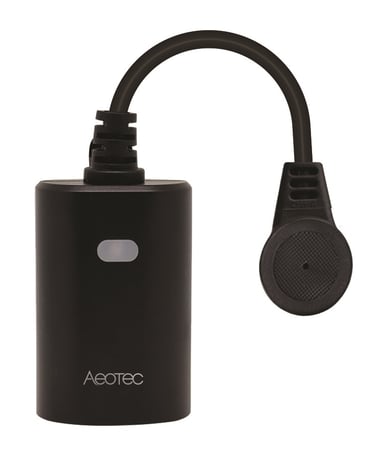
Aeotec
Outdoor Smart Plug
ZWA042
Binary Switch DT
HW: 01 FW: 01.00
ZGM130S037HGN2 / ZGM130S037HGN1
7.16.3
0x0371 (881)
N/A
0x0103 (259)
ZC14-22050107
2022-05-24 09:38:30
N/A
Enhanced 232 Slave
Always On Slave
Aeotec Z-Wave™ Outdoor Smart Plug


1 - Reaction of led
Parameter setting to change the reaction of LED setting.Size: 1 byte
Default: 2
Minimum: 0
Maximum: 4
Possible values
| From | To | Desription |
|---|---|---|
| 0 | 0 | Disable LED completely |
| 1 | 1 | Turn on between particular times only (Night Light Mode) |
| 2 | 2 | Display ON/OFF status |
| 3 | 3 | Display the reverse state of ON/OFF status |
| 4 | 4 | Display always ON state |
2 - Night led on time
Night Light ON time.Size: 4 bytes
Default: 1572864
Minimum: 0
Maximum: 2359296
Possible values
| From | To | Desription |
|---|---|---|
| 0 | 2359296 | Value setting =0xRRHHMMSS RR = reserved HH = Hours MM = Minutes SS = Seconds |
3 - Night led off time
Night Light OFF time.Size: 4 bytes
Default: 393216
Minimum: 0
Maximum: 2359296
Possible values
| From | To | Desription |
|---|---|---|
| 0 | 2359296 | Value setting =0xRRHHMMSS RR = reserved HH = Hours MM = Minutes SS = Seconds |
4 - Indicator play duration
Setting indicator play duration.Size: 1 byte
Default: 0
Minimum: 0
Maximum: 255
Possible values
| From | To | Desription |
|---|---|---|
| 0 | 0 | indicates that it is not blinking |
| 1 | 255 | Will set the duration and start the blinking process. This sets the timeframe of blinking in seconds. Once the duration ends, the blinking will stop and will set its configuration value back to 0 |
5 - Indicator speed
Select indicator flash speed.Size: 1 byte
Default: 5
Minimum: 1
Maximum: 24
Possible values
| From | To | Desription |
|---|---|---|
| 1 | 24 | Indicator speed |
7 - Control turn off
Prevents the plug from being turned off via its button.Size: 1 byte
Default: 0
Minimum: 0
Maximum: 2
Possible values
| From | To | Desription |
|---|---|---|
| 0 | 0 | The plug will operate as normal and can be turned on or off |
| 1 | 1 | The button on smart plug will be disabled for on and off commands, but still work for network removal or inclusion |
| 2 | 2 | The plug will ignore any commands to turn it off AND it’ll ignore any use of the button (but the button will still work for network removal or inclusion) |
8 - Restore status after power failure
Action in case of power out.Size: 1 byte
Default: 0
Minimum: 0
Maximum: 2
Possible values
| From | To | Desription |
|---|---|---|
| 0 | 0 | last status |
| 1 | 1 | power on |
| 2 | 2 | power off |
30 - Alarm setting
Determines if alarms are enabled in Switch, and what Switch will react to which alarms.Size: 1 byte
Default: 0
Minimum: 0
Maximum: 255
Possible values
| From | To | Desription |
|---|---|---|
| 0 | 0 | Disable all alarm settings |
| 1 | 1 | Smoke alarm |
| 2 | 2 | CO alarm |
| 4 | 4 | CO2 alarm |
| 8 | 8 | Heat alarm |
| 16 | 16 | Water alarm |
| 32 | 32 | Access Control (DW Sensor open) |
| 64 | 64 | Home Security (intrusion) |
| 128 | 128 | Yellow |
31 - Alarm response in device
Enabled by (Alarm settings), and determines what the switch does in the case an alarm is triggered.Size: 1 byte
Default: 0
Minimum: 0
Maximum: 255
Possible values
| From | To | Desription |
|---|---|---|
| 0 | 0 | disable, no reaction to alarm settings |
| 1 | 1 | Switch is ON |
| 2 | 2 | Switch is OFF |
| 3 | 255 | Sets rate at which Switch turns ON and OFF in seconds (ie. if set to 3, then switch will turn ON in 0.3 seconds, and then turn OFF in 0.3 seconds in a cycle until user disables the alarm manually, if set to 255, then it will cycle every 25.5 seconds) |
32 - Alarm disable setting
Determines the method of disabling the alarm of the device.Size: 1 byte
Default: 1
Minimum: 0
Maximum: 255
Possible values
| From | To | Desription |
|---|---|---|
| 0 | 0 | Can be disabled by 1x tapping switches action button once |
| 1 | 1 | Can be disabled by 2x tapping Switches action button within 1 second |
| 2 | 2 | Can be disabled by 4x tapping Switches action button within 2 seconds |
| 3 | 3 | Can be disabled by pressing and holding Switches action button for 10 seconds |
| 5 | 255 | Sets the duration of the alarm in seconds (ie. Customer sets this setting to 50, the alarm state of the Switch will disable after 50 seconds) |
40 - Auto turn off timer
Auto off after as soon as the switch turns ONSize: 4 bytes
Default: 0
Minimum: 0
Maximum: 86400
Possible values
| From | To | Desription |
|---|---|---|
| 0 | 0 | No auto off with timer |
| 1 | 86400 | seconds |
41 - Auto turn on timer
Auto on after as soon as the switch turns OFFSize: 4 bytes
Default: 0
Minimum: 0
Maximum: 86400
Possible values
| From | To | Desription |
|---|---|---|
| 0 | 0 | No auto off with timer |
| 1 | 86400 | seconds |
Tap the button on device once.
Tap the button on device twice.
Press and hold the button for 20s. Note: Please use this procedure only when the network primary controller is missing or otherwise inoperable.
Page 5 in the UserManual
| Type | Value(s) |
|---|
| Group | Type |
|---|---|
| Heat Alarm | Heat sensor status: Overheat detected |