Nexa
Indoor Motion Detector
ZMD-107
Notification Sensor
HW: 1 FW: 1.00:00.05
SD3502
6.71.01
0x0060 (96)
0x0001 (1)
0x0006 (6)
ZC10-22067098
2022-06-07 17:39:59.935976
N/A
Enhanced 232 Slave
Reporting Sleeping Slave
Yes
The ZMD-107 Motion Detector is a Z-Wave TM enabled device which is fully compatible with any Z- WaveTM enabled network. The device can be set up in a Z-Wave network to communicate directly with other end devices such as lighting controllers, or to report directly to a Z-Wave controller (usually a gateway).
The ZMD-107 Motion Detector is a Z-WaveTM enabled device which is fully compatible with any Z- WaveTM enabled network. The device can be set up in a Z-Wave network to communicate directly with other end devices such as lighting controllers, or to report directly to a Z-Wave controller (usually a gateway). This product supports the S2 security protocol that uses encrypted Z-Wave PlusTM messages to communicate to other security-enabled Z-Wave Plus products. A security-enabled Z-Wave Plus Controller must be used in order to fully utilize the security features of this product. This product can be operated in any Z-WaveTM network with other Z-Wave certified devices from other manufacturers. All mains operated nodes within the network will act as repeaters regardless of vendor to increase reliability of the network. The Motion Detector is designed with two detecting sensors, Passive Infra-Red (PIR) sensor and light sensor, in order to fulfill the purpose of security and home automation. When the detector is cooperated with security appliances, it is acting as a security device by detecting changes in infra-red radiation levels. If a person moves within or across the device field of vision, a trigger radio signal will be transmitted to cause full alarm condition in order to frighten intruders away. Alternatively, when the detector is worked with home automation appliances, the detector can be set to perform the role of home automation device by detecting both changes in infra-red radiation levels and percentage of lux levels. Once night falls, the percentage of ambient illumination is lower than preset value. If a person moves within or across the device field of vision, a trigger radio signal will be transmitted so as to turn on the connected lightings for better illumination. The PIR Detector adopts a CR123 3.0V Lithium battery which under normal conditions will have typical life in excess of 1 year. When the battery level drops to an unacceptable level,,the detector will emit Battery report to the Z-Wave controller. When this occurs the batteries should be replaced as soon as possible.
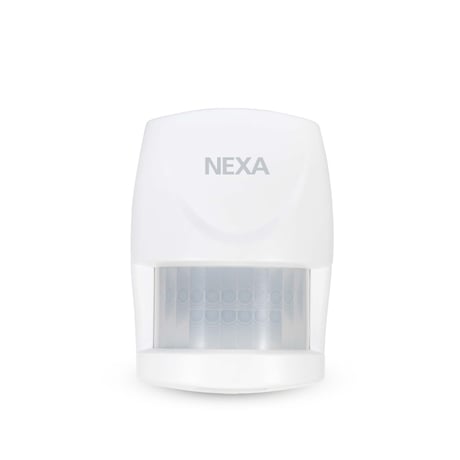
Product Image


1 - Parameter 1
Basic Set LevelSize: 1 byte
Default: 99
Minimum: 1
Maximum: 99
Possible values
| From | To | Desription |
|---|---|---|
| 1 | 99 | When Basic Set Command is sent where contains a value, the receiver will take it for consideration; for instance, if a lamp module is received the Basic Set command of which value is decisive as to how bright of dim level of lamp module shall be. |
3 - Parameter 3
Sensitivity Level (PIR sensor only)Size: 1 byte
Default: 6
Minimum: 1
Maximum: 10
Possible values
| From | To | Desription |
|---|---|---|
| 1 | 10 | In order to provide a best efficiency of the detector, it is recommended to test the detector with movements from a farthest end of the coverage area at first time of use. If movements cannot be detected sensitively, simply adjust the sensitivity level with Configuration Parameter #3. This parameter can be configured with the value of 1 through 10, where 1 means low sensitivity and 10 means highest sensitivity |
4 - Parameter 4
Re-trigger Interval Setting (PIR sensor only)Size: 2 bytes
Default: 180
Minimum: 5
Maximum: 3600
Possible values
| From | To | Desription |
|---|---|---|
| 5 | 3600 | The Configuration parameter that can be used to adjust the interval of being re-triggered after the detector has been triggered as Configuration Parameter #4. No response will be made during this interval if a movement is presented. The time interval can be set between 5 secs to 3600 secs. |
5 - Parameter 5
Lux LevelSize: 1 byte
Default: 20
Minimum: 1
Maximum: 100
Possible values
| From | To | Desription |
|---|---|---|
| 1 | 100 | The user can set a detecting percentage of lux level which determines when the light sensor will be activated. If percentage of lux level of ambient illumination falls below this percentage, and a person moves across or within the protected area, the detector will emit Z-Wave ON Command (i.e. Basic Set Command (Value = Basic Set Level)) to controller and activate connected modules and lighting. Percentage can be set between 1% to 100%. |
6 - Parameter 6
On-Off DurationSize: 2 bytes
Default: 15
Minimum: 5
Maximum: 3600
Possible values
| From | To | Desription |
|---|---|---|
| 5 | 3600 | The function of on-off duration setting will be useful if the detector is connected with a module or lighting. The duration determines how long the module/lighting should stay ON. For instance, Lamp Module turns off 100 secs after it has been turned on. This parameter can be configured with the value of 5 through 3600, where 5 means 5 second delay and 3600 means 3600 seconds of delay. |
1. Put the Z-Wave Controller into inclusion mode. 2. Press the tamper switch 3 times within 1.5 seconds to put the unit into inclusion mode.
1. Put the Z-Wave Controller into exclusion mode. 2. Press the tamper switch 3 times within 1.5 seconds to put the unit into exclusion mode.
After it has been included into a Z-Wave network, the detector will go to sleep but will send a Wakeup Notification Command periodically at preset period to the controller. The Motion detector will stay awake for 10 seconds at least and then go back to sleep to conserve battery life.
1. Press the tamper switch 3 times within 1.5 seconds to put the unit into exclusion mode. 2. Within 1 second of step 1, press the tamper switch again and hold until LED is off (about 5 seconds) 3. Node ID is excluded. The device reverts to factory default state and will be in auto-inclusion mode for 4 minutes.
Note: If you are connecting this unit to a Z-Wave Controller that utilizes the S2 security protocol, you may be asked to enter a 5 digit Device Specific Key (DSK) that is unique to each unit by your controller. This can be found in one of two places: - on the QR code label on the back of the unit - on the insert card inside the packaging
| Type | Value(s) |
|---|
| Group | Type |
|---|---|
| Home Security |
|
| Power Management | Power status: Power has been applied |