Yale
nexTouch Touch Screen Lever Lock
NTB642-ZW2
Door Lock - Keypad
HW: 255 FW: 1.78:32.33
ZM5101
6.51.07
0x0129 (297)
0x8101 (33025)
0x0B2A (2858)
ZC10-22067112
2022-06-15 14:01:08.903877
N/A
Enhanced 232 Slave
Listening Sleeping Slave
Yes
Yale nexTouch™ provides small business owners a wireless access management solution with the security of commercial grade locks and the convenience and cost-efficiency of wireless installation. The lock can be paired with a Z-Wave™ system for easy integration into new and existing alarm and automation platforms
Unlock what’s next in security with nexTouch™ commercial keypad door locks from Yale®. The nexTouch keyless electronic door lock combines a modern look with durability that is perfect for your multi-family property, small business office space, retail space, hotel, airport, restroom, or mixed-use commercial building. All nexTouch Locks are easy to use and install, and allow you to manage access with up to 500 unique PIN codes. The nexTouch is ANSI/BHMA Grade 1 Certified and weather resistant.
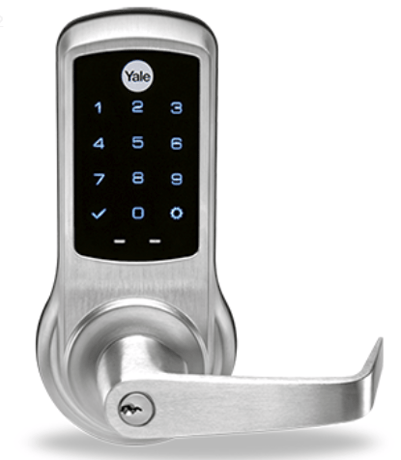
Product Image


1 - Silent Mode on/off
Level control, 1 = High Volume, 2 = Low Volume, 3 = Silent. Default is 2 or Low VolumeSize: 1 byte
Default: 2
Minimum: 1
Maximum: 3
Possible values
| From | To | Desription |
|---|---|---|
| 1 | 3 | Level |
2 - Auto Relock On/Off
0x00 = OFF, 0xFF = ON default is 0x00 or OFFSize: 1 byte
Default: 0
Minimum: 0
Maximum: 255
Possible values
| From | To | Desription |
|---|---|---|
| 0 | 0 | Auto Relock Off |
| 255 | 255 | Auto Relock On |
3 - Auto Relock Time
10 to 180 seconds default is 30 secondsSize: 1 byte
Default: 30
Minimum: 10
Maximum: 180
Possible values
| From | To | Desription |
|---|---|---|
| 10 | 180 | Seconds |
4 - Wrong Code Entry Limit
3 to 10 default is 5 timesSize: 1 byte
Default: 5
Minimum: 3
Maximum: 10
Possible values
| From | To | Desription |
|---|---|---|
| 3 | 10 | Times |
5 - Language
1=English, 2=Spanish, 3=French default is 1= EnglishSize: 1 byte
Default: 1
Minimum: 1
Maximum: 3
Possible values
| From | To | Desription |
|---|---|---|
| 1 | 1 | English Language |
| 2 | 2 | Spanish Language |
| 3 | 3 | French Language |
7 - Shut Down Time (after wrong code entries)
10 to 180 seconds default is 60 secondsSize: 1 byte
Default: 60
Minimum: 10
Maximum: 180
Possible values
| From | To | Desription |
|---|---|---|
| 10 | 180 | Seconds |
8 - Operating Mode
00 = normal mode (this is the default mode) 01 = vacation mode, keypad lockout 02= privacy mode, no keypad. RF Unlock will workSize: 1 byte
Default: 0
Minimum: 0
Maximum: 2
Possible values
| From | To | Desription |
|---|---|---|
| 0 | 0 | Normal Mode (Default) |
| 1 | 1 | Vacation Mode (Keypad Locked Out) |
| 2 | 2 | Privacy Mode (Keypad Locked, RF Unlock Functional) |
11 - One Touch Locking
0x00 = OFF, 0xFF = ON default is 0xFF or ON.Size: 1 byte
Default: 0
Minimum: 0
Maximum: 255
Possible values
| From | To | Desription |
|---|---|---|
| 0 | 0 | One Touch Locking Off |
| 255 | 255 | One Touch Locking On |
12 - Privacy Button
0x00 = OFF, 0xFF = ON default is 0x00 or OFFSize: 1 byte
Default: 0
Minimum: 0
Maximum: 255
Possible values
| From | To | Desription |
|---|---|---|
| 0 | 0 | Privacy Button Off |
| 255 | 255 | Privacy Button On |
15 - Reset to Factory Defaults
01 = Lock will execute Reset To Factory. No default valueSize: 1 byte
Default: 0
Minimum: 0
Maximum: 255
Possible values
| From | To | Desription |
|---|---|---|
| 0 | 0 | Reset to Factory Off |
| 255 | 255 | Reset to Factory On |
18 - Door Propped Timer
10 to 2540 second. This value is represented as seconds X 10. (ie a value of 4 would mean a door propped timer of 40 seconds) Set to 0x00 to disable Door Propped Alarm. Default = 0x00 (off)Size: 1 byte
Default: 0
Minimum: 10
Maximum: 255
Possible values
| From | To | Desription |
|---|---|---|
| 10 | 255 | Seconds |
19 - DPS Alarm
0x00 = OFF, 0xFF = ON Default is 0x00 or off. Used to enable/disable door condition alarms for locks that support a door position sensor. Any lock that does not support DPS will always report 0x00.Size: 1 byte
Default: 0
Minimum: 0
Maximum: 255
Possible values
| From | To | Desription |
|---|---|---|
| 0 | 0 | DPS Alarm Off |
| 255 | 255 | DPS Alarm On |
21 - Eco Mode On/Off
0x00 = OFF, 0xFF = ON default is 0x00 or OFF If supported switches lock to lower power mode of operation with reduced sound and led brightness.Size: 1 byte
Default: 0
Minimum: 0
Maximum: 127
Possible values
| From | To | Desription |
|---|---|---|
| 0 | 0 | Eco Mode Off |
| 127 | 127 | Eco Mode On |
1. Enter the 4-8 digit master PIN code followed by the gear key. 2. Press the 7 key followed by the gear key. 3. Press the 1 key followed by the gear key.
1. Enter the 4-8 digit master PIN code followed by the gear key. 2. Press the 7 key followed by the gear key. 3. Press the 3 key followed by the gear key.
Press any key to wake up product
Please use this procedure only when the network primary controller is missing or otherwise inoperable. 1. Remove the inside lever with the lever removal tool. 2. Remove battery cover using hex wrench provided with lock. 3. Remove four (4) AA batteries. 4. Remove the 10-32 x 3/4"" pan head screw from the center of the battery housing into the barrel nut of the outside assembly. 5. Remove inside escutcheon. Cables may stay connected. 6. Reinstall batteries 7. On the back of the PC board, push and hold the Reset Button with the lever removal tool for 3 seconds. 8. While continuing the press the reset button, temporarily remove one AA battery. 9. Reinstall the battery 10. Release reset button and wait 15 seconds. Speaker will announce ""Welcome to Yale"" 11. Reassemble escutcheon
| Type | Value(s) |
|---|
| Group | Type |
|---|---|
| Access Control | (Refer to parameters): State idle |