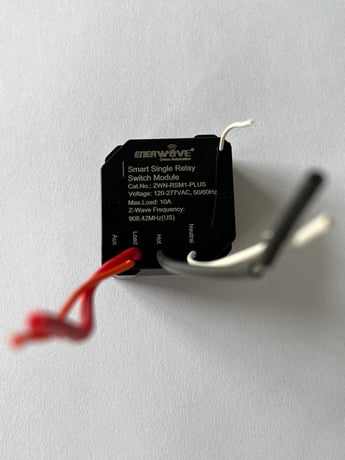
Enerwave
Smart Single Relay Switch Module
ZWN-RSM1-PLUS
Binary Switch DT
HW: 01 FW: 01.06
ZGM130S037HGN2 / ZGM130S037HGN1
7.16.3
0x011A (282)
N/A
0x0121 (289)
ZC14-22070112
2022-07-01 08:26:19
N/A
Enhanced 232 Slave
Always On Slave
1. Enerwave Z-Wave Plus™ Single Relay is the most advanced and customizable module you can add to your existing appliances and lights. 2. Module can be installed in wall boxes behind switches and outlets or in ceiling boxes behind ceiling fans or chandeliers. 3. Hidden relay allows you to use original switches and decorative wall plates. 4. Remotely turn your appliances (lights, fans) on and off from an internet-connected smartphone, tablet, or computer. 5. Program Z-Wave™ relay switch in scenes, groups, and associations. 6. Proper use all Z-Wave trademarks.


5 - Power on status
Power on statusSize: 1 byte
Default: 0
Minimum: 0
Maximum: 2
Possible values
| From | To | Desription |
|---|---|---|
| 0 | 0 | 0 |
19 - Child lockout enable
Child lockout enableSize: 1 byte
Default: 0
Minimum: 0
Maximum: 1
Possible values
| From | To | Desription |
|---|---|---|
| 0 | 0 | 0 |
20 - Delayed off time
Delayed off timeSize: 1 byte
Default: 0
Minimum: 0
Maximum: 240
Possible values
| From | To | Desription |
|---|---|---|
| 0 | 0 | 0 |
1. Tap on your hub in the home page of the app or find it under Devices in the SmartThings app 2. Tap the three dots in the top right3. Tap Z-Wave Utilities 4. Tap Z-Wave Exclusion 5. While the app is searching for a device, press and released the program button on the back of the relay 6. The app will indicate when the device is successfully removed.
If your primary controller is missing or inoperable, you may need to reset the device to factory settings. To reset the relay, press and hold the program button for 10 seconds. The device will send reset locally notification to controller and the connected load will turn on/off 5 times to confirm successful reset.
The SmartStart QRCode is located on the back of the relay, following to the Z-Wave Plus logo.
| Type | Value(s) |
|---|