Zooz
Double Switch
ZEN30
Multilevel Switch DT
HW: 01 FW: 03.00
ZGM130S037HGN2 / ZGM130S037HGN1
7.16.3
0x027A (634)
N/A
0xA000 (40960)
ZC14-22080126
2022-08-03 07:23:44
N/A
Enhanced 232 Slave
Always On Slave
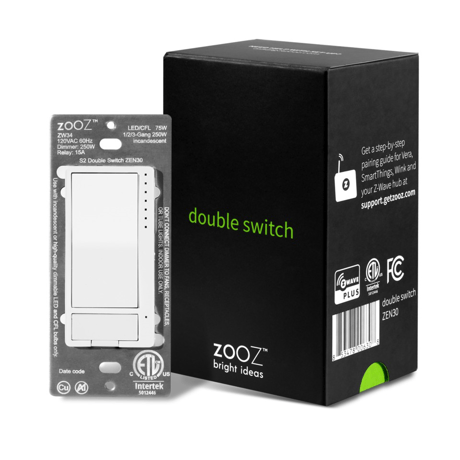
Z-Wave Plus Dimmer (up to 75 W LEDs and 250 W incandescent) and On/Off Relay in one. Use the Double Switch as a direct Z-Wave™ replacement for a stacked switch controlling 2 independent loads.


1 - LED Indicator Mode for Dimmer
Choose if you want the LED indicator to turn on when the switch (light) is on or off, or if you want it to remain on or off at all times. This setting is for the top status indicator only.Size: 1 byte
Default: 0
Minimum: 0
Maximum: 3
Possible values
| From | To | Desription |
|---|---|---|
| 0 | 0 | LED indicator is on when switch is off, LED indicator is off when switch is on (default) |
| 1 | 1 | LED indicator is on when switch is on, LED indicator is off when switch is off |
| 2 | 2 | LED indicator is always off and LED's don't indicate brightness level during dimming |
| 3 | 3 | LED indicator is always on. |
2 - LED Indicator Control for Relay
Choose if you want the LED indicator to turn on when the relay is on or off, or if you want it to remain on or off at all timesSize: 1 byte
Default: 0
Minimum: 0
Maximum: 3
Possible values
| From | To | Desription |
|---|---|---|
| 0 | 0 | LED indicator is on when relay is off, LED indicator is off when relay is on (default) |
| 1 | 1 | LED indicator is on when relay is on, LED indicator is off when relay is off |
| 2 | 2 | LED indicator is always off |
| 3 | 3 | LED indicator is always on |
3 - LED Indicator Color for Dimmer
Choose the color of the LED indicators for the dimmer.Size: 1 byte
Default: 0
Minimum: 0
Maximum: 3
Possible values
| From | To | Desription |
|---|---|---|
| 0 | 0 | white (default) |
| 1 | 1 | blue |
| 2 | 2 | green |
| 3 | 3 | red |
4 - LED Indicator Color for Relay
Choose the color of the LED indicator for the relay.Size: 1 byte
Default: 0
Minimum: 0
Maximum: 3
Possible values
| From | To | Desription |
|---|---|---|
| 0 | 0 | white (default) |
| 1 | 1 | blue |
| 2 | 2 | green |
| 3 | 3 | red |
5 - IndicatorDimmerBrightness
Led indicator brightness for dimmer.Size: 1 byte
Default: 1
Minimum: 0
Maximum: 2
Possible values
| From | To | Desription |
|---|---|---|
| 0 | 0 | 0 |
6 - IndicatorRelayBrightness
Led indicator brightness for relay.Size: 1 byte
Default: 1
Minimum: 0
Maximum: 2
Possible values
| From | To | Desription |
|---|---|---|
| 0 | 0 | 0 |
7 - IndicatorSceneMode
Led indicator mode for scene.Size: 1 byte
Default: 1
Minimum: 0
Maximum: 1
Possible values
| From | To | Desription |
|---|---|---|
| 0 | 0 | 0 |
8 - DimmerAutoTurnOffTimer
Auto turn off timer for dimmer.Size: 4 bytes
Default: 0
Minimum: 0
Maximum: 65535
Possible values
| From | To | Desription |
|---|---|---|
| 0 | 0 | 0 |
9 - DimmerAutoTurnOnTimer
Auto turn on timer for dimmer.Size: 4 bytes
Default: 0
Minimum: 0
Maximum: 65535
Possible values
| From | To | Desription |
|---|---|---|
| 0 | 0 | 0 |
10 - RelayAutoTurnOffTimer
Auto turn off timer for relay.Size: 4 bytes
Default: 0
Minimum: 0
Maximum: 65535
Possible values
| From | To | Desription |
|---|---|---|
| 0 | 0 | 0 |
11 - RelayAutoTurnOnTimer
Auto turn on timer for relay.Size: 4 bytes
Default: 0
Minimum: 0
Maximum: 65535
Possible values
| From | To | Desription |
|---|---|---|
| 0 | 0 | 0 |
12 - On Off Status After Power Failure
Set the on/off status of the device after power failure.Size: 1 byte
Default: 3
Minimum: 0
Maximum: 8
Possible values
| From | To | Desription |
|---|---|---|
| 0 | 0 | dimmer and relay forced to off (regardless of state prior to power outage) |
| 1 | 1 | dimmer forced to off, relay forced to on |
| 2 | 2 | dimmer forced to on, relay forced to off |
| 3 | 3 | remembers and restores on/off status for dimmer and relay after power failure (default) |
| 4 | 4 | remembers and restores on/off status for dimmer, relay forced to on |
| 5 | 5 | remembers and restores on/off status for dimmer, relay forced to off |
| 6 | 6 | dimmer forced to on, remembers and restores on/off status for relay |
| 7 | 7 | dimmer forced to off, remembers and restores on/off status for relay |
| 8 | 8 | dimmer and relay forced to on. |
13 - Ramp Rate Control for Dimmer
Adjust the ramp rate for the dimmer (fade-in / fade-out effect for on/off operation). Values correspond to the number of seconds it takes for the dimmer to reach full brightness or turn off when operated manually.Size: 1 byte
Default: 1
Minimum: 0
Maximum: 99
Possible values
| From | To | Desription |
|---|---|---|
| 0 | 0 | instant on/off |
| 1 | 99 | (seconds) |
14 - DimmerMinLevel
Multilevel minimum value for dimmer.Size: 1 byte
Default: 1
Minimum: 0
Maximum: 99
Possible values
| From | To | Desription |
|---|---|---|
| 0 | 0 | 0 |
15 - DimmerMaxLevel
Multilevel maximum value for dimmer.Size: 1 byte
Default: 99
Minimum: 1
Maximum: 99
Possible values
| From | To | Desription |
|---|---|---|
| 0 | 0 | 0 |
16 - DimmerAssociationReport
Association reports for dimmer only.Size: 1 byte
Default: 0
Minimum: 0
Maximum: 1
Possible values
| From | To | Desription |
|---|---|---|
| 0 | 0 | 0 |
17 - Double Tap Function for Dimmer
Choose if you want the dimmer to turn on to full brightness or custom brightness level after you double-tap the upper paddle.Size: 1 byte
Default: 0
Minimum: 0
Maximum: 1
Possible values
| From | To | Desription |
|---|---|---|
| 0 | 0 | the light will turn on to full brightness with double tap (default). |
| 1 | 1 | the light will turn on to the maximum brightness level set in Parameter 15 with double tap. |
18 - DoubleTapBehavior
Behavior of quickly press upper paddle 2 times.Size: 1 byte
Default: 0
Minimum: 0
Maximum: 2
Possible values
| From | To | Desription |
|---|---|---|
| 0 | 0 | 0 |
19 - Enable/Disable Load Control for Dimmer (Smart Bulb Setting)
Enable or disable direct manual and Z-Wave™ control of the connected light. Works great for smart bulb control. If disabled, the dimmer will no longer control the connected bulb directly but will still send on/off and brightness reports to the hub so you can use them to create automations for your smart bulbs or other switches. Scenes and other functionality will still be available through paddles.Size: 1 byte
Default: 1
Minimum: 0
Maximum: 2
Possible values
| From | To | Desription |
|---|---|---|
| 0 | 0 | manual control disabled. |
| 1 | 1 | manual control enabled (default). |
| 2 | 2 | manual and Z-Wave™ control disabled. |
20 - Enable/Disable Load Control for Relay (Remote Control Setting)
Enable or disable direct manual and Z-Wave™ control of the connected load. Works great for smart bulbs or any type of remote / scene control. If disabled, the relay will no longer control the connected load directly but will still send on/off reports to the hub so you can use them to create automations for your smart bulbs or other devices. Scenes and other functionality will still be available through the button.Size: 1 byte
Default: 1
Minimum: 0
Maximum: 2
Possible values
| From | To | Desription |
|---|---|---|
| 0 | 0 | manual control disabled. |
| 1 | 1 | manual control enabled (default). |
| 2 | 2 | manual and Z-Wave™ control disabled. |
21 - RampRateForHold
Ramp rate when press and hold the paddle to dimming.Size: 1 byte
Default: 4
Minimum: 1
Maximum: 99
Possible values
| From | To | Desription |
|---|---|---|
| 0 | 0 | 0 |
22 - Z-Wave™ Ramp Rate for Dimmer
Choose if you would like to match the Z-Wave™ on/off ramp rate with the manual ramp rate or set it separately in your hub.Size: 1 byte
Default: 0
Minimum: 0
Maximum: 1
Possible values
| From | To | Desription |
|---|---|---|
| 0 | 0 | Z-Wave™ on/off ramp rate matches the manual ramp rate set in Parameter 13. |
| 1 | 1 | Z-Wave™ on/off ramp rate is set separately through its command class in the hub. |
23 - DimmerCustomBrightnessLevel
Custom brightness level for tap once.Size: 1 byte
Default: 0
Minimum: 0
Maximum: 99
Possible values
| From | To | Desription |
|---|---|---|
| 0 | 0 | 0 |
24 - DimmerReportAndIndicatorBehavior
Disable local control behavior for dimmer.Size: 1 byte
Default: 0
Minimum: 0
Maximum: 1
Possible values
| From | To | Desription |
|---|---|---|
| 0 | 0 | 0 |
25 - RelayReportAndIndicatorBehavior
Disable local control behavior for relay.Size: 1 byte
Default: 0
Minimum: 0
Maximum: 1
Possible values
| From | To | Desription |
|---|---|---|
| 0 | 0 | 0 |
26 - NightModeBrightness
Night mode brightness level.Size: 1 byte
Default: 20
Minimum: 0
Maximum: 99
Possible values
| From | To | Desription |
|---|---|---|
| 0 | 0 | 0 |
27 - DimmerLocalButtonFunction
Local button function for dimmer.Size: 1 byte
Default: 0
Minimum: 0
Maximum: 2
Possible values
| From | To | Desription |
|---|---|---|
| 0 | 0 | 0 |
1. Initiate inclusion (pairing) in the app (or web interface). 2. Finalize inclusion at the switch. TAP the top paddle on the dimmer 3 times quickly. 3. The LED indicators will blink to signal communication and remain on for 2 seconds to confirm inclusion.
If your primary controller is missing or inoperable, you may need to reset the device to factory settings. To complete the reset process manually, press and hold the lower paddle on the dimmer for at least 15 seconds until the LED indicators start flashing, then release. Then immediately press and hold the upper paddle on the dimmer for at least 15 seconds. The LED indicators will flash again to confirm successful reset. NOTE: All previously recorded activity and custom settings will be erased from the device’s memory.
The DSK label is located on the front metal plate of the switch, under the relay button. Scan the QR Code / Enter the 5-digit DSK.
| Type | Value(s) |
|---|