ZVIDAR
Thermostatic Radiator Valve
Z-TRV-V01
Thermostat DT
HW: 01 FW: 01.08
ZGM130S037HGN2 / ZGM130S037HGN1
7.16.3
0x045A (1114)
N/A
0x0400 (1024)
ZC14-22100141
2022-10-10 12:49:29
N/A
Enhanced 232 Slave
Listening Sleeping Slave
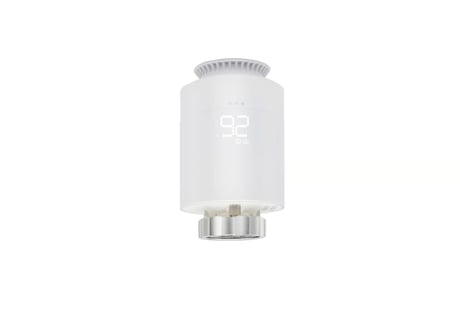
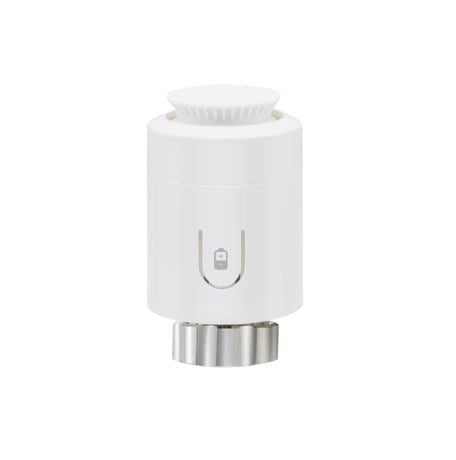
Thermostatic Radiator Valves (TRVs) sense the air temperature around them and regulate the flow of water through the radiator which they are fitted to.


1 - Open window detect function
Open window detect functionSize: 1 byte
Default: 0
Minimum: 0
Maximum: 1
Possible values
| From | To | Desription |
|---|---|---|
| 0 | 0 | 0 |
2 - Anti-freezing function
Anti-freezing functionSize: 1 byte
Default: 0
Minimum: 0
Maximum: 1
Possible values
| From | To | Desription |
|---|---|---|
| 0 | 0 | 0 |
3 - Measured temperature offset
Measured temperature offsetSize: 1 byte
Default: 0
Minimum: 250
Maximum: 6
Possible values
| From | To | Desription |
|---|---|---|
| 0 | 0 | 0 |
4 - Set away home
Set away homeSize: 1 byte
Default: 0
Minimum: 0
Maximum: 1
Possible values
| From | To | Desription |
|---|---|---|
| 0 | 0 | 0 |
5 - Anti-scale function
Anti-scale functionSize: 1 byte
Default: 0
Minimum: 0
Maximum: 1
Possible values
| From | To | Desription |
|---|---|---|
| 0 | 0 | 0 |
6 - Temperature auto report interval time
Temperature auto report interval timeSize: 4 bytes
Default: 0
Minimum: 0
Maximum: 2678400
Possible values
| From | To | Desription |
|---|---|---|
| 0 | 0 | 0 |
7 - Temperature change report threshold
Temperature change report thresholdSize: 1 byte
Default: 5
Minimum: 0
Maximum: 100
Possible values
| From | To | Desription |
|---|---|---|
| 0 | 0 | 0 |
8 - Battery auto report interval time
Battery auto report interval timeSize: 4 bytes
Default: 0
Minimum: 0
Maximum: 2678400
Possible values
| From | To | Desription |
|---|---|---|
| 0 | 0 | 0 |
9 - Battery change report threshold
Battery change report thresholdSize: 1 byte
Default: 5
Minimum: 0
Maximum: 50
Possible values
| From | To | Desription |
|---|---|---|
| 0 | 0 | 0 |
10 - Enable open child lock
Enable open child lockSize: 1 byte
Default: 0
Minimum: 0
Maximum: 1
Possible values
| From | To | Desription |
|---|---|---|
| 0 | 0 | 0 |
Include the TRV into the Z-Wave network manually: a. Power on your TRV, b. Set your Z-Wave controller into add/inclusion mode. c. In “OF” state, short press rotary plate three times until the screen shows “- -”. d. The screen will show “PA” after few seconds, which meant the inclusion is successful. And the signal icon will light on. Otherwise, the inclusion is failed, which you will need to repeat the process form step b.
Exclude TRV from a Z-Wave network: a. Power on your TRV b. Set the Z-Wave primary controller into remove/exclusion mode. c. In “OF” state, short press rotary plate three times until the screen shows “- -”. d. The screen will turn back to “OF” after few seconds, which meant the inclusion is successful. The signal icon light will be off. Otherwise, the exclusion is failed which you will need to repeat the process form step b.
4.3 Reset TRV to factory default In “ OF” state, press and hold rotary plate for at least 5 seconds and release when the 8 screen will blink “OF”. When the reset is successful, the screen will show “OF” in solid for 2 seconds then turn off. And TRV will reset itself to factory default by sending a “Device Reset Locally Notification” to gateway. Note: Please use this procedure only when the network primary controller is missing or otherwise inoperable.
Refer to page 7 in English End User Manuals
| Sensor type |
|---|
| Air Temperature |