Johnson Controls
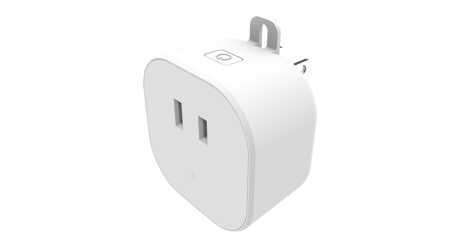
Smart Plug In Dimmer
IQ Dimmer
Multilevel Switch DT
HW: 01 FW: 08.06
EFR32ZG23A
7.17.2
0x012A (298)
N/A
0x4744 (18244)
ZC14-22120180
2022-12-15 14:41:40
N/A
Enhanced 232 Slave
Always On Slave
Smart plug in dimmer that works with incandescent and most dimmable fluorescent (CFL), or LED lighting


3 - LED Mode Indicator
When value = 0, the LED indicator will be OFF when the connected appliance is ON, and the LED indicator will be ON when the connected appliance is OFF. If value = 1, the LED indicator will be OFF when the connected appliance is OFF, and the LED indicator will be ON when the connected appliance is ON. If value = 2, the LED indicator will be always OFF regardless of the load status."Size: 1 byte
Default: 0
Minimum: 0
Maximum: 2
Possible values
| From | To | Desription |
|---|---|---|
| 0 | 0 | the LED indicator will be OFF when the connected appliance is ON, and the LED indicator will be ON when the connected appliance is OFF |
| 1 | 1 | the LED indicator will be OFF when the connected appliance is OFF, and the LED indicator will be ON when the connected appliance is ON |
| 2 | 2 | the LED indicator will be always OFF regardless of the load status |
11 - Set dimmer ramp rate (remote)
Valid Values: 0-99, 0=No delay (instant ON), 1=1 secondSize: 1 byte
Default: 3
Minimum: 0
Maximum: 99
Possible values
| From | To | Desription |
|---|---|---|
| 0 | 99 | second |
12 - Set dimmer ramp rate (local)
Valid Values: 0-99, 0=No delay (instant ON), 1=1 secondSize: 1 byte
Default: 3
Minimum: 0
Maximum: 99
Possible values
| From | To | Desription |
|---|---|---|
| 0 | 99 | second |
If Inclusion still fails after the 2nd attempt, you need to first reset the IQ Dimmer before repeating the above step. The manual reset method is as follows: 1. Unplug the IQ Dimmer from the AC outlet and also unplug the power plug of the appliance from the IQ Dimmer (if plugged in) 2. Press and hold the button on the IQ Dimmer. 3. Plug the IQ Dimmer back into the AC outlet with the button pressed After 3 seconds, release the button. If you see the LED blink, that means that the PD800 has been reset successfully and you may retry Step 3 above to add the module into your network. Otherwise, please repeat the manual reset procedure.
Page 1
| Type | Value(s) |
|---|