Yale
Yale Real Living® Assure Lock™ Interconnected
YRC620-ZW2
Door Lock - Keypad
HW: 255 FW: 1.78:32.33
ZM5101
6.51.07
0x0129 (297)
0x8103 (33027)
0x12C2 (4802)
ZC10-23027123
2023-02-27 14:04:39.95346
N/A
Enhanced 232 Slave
Listening Sleeping Slave
Yes
Yale Real Living Assure Lock Interconnected combines electronic deadbolts with the convenience of a passage lever for panic proof egress. From the inside, both the latchbolt and the deadbolt are retracted simultaneously in a single motion for a quick and easy exit. This lock works with Z-Wave™ technology and also comes in 12 finishes.
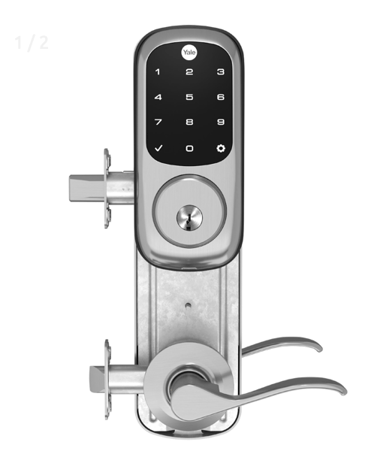
Product Image


1 - Silent Mode on/off
Level control, 1 = High Volume, 2 = Low Volume, 3 = Silent. Default is 1 or High VolumeSize: 1 byte
Default: 1
Minimum: 1
Maximum: 3
Possible values
| From | To | Desription |
|---|---|---|
| 1 | 3 | Sound level |
2 - Auto Relock on/off
0x00 = OFF, 0xFF = ON default is 0x00 or OFFSize: 1 byte
Default: 0
Minimum: 0
Maximum: 255
Possible values
| From | To | Desription |
|---|---|---|
| 0 | 0 | Auto Relock On |
| 255 | 255 | Auto Relock OFF |
3 - Relock Time
10 to 180 seconds default is 30 secondsSize: 1 byte
Default: 30
Minimum: 10
Maximum: 180
Possible values
| From | To | Desription |
|---|---|---|
| 10 | 180 | Seconds |
4 - Wrong Code Entry Limit
3 to 10 default is 5 timesSize: 1 byte
Default: 5
Minimum: 3
Maximum: 10
Possible values
| From | To | Desription |
|---|---|---|
| 3 | 10 | Times |
5 - Language
1=English, 2=Spanish, 3=French default is 1= EnglishSize: 1 byte
Default: 1
Minimum: 1
Maximum: 3
Possible values
| From | To | Desription |
|---|---|---|
| 1 | 1 | English |
| 2 | 2 | Spanish |
| 3 | 3 | French |
7 - Shut Down Time (After wrong codes)
10 to 180 seconds default is 60 secondsSize: 1 byte
Default: 60
Minimum: 10
Maximum: 180
Possible values
| From | To | Desription |
|---|---|---|
| 10 | 180 | Seconds |
8 - Operating Mode
00 = normal mode (this is the default mode) 01 = vacation mode, keypad lockout 02 = privacy mode, no keypad. RF Unlock will workSize: 1 byte
Default: 0
Minimum: 0
Maximum: 2
Possible values
| From | To | Desription |
|---|---|---|
| 0 | 0 | Normal mode |
| 1 | 1 | Vacation mode |
| 2 | 2 | Privacy mode |
11 - One Touch Locking
0x00 = OFF, 0xFF = ON default is 0xFF or ON.Size: 1 byte
Default: 0
Minimum: 0
Maximum: 255
Possible values
| From | To | Desription |
|---|---|---|
| 0 | 0 | One Touch Locking On |
| 255 | 255 | One Touch Locking Off |
12 - Privacy Button
0x00 = OFF, 0xFF = ON default is 0x00 or OFFSize: 1 byte
Default: 0
Minimum: 0
Maximum: 255
Possible values
| From | To | Desription |
|---|---|---|
| 255 | 255 | Privacy Button On |
| 0 | 0 | Privacy Button Off |
| 0 | 0 | Normal Mode |
| 1 | 1 | Vacation Mode |
| 2 | 2 | Privacy Mode |
13 - Lock Status LED
0x00 = OFF , 0xFF=ON default is 0x00 or OFFSize: 1 byte
Default: 0
Minimum: 0
Maximum: 255
Possible values
| From | To | Desription |
|---|---|---|
| 0 | 0 | Lock Status LED On |
| 255 | 255 | Lock Status LED Off |
15 - Reset to Factory Defaults
01 = Lock will execute Reset To Factory. No default valueSize: 1 byte
Default: 0
Minimum: 0
Maximum: 255
Possible values
| From | To | Desription |
|---|---|---|
| 0 | 0 | Reset to Factory ON |
| 255 | 255 | Reset to Factory Off |
16 - Escape Return Mode
0x00 = OFF, 0xFF = ON default is 0x00 or OFF Enables the Escape Return mode of operation for the lock.Size: 1 byte
Default: 0
Minimum: 0
Maximum: 255
Possible values
| From | To | Desription |
|---|---|---|
| 0 | 0 | Escape Return ON |
| 255 | 255 | Escape Return OFF |
21 - Eco Mode on/off
0x00 = OFF, 0xFF = ON default is 0x00 or OFF If supported switches lock to lower power mode of operation with reduced sound and led brightness.Size: 1 byte
Default: 0
Minimum: 0
Maximum: 255
Possible values
| From | To | Desription |
|---|---|---|
| 0 | 0 | Eco Mode ON |
| 255 | 255 | Eco Mode OFF |
Enter the 4-8 master Pin code followed by the gear key. Press the 7 key followed by the gear key Press the 1 key followed by the gear key
Enter the 4-8 digit master pin code followed by the gear key Press the 7 key followed by the gear key Press the 3 key followed by the gear key
Lock Activation
Remove the battery cover and batteries. Remove the interior escutcheon to access the reset button. The reset button is located above the PCB cable connector. While pressing the reset button for a minimum of 3 seconds, reinstall batteries. Release reset button. Replace battery cover. Please use this procedure only when the network primary controller is missing or otherwise inoperable
| Type | Value(s) |
|---|
| Group | Type |
|---|---|
| Access Control | (Refer to parameters): State idle |