ZOOZ
Double Relay
ZEN52 LR
Binary Switch DT
HW: 01 FW: 01.50
ZGM130S037HGN2 / ZGM130S037HGN1
7.15.4
0x027A (634)
N/A
0x0904 (2308)
ZC14-23020193
2023-02-02 12:16:31
N/A
Enhanced End Node 232
Always On Slave
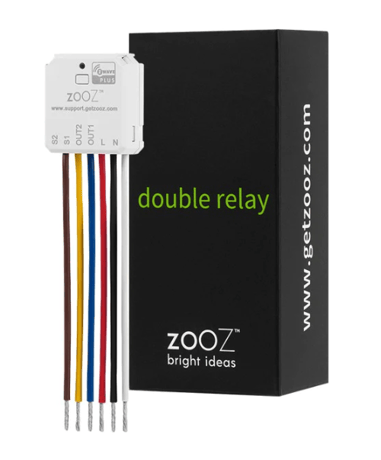
Use the Double Relay to control 2 120 V lights or electrical devices under 5 A individually via Z-Wave™ or from your wall switches.


2 - Led indicator load status
Led indicator load statusSize: 1 byte
Default: 1
Minimum: 0
Maximum: 1
Possible values
| From | To | Desription |
|---|---|---|
| 0 | 0 | Disable |
| 1 | 1 | Enable |
3 - Auto turn-off timer Relay 1
Automatically turns the switch off after this many minutes. When the switch is turned on a timer is started that is the duration of this setting. When the timer expires, the switch is turned off. 0 = timer disabled 1 ~ 65535 = (minutes) timer enabledSize: 2 bytes
Default: 0
Minimum: 0
Maximum: 65535
Possible values
| From | To | Desription |
|---|---|---|
| 0 | 0 | Disabled |
| 1 | 65535 | minutes |
4 - Auto turn-on timer Relay 1
Automatically turns the switch on after this many minutes. When the switch is turned off a timer is started that is the duration of this setting. When the timer expires, the switch is turned on. 0 = timer disabled 1 ~ 65535 = (minutes) timer enabledSize: 2 bytes
Default: 0
Minimum: 0
Maximum: 65535
Possible values
| From | To | Desription |
|---|---|---|
| 0 | 0 | Disabled |
| 1 | 65535 | minutes |
5 - Auto turn-off timer Relay 2
Automatically turns the switch off after this many minutes. When the switch is turned on a timer is started that is the duration of this setting. When the timer expires, the switch is turned off. 0 = timer disabled 1 ~ 65535 = (minutes) timer enabledSize: 2 bytes
Default: 0
Minimum: 0
Maximum: 65535
Possible values
| From | To | Desription |
|---|---|---|
| 0 | 0 | Disabled |
| 1 | 65535 | minutes |
6 - Auto turn-on timer Relay 2
Automatically turns the switch on after this many minutes. When the switch is turned off a timer is started that is the duration of this setting. When the timer expires, the switch is turned on. 0 = timer disabled 1 ~ 65535 = (minutes) timer enabledSize: 2 bytes
Default: 0
Minimum: 0
Maximum: 65535
Possible values
| From | To | Desription |
|---|---|---|
| 0 | 0 | Disabled |
| 1 | 65535 | minutes |
7 - Timer for relay 1 seconds or minutes
Timer for relay 1 seconds or minutes. 1 = minutes, 2 = secondsSize: 1 byte
Default: 1
Minimum: 1
Maximum: 2
Possible values
| From | To | Desription |
|---|---|---|
| 1 | 1 | minutes |
| 2 | 2 | seconds |
8 - Timer for relay 2 seconds or minutes
Timer for relay 2 seconds or minutes. 1 = minutes, 2 = secondsSize: 1 byte
Default: 1
Minimum: 1
Maximum: 2
Possible values
| From | To | Desription |
|---|---|---|
| 1 | 1 | minutes |
| 2 | 2 | seconds |
14 - Restores state after power failure, relay 1
The state the switch should return to once power is restored after power failure, relay 1.Size: 1 byte
Default: 2
Minimum: 0
Maximum: 2
Possible values
| From | To | Desription |
|---|---|---|
| 0 | 0 | Output off |
| 1 | 1 | Output on |
| 2 | 2 | Output the state after power |
15 - Restores state after power failure, relay 2
The state the switch should return to once power is restored after power failure, relay 2Size: 1 byte
Default: 2
Minimum: 0
Maximum: 2
Possible values
| From | To | Desription |
|---|---|---|
| 0 | 0 | Output off |
| 1 | 1 | Output on |
| 2 | 2 | Output the state after power |
16 - Enable or Disable Scene
Enable/disable to send scene notification command when the switches external action.Size: 1 byte
Default: 1
Minimum: 0
Maximum: 1
Possible values
| From | To | Desription |
|---|---|---|
| 0 | 0 | Disable |
| 1 | 1 | Enable |
17 - Enable or Disable Output control relay 1
Enable or Disable Output control (disable LOAD ONLY, ON/OFF works) relay 1.Size: 1 byte
Default: 1
Minimum: 0
Maximum: 2
Possible values
| From | To | Desription |
|---|---|---|
| 0 | 0 | Disable local button and External Switch control enable Z-Wave control (reports on hub ON/OFF) |
| 1 | 1 | Enable local button and External Switch control enable Z-Wave control |
| 2 | 2 | Disable local button and External Switch control disable Z-Wave control (reports on hub ON/OFF) |
18 - Enable or Disable Output control relay 2
Enable or Disable Output control (disable LOAD ONLY, ON/OFF works) relay 2.Size: 1 byte
Default: 1
Minimum: 0
Maximum: 2
Possible values
| From | To | Desription |
|---|---|---|
| 0 | 0 | Disable local button and External Switch control enable Z-Wave control (reports on hub ON/OFF) |
| 1 | 1 | Enable local button and External Switch control enable Z-Wave control |
| 2 | 2 | Disable local button and External Switch control disable Z-Wave control (reports on hub ON/OFF) |
20 - External switch type input 1
External switch type input 1Size: 1 byte
Default: 2
Minimum: 0
Maximum: 4
Possible values
| From | To | Desription |
|---|---|---|
| 0 | 0 | Toggle switch (device changes status when switch changes status) |
| 1 | 1 | Momentary switch |
| 2 | 2 | Switch ON ->always ON. Switch OFF->always OFF |
| 3 | 3 | 3-way impulse control |
| 4 | 4 | Garage Mode |
21 - External switch type input 2
External switch type input 2Size: 1 byte
Default: 2
Minimum: 0
Maximum: 4
Possible values
| From | To | Desription |
|---|---|---|
| 0 | 0 | Toggle switch (device changes status when switch changes status) |
| 1 | 1 | Momentary switch |
| 2 | 2 | Switch ON ->always ON. Switch OFF->always OFF |
| 3 | 3 | 3-way impulse control |
| 4 | 4 | Garage Mode |
22 - Impulse time for par 20=3
Impulse time for par 20=3.Size: 1 byte
Default: 10
Minimum: 2
Maximum: 200
Possible values
| From | To | Desription |
|---|---|---|
| 2 | 200 |
23 - Impulse time for par 21=3
Impulse time for par 21=3.Size: 1 byte
Default: 10
Minimum: 2
Maximum: 200
Possible values
| From | To | Desription |
|---|---|---|
| 2 | 200 |
24 - Association reports
Association reportsSize: 1 byte
Default: 1
Minimum: 0
Maximum: 1
Possible values
| From | To | Desription |
|---|---|---|
| 0 | 0 | Z-Wave control: Binary switch report, Manual control: Basic report |
| 1 | 1 | Z-Wave control: Binary switch report, Manual control: Binary switch report |
25 - Relay 1 type behavior
Relay 1 type behavior. 0 = NO, 1 = NCSize: 1 byte
Default: 0
Minimum: 0
Maximum: 1
Possible values
| From | To | Desription |
|---|---|---|
| 0 | 0 | NO |
| 1 | 1 | NC |
26 - Relay 2 type behavior
Relay 2 type behavior. 0 = NO, 1 = NCSize: 1 byte
Default: 0
Minimum: 0
Maximum: 1
Possible values
| From | To | Desription |
|---|---|---|
| 0 | 0 | NO |
| 1 | 1 | NC |
1. Add Device to your hub. Initiate inclusion (pairing) in the app (or web interface). Not sure how? Scan one of the QR codes below for step-by-step instructions or get in touch: www.support.getzooz.com 2. Finalize inclusion at the relay. TAP THE Z-WAVE BUTTON 3 TIMES QUICKLY The LED indicator will blink green to signal communication and turn green for 2 seconds if inclusion is successful or turn red for 2 seconds if the pairing attempt fails.
If your primary controller is missing or inoperable, you may need to reset the device to factory settings. To reset the relay, click the Z-Wave button twice and hold it for 15 seconds. The LED indicator will flash during the process and turn red for 3 seconds to confirm a successful reset.
The SmartStart QRCode is located on the back of the relay, next to the Z-Wave™ Plus logo.
| Type | Value(s) |
|---|