Cherubini
ORA ZRX 10/17
CZT45101700
Window Covering DT
HW: 01 FW: 02.01
ZGM130S037HGN2 / ZGM130S037HGN1
7.16.3
0x0455 (1109)
N/A
0x0004 (4)
ZC14-23030204
2023-03-01 16:50:50
N/A
Enhanced End Node 232
Always On Slave
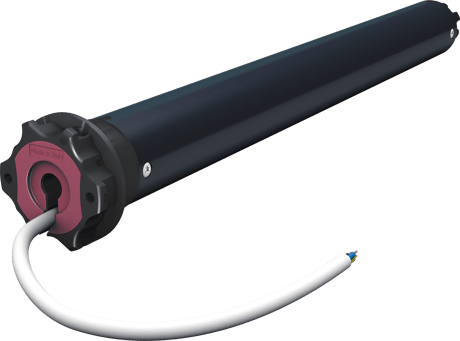
ORA ZRX is a dual radio motor for awnings and pergolas, with programmable limit switches, and wired control option. The dual-radio control allows, on the one hand, the adjustment of the limit switches and the main functions to be carried out simply and interactively and, on the other hand, to be integrated into a Z-Wave™ network. The wired control option provides for both programming and motor control, from a simple switch, as an addition or as an alternative to the radio remote control.


30 - OPEN_COLLISION_SCENE_ID
Scene id sent if a collision is detected during opening operation. O no scene ID is sentSize: 2 bytes
Default: 0
Minimum: 0
Maximum: 254
Possible values
| From | To | Desription |
|---|---|---|
| 0 | 0 | Do not send the scene activation |
| 1 | 254 | The scene Id sent for the collision during Opening |
31 - CLOSE_COLLISION_SCENE_ID
Scene id sent if a collision is detected during closing operation. O no scene ID is sentSize: 2 bytes
Default: 0
Minimum: 0
Maximum: 254
Possible values
| From | To | Desription |
|---|---|---|
| 0 | 0 | Do not send the scene activation |
| 1 | 254 | The scene Id sent for the collision during Closing |
32 - PARAM_ID
Parameter Id used by the window covering set on group: Follow me weatherSize: 1 byte
Default: 13
Minimum: 0
Maximum: 23
Possible values
| From | To | Desription |
|---|---|---|
| 0 | 23 | Send the Window covering set using this parameter ID |
33 - MOVEMENT_TRIGGER
Read-only parameter. Used to describe the reason of the last movementSize: 1 byte
Default: 0
Minimum: 0
Maximum: 3
Possible values
| From | To | Desription |
|---|---|---|
| 0 | 0 | requested by the user |
| 1 | 1 | Wind |
| 2 | 2 | Sun |
| 3 | 3 | Rain |
34 - AUTOMATION_CONFIG
Used to define for which event the automation is active.Size: 1 byte
Default: 5
Minimum: 5
Maximum: 7
Possible values
| From | To | Desription |
|---|---|---|
| 1 | 1 | Wind Automation is active (always active, cannot be disabled) |
| 2 | 2 | Sun Automation |
| 4 | 4 | Rain Automation (always active, cannot be disabled) |
35 - SENSOR_ACTIVATION_STATUS
Read-only parameter. Used to describe which sensor has been associated to the motorSize: 1 byte
Default: 0
Minimum: 0
Maximum: 7
Possible values
| From | To | Desription |
|---|---|---|
| 0 | 0 | No sensors are associated to the motor |
| 1 | 1 | Wind Sensor |
| 2 | 2 | Sun Sensor |
| 4 | 4 | Rain Sensor |
36 - LOST_LIFE_SIGNAL
Read-only parameter. Used to describe if the motor has lost the connection with its sensorsSize: 1 byte
Default: 0
Minimum: 0
Maximum: 1
Possible values
| From | To | Desription |
|---|---|---|
| 0 | 0 | Connection with the sensors is alive |
| 1 | 1 | Connection with the sensors has been lost |
37 - LEVEL_REPORT_PERIOD
Used to define the level report frequency.Size: 1 byte
Default: 5
Minimum: 2
Maximum: 60
Possible values
| From | To | Desription |
|---|---|---|
| 2 | 60 | Define the time frequency from a level report to the next ones (expressed in seconds) |
38 - COLLISION_STATUS
Read-only parameter. Used to tell if a collision happened in the last movement.Size: 1 byte
Default: 2
Minimum: 0
Maximum: 2
Possible values
| From | To | Desription |
|---|---|---|
| 0 | 0 | Collision During opening operation |
| 1 | 1 | Collision During closing operation |
| 2 | 2 | No collision |
Same as above
The Z-Wave™ configuration of the ORA ZRX motor can be reset to the original factory values with the following programming sequence: 1) From the remote control: AB - AC - BC (4 seconds), wait for confirmation movements to be executed. FIG see manual 2) From the button (if the end stops are not adjusted, you can use either sequence indifferently): a. With the motor on the high limit switch: UP-UP-UP-DOWN-UP-DOWN FIG see manual b. With the motor on the low limit switch: DOWN-DOWN-DOWN-UP-DOWN-UP FIG see manual Please use this procedure only when the network primary controller is missing or otherwise inoperable. INFO: If the reset is performed while the device is still part of a network, it notifies the other devices in the Lifeline Group that it has been removed (Device Reset Locally Notification).
Controllable also by Cherubini radio remote control, and by wired button The radio remote control is extremely useful when installing the motor on the awning, to set the limit switches and perform all programming and association functions with the climate sensors. After the first installation, the remote control can still be used as a local control point. Climate Alerts Intelligence The device is able to send a notification based on the information provided by the sensors linked to the motor (Wind, Rain, Solar) so it can recognize Wind, Rain, and Sun alerts and decide to open/close the awning based on the configuration. Recognizes obstacles Notification is send when the motor reaches an obstacle during its operation.
page 4 - The QR code and DSK in the numerical format are shown on the label on the motor cable. The PIN is the first group of 5 digits printed underlined. To facilitate consultation of these codes, the label has a detachable, self-adhesive part, which can be kept in the instruction manual, or applied in an easily accessible place on the roller shutter (box or final blade).

| Type | Value(s) |
|---|
| Group | Type |
|---|---|
| System |
|