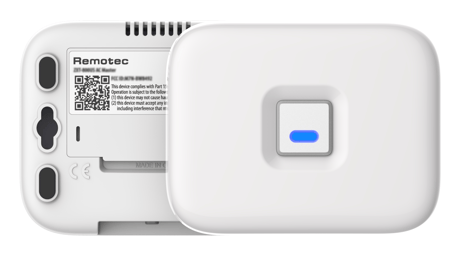
Remotec
ZXT-800 AC/AV MASTER
ZXT-800IL
Thermostat DT
HW: 01 FW: 01.04:02.01
EFR32ZG23A
7.18.3
0x5254 (21076)
N/A
0x0107 (263)
ZC14-23030220
2023-03-30 08:02:24
N/A
Enhanced End Node 232
Listening Sleeping End Node
Experience the latest generation of Z-Wave™ smart controls for IR Extender


25 - Learn AC IR code
Storage location 0 –32 for AC IR code learning (refer to AC learning mapping table) value: 0 - 32Size: 1 byte
Default: 0
Minimum: 0
Maximum: 32
Possible values
| From | To | Desription |
|---|---|---|
| 0 | 32 | Storage location for AC IR code |
26 - Learn AV IR code
Storage location 0 –40 for AV IR code learning (refer to AV learning mapping table) value: 0-40Size: 1 byte
Default: 0
Minimum: 0
Maximum: 40
Possible values
| From | To | Desription |
|---|---|---|
| 0 | 40 | Storage location for V IR code |
27 - Set IR code from built-in AC library
Refer to AC code list find from code finder page by code list QR code AC Learning code number = 0000(0x0000) value: 0-2389Size: 2 bytes
Default: 18
Minimum: 0
Maximum: 2389
Possible values
| From | To | Desription |
|---|---|---|
| 0 | 2389 | AC Learning code number = 0000(0x0000) value: 0-2389 |
28 - External IR Emitter power level
0(0x00) - normal power mode 255(0xFF) - high power mode (default)Size: 1 byte
Default: 255
Minimum: 0
Maximum: 255
Possible values
| From | To | Desription |
|---|---|---|
| 0 | 0 | normal power mode |
| 255 | 255 | high power mode (default) |
30 - Set Auto Report Condition, Trigger by Room Temperature change
0(0x00) = Disable AUTO report function (default) It can extend the battery life. Auto report if room temperature is different from last reportSize: 1 byte
Default: 0
Minimum: 0
Maximum: 8
Possible values
| From | To | Desription |
|---|---|---|
| 0 | 0 | Disabled |
| 1 | 1 | 1°F (0.5°C) |
| 2 | 2 | 2°F (1°C) |
| 3 | 3 | 3°F (1.5°C) |
| 4 | 4 | 4°F (2°C) |
| 5 | 5 | 5°F (2.5°C) |
| 6 | 6 | 6°F (3°C) |
| 7 | 7 | 7°F (3.5°C) |
| 8 | 8 | 8°F (4°C) |
32 - Set Built-in IR Emitter Control
It is allowed to disable internal IR emitter if use external IR emitter jack, it can extend the battery life.Size: 1 byte
Default: 255
Minimum: 0
Maximum: 255
Possible values
| From | To | Desription |
|---|---|---|
| 0 | 0 | Disable |
| 255 | 255 | Enable (default) |
33 - Control Air conditioner “Swing” function
0(0x00) = Swing OFF 1(0x01) = Swing Auto (default)Size: 1 byte
Default: 1
Minimum: 0
Maximum: 1
Possible values
| From | To | Desription |
|---|---|---|
| 0 | 0 | Swing OFF |
| 1 | 1 | Swing Auto (default) |
34 - Temperature and Humidity Auto Report
Set Auto Report Condition by Time Interval 0(0x00) = Disable AUTO report (default)Size: 1 byte
Default: 0
Minimum: 0
Maximum: 6
Possible values
| From | To | Desription |
|---|---|---|
| 1 | 1 | 15 mins |
| 2 | 2 | 30 mins |
| 3 | 3 | 1 Hr |
| 4 | 4 | 2 Hrs |
| 5 | 5 | 3 Hrs |
| 6 | 6 | 4 Hrs |
37 - Calibrate temperature reading
Temperature offset value 0(0x00) = 0°C (default)Size: 1 byte
Default: 0
Minimum: 0
Maximum: 255
Possible values
| From | To | Desription |
|---|---|---|
| 0 | 0 | 0°C (default) |
| 1 | 1 | 0.5°C |
| 2 | 2 | 1°C |
| 3 | 3 | 1.5°C |
| 4 | 4 | 2°C |
| 5 | 5 | 2.5°C |
| 6 | 6 | 3°C |
| 7 | 7 | 3.5°C |
| 8 | 8 | 4°C |
| 9 | 9 | 4.5°C |
| 10 | 10 | 5°C |
| 255 | 255 | -0.5°C |
| 254 | 254 | -1°C |
| 253 | 253 | -1.5°C |
| 252 | 252 | -2°C |
| 251 | 251 | -2.5°C |
| 250 | 250 | -3°C |
| 249 | 249 | -3.5°C |
| 248 | 248 | -4°C |
| 247 | 247 | -4.5°C |
| 246 | 246 | -5°C |
38 - Select AV endpoint
Select AV endpointSize: 1 byte
Default: 2
Minimum: 2
Maximum: 4
Possible values
| From | To | Desription |
|---|---|---|
| 2 | 2 | end point 2 (AV1) default |
| 3 | 3 | end point 3 (AV2) |
| 4 | 4 | end point 4 (AV3) |
53 - Calibrate humidity reading
Calibrate humidity readingSize: 1 byte
Default: 0
Minimum: 0
Maximum: 255
Possible values
| From | To | Desription |
|---|---|---|
| 0 | 0 | 0% (default) |
| 1 | 30 | 1% to 30(0x1E) = 30% |
| 226 | 255 | -1% to 226(0xE2) = -30% |
60 - Trigger BLE advertising
Trigger BLE advertisingSize: 1 byte
Default: 0
Minimum: 0
Maximum: 255
Possible values
| From | To | Desription |
|---|---|---|
| 0 | 0 | Disable BLE advertising (default) |
| 255 | 255 | Enable BLE advertising, please also set Parameter 61 below. (If the ZXT-800 is installed at ceiling location, user can trigger BLE advertisement through the Z-Wave Configuration without click the PROG button.) |
61 - BLE advertising option
BLE advertising optionSize: 1 byte
Default: 0
Minimum: 0
Maximum: 1
Possible values
| From | To | Desription |
|---|---|---|
| 0 | 0 | ZXT-800 advertises for 10 minutes then stop (default) |
| 1 | 1 | ZXT-800 keep advertising, it is suitable for USB supply power |
160 - Device reset to default
Device reset to defaultSize: 1 byte
Default: 0
Minimum: 0
Maximum: 255
Possible values
| From | To | Desription |
|---|---|---|
| 0 | 0 | Default |
| 255 | 255 | device reset to default |
Classic inclusion Refer to your primary controller to enter into the Inclusion Mode or Exclusion Mode Once the primary controller is ready to include/exclude the device, press the “PROG” button once.
Refer to your primary controller to enter into the Inclusion Mode or Exclusion Mode Once the primary controller is ready to include/exclude the device, press the “PROG” button once.
Please use this procedure only when the network primary controller is missing or otherwise inoperable Press and keep holding “PROG” button not less than 10 seconds: LED will light up at first 5 seconds, LED flashes twice then stay off after reset process completed.
None
page 5 of user manual use Smart Phone App to scan ZXT-800 SmartStart QR code, it will include the device into the Z-Wave network automatically. User can find out the QR code at device bottom Z-Wave DSK area. Make sure your gateway supports SmartStart feature.
| Type | Value(s) |
|---|
| Sensor type |
|---|
| Air Temperature |
| Humidity |