Kaadas
Digital Mortise Door Lock
KA251-Z
Lock DT
HW: 208 FW: 01.02:01.27
EFR32ZG23A
7.18.4
0x021D (541)
N/A
0x0103 (259)
ZC14-23050274
2023-05-31 16:08:09
N/A
Enhanced End Node 232
Listening Sleeping End Node
Yes
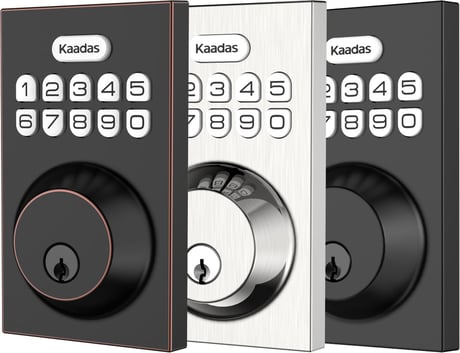
KA251-Z is a smart backlit keypad lock with Z-Wave™ communication, and it is available in three colcor finishes:Satin Nickel,Oil Rubbed Bronze and Matte Black.


1 - Configure volume level
Configure volume levelSize: 1 byte
Default: 2
Minimum: 0
Maximum: 2
Possible values
| From | To | Desription |
|---|---|---|
| 0 | 0 | 0 |
2 - Configure led
Enable/disable ledSize: 1 byte
Default: 1
Minimum: 0
Maximum: 1
Possible values
| From | To | Desription |
|---|---|---|
| 0 | 0 | 0 |
3 - Timed battery report
Configure timed battery reportSize: 2 bytes
Default: 1440
Minimum: 0
Maximum: 14400
Possible values
| From | To | Desription |
|---|---|---|
| 0 | 0 | 0 |
4 - Association Group 2 Settings
Configure the Basic Set valueSize: 1 byte
Default: 1
Minimum: 0
Maximum: 6
Possible values
| From | To | Desription |
|---|---|---|
| 0 | 0 | 0 |
5 - Check fingerprint
Check if there is any fingerprint stored in the lockSize: 1 byte
Default: 0
Minimum: 0
Maximum: 1
Possible values
| From | To | Desription |
|---|---|---|
| 0 | 0 | 0 |
1. Enter master mode(input Kaadas + Kaadas + Master PIN Code + Kaadas) 2. Input "0" to enter "Network settings" 3. Input "1 + Kaadas" to enter "Include mode"
1. Enter master mode(input Kaadas + Kaadas + Master PIN Code + Kaadas) 2. Input "0" to enter "Network settings" 3. Input "2 + Kaadas" to enter "Exclusion mode"
1. Operations on lock 1) Keep your lock in "unlock" status, insert 4AA batteries in battery pack. 2) Use the provided reset pin to press and hold the reset button for more than 5 seconds until hearing beep sound. 3) If reset is successful, the bolt will extend on its own to learn the orientation of the door. 2. Please use this procedure only when the network primary controller is missing or otherwise inoperable.
You may find the DSK on individual package of each product.
| Type | Value(s) |
|---|
| Group | Type |
|---|---|
| Access Control |
|