TLJ Access Control
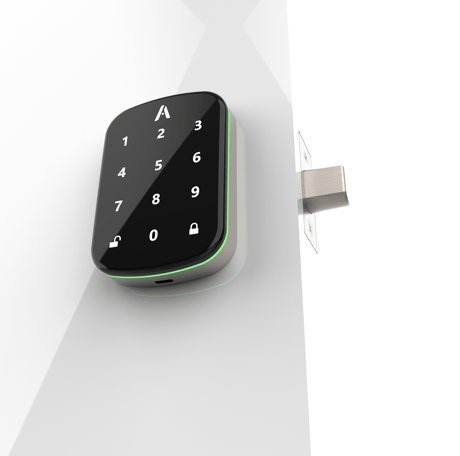
ADB1 Touchscreen keypad with Z-WaveTM and BLE
TLJ ADB1
Lock DT
HW: 01 FW: 01.28:03.30
ZGM130S037HGN2 / ZGM130S037HGN1
7.16.3
0x0449 (1097)
N/A
0x0004 (4)
ZC14-23060290
2023-06-07 14:53:14
N/A
Enhanced End Node 232
Listening Sleeping Slave
Yes
Motorized Deadbolt, battery powered , with embedded Z-Wave™ capabilities for remote control and compatible with RFID tags, PIN codes & BLE. Fully loaded.


1 - SilentOnOff
ControlSoundSize: 1 byte
Default: 0
Minimum: 0
Maximum: 3
Possible values
| From | To | Desription |
|---|---|---|
| 0 | 0 | 0 |
2 - RelockOnOff
AutoRelockSize: 1 byte
Default: 255
Minimum: 0
Maximum: 255
Possible values
| From | To | Desription |
|---|---|---|
| 0 | 0 | 0 |
3 - RelockTimer
RelockTimerSize: 1 byte
Default: 3
Minimum: 1
Maximum: 180
Possible values
| From | To | Desription |
|---|---|---|
| 0 | 0 | 0 |
4 - WrongCode
EntryLimitSize: 1 byte
Default: 5
Minimum: 0
Maximum: 255
Possible values
| From | To | Desription |
|---|---|---|
| 0 | 0 | 0 |
6 - PressRandom
WakeupZpadSize: 1 byte
Default: 255
Minimum: 0
Maximum: 255
Possible values
| From | To | Desription |
|---|---|---|
| 0 | 0 | 0 |
7 - LockOutTime
LockOutTimeSize: 1 byte
Default: 30
Minimum: 10
Maximum: 180
Possible values
| From | To | Desription |
|---|---|---|
| 0 | 0 | 0 |
8 - OpreatingMode
OpreatingModeSize: 1 byte
Default: 1
Minimum: 0
Maximum: 3
Possible values
| From | To | Desription |
|---|---|---|
| 0 | 0 | 0 |
9 - DoorLockPair9
DoorLockPair9Size: 4 bytes
Default: 16777215
Minimum: 0
Maximum: 16777215
Possible values
| From | To | Desription |
|---|---|---|
| 0 | 0 | 0 |
10 - DoorLockPair10
DoorLockPair10Size: 4 bytes
Default: 16777215
Minimum: 0
Maximum: 16777215
Possible values
| From | To | Desription |
|---|---|---|
| 0 | 0 | 0 |
11 - OneTouchLock
OneTouchLockSize: 1 byte
Default: 0
Minimum: 0
Maximum: 255
Possible values
| From | To | Desription |
|---|---|---|
| 0 | 0 | 0 |
15 - ResetDefault
RstFactoryDefaultSize: 1 byte
Default: 0
Minimum: 0
Maximum: 1
Possible values
| From | To | Desription |
|---|---|---|
| 0 | 0 | 0 |
17 - DeadblotFunc
DeadblotFuncSize: 1 byte
Default: 0
Minimum: 0
Maximum: 255
Possible values
| From | To | Desription |
|---|---|---|
| 0 | 0 | 0 |
18 - DoorPosition
AlarmTimerSize: 1 byte
Default: 10
Minimum: 0
Maximum: 60
Possible values
| From | To | Desription |
|---|---|---|
| 0 | 0 | 0 |
20 - DeadblotInstall
DeadblotInstallSize: 1 byte
Default: 255
Minimum: 0
Maximum: 255
Possible values
| From | To | Desription |
|---|---|---|
| 0 | 0 | 0 |
22 - PrivacyMode
DeadblotExtSize: 1 byte
Default: 255
Minimum: 0
Maximum: 255
Possible values
| From | To | Desription |
|---|---|---|
| 0 | 0 | 0 |
24 - BLEInterface
SupportSize: 1 byte
Default: 0
Minimum: 0
Maximum: 255
Possible values
| From | To | Desription |
|---|---|---|
| 0 | 0 | 0 |
25 - BleKeyUid25
BleKeyUid25Size: 4 bytes
Default: 16777215
Minimum: 0
Maximum: 16777215
Possible values
| From | To | Desription |
|---|---|---|
| 0 | 0 | 0 |
26 - BleKeyUid26
BleKeyUid26Size: 4 bytes
Default: 16777215
Minimum: 0
Maximum: 16777215
Possible values
| From | To | Desription |
|---|---|---|
| 0 | 0 | 0 |
48 - LowBatPercent
LowBatAlarmSize: 1 byte
Default: 10
Minimum: 5
Maximum: 50
Possible values
| From | To | Desription |
|---|---|---|
| 0 | 0 | 0 |
Touch the screen and input two random code. Hold the button “√” for 3 seconds,it will display “M”(number 1 3 4 5 6 7 9 light up). Later all keys are light up then input the master PIN. Later “number 1 2 9 0” will light up, tap “2” to enter into Zwave gateway paring mode. Ensure to enter the gateway into inclusion mode at the same time. The Smart deadbolt lock will timeout after 60 seconds of inactivity. When inclusion is finished The Smart deadbolt lock will sound audible beeps and returns to the main menu.
Touch the screen and input two random code. Hold the button “√” for 3 seconds,it will display “M”(number 1 3 4 5 6 7 9 light up). Later all keys are light up then input the master PIN. Later “number 1 2 9 0” will light up, tap “2” to enter into Zwave gateway paring mode. Ensure to enter the gateway into exclusion mode at the same time. The Smart deadbolt lock will timeout after 60 seconds of inactivity. When exclusion is finished The Smart deadbolt lock will sound audible beeps and returns to the main menu.
Simply by touching the front main panel touch screen keypad, anywhere will wake-up the Zpad.
Factory Reset : Hold the Reset button(internal button) for 20seconds until the panel display number “1”and“2”, then release the button, then press “✔" button on front screen (the keypad LED will flash).
Adding an RFID 13.56mhz tag is essentially adding a 10 digit user PIN, using the unique identification (UID) of the tag in a decimal format.
Page 6, System integrators guide doc - "DSK is printed on the back side of the smart deadbolt lock"
| Type | Value(s) |
|---|
| Group | Type |
|---|---|
| Access Control |
|
| Power Management |
|