Jasco Pro Series
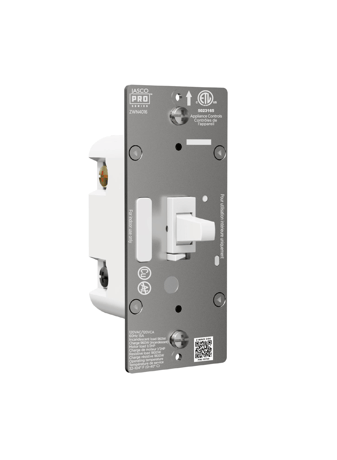
Z-Wave Plus In-Wall Smart Switch, White Toggle, 800S
76598/ZWN4016
Binary Switch DT
HW: 01 FW: 00.03
EFR32ZG23A
7.19.3
0x0063 (99)
N/A
0x4952 (18770)
ZC14-23080314
2023-08-15 18:34:31
N/A
Enhanced End Node 232
Always On End Node
Z-Wave Long Range On/Off Switch,Longer distance, more stable network, reliable control of your lighting.


3 - LED light mode
Set the LED Light Mode.Size: 1 byte
Default: 0
Minimum: 0
Maximum: 3
Possible values
| From | To | Desription |
|---|---|---|
| 0 | 0 | LED ON when device is OFF, LED is OFF when device is ON |
| 1 | 1 | LED ON when device is ON, LED is OFF when device is OFF |
| 2 | 2 | LED always OFF |
| 3 | 3 | LED always ON |
4 - Invert Switch
Reverse the default ON/OFF Paddle switch.Size: 1 byte
Default: 0
Minimum: 0
Maximum: 1
Possible values
| From | To | Desription |
|---|---|---|
| 0 | 0 | Default Paddle Switch orientation |
| 1 | 1 | Invert (up side down) the Paddle Switch orientation |
5 - Select 3-Way Type
Configure standard 3-Way or Add-On Switch.Size: 1 byte
Default: 0
Minimum: 0
Maximum: 1
Possible values
| From | To | Desription |
|---|---|---|
| 0 | 0 | Add-On Switch |
| 1 | 1 | Standard 3-Way Switch |
19 - Alternate Exclusion
Alternative way to perform Exclusion.Size: 1 byte
Default: 0
Minimum: 0
Maximum: 1
Possible values
| From | To | Desription |
|---|---|---|
| 0 | 0 | Default Press Single Paddle switch (up or down paddle switch) once |
| 1 | 1 | Press Menu button once |
34 - LED light color
Set the LED Light Color.Size: 1 byte
Default: 5
Minimum: 1
Maximum: 8
Possible values
| From | To | Desription |
|---|---|---|
| 1 | 1 | RED |
| 2 | 2 | ORANGE |
| 3 | 3 | YELLOW |
| 4 | 4 | GREEN |
| 5 | 5 | BLUE |
| 6 | 6 | PINK |
| 7 | 7 | PURPLE |
| 8 | 8 | WHITE |
35 - LED light intensity
Set the LED Light Intensity.Size: 1 byte
Default: 4
Minimum: 1
Maximum: 7
Possible values
| From | To | Desription |
|---|---|---|
| 1 | 7 | Lowest to Highest |
36 - Guide light mode intensity
Set the Guide light Mode Intensity.Size: 1 byte
Default: 4
Minimum: 1
Maximum: 7
Possible values
| From | To | Desription |
|---|---|---|
| 1 | 7 | Lowest to Highest |
39 - Relay Control
Disable manual control relay.Size: 1 byte
Default: 0
Minimum: 0
Maximum: 1
Possible values
| From | To | Desription |
|---|---|---|
| 0 | 0 | Relay is controlled by the paddle switch |
| 1 | 1 | Relay is not controlled, relay is always OFF, and power always ON |
Network Wide Inclusion To A Z-Wave™ Network TAP the button once times to REMOVE/EXCLUDE the device Refer to your primary controller instructions to process the inclusion / exclusion setup procedure. When prompted by your primary controller, click the Z-Wave button one times .
Network Wide exclude To A Z-Wave™ Network TAP the button once times to REMOVE/EXCLUDE the device Refer to your primary controller instructions to process the inclusion / exclusion setup procedure. When prompted by your primary controller, click the Z-Wave button one times .
Factory Reset:Pull the Airgap switch. Press and hold the bottom button, push the Airgap switch back in and continue holding the bottom button for 10 seconds. The LED will flash once each of the 8 colors then stop. Note: Please use this procedure only when the network primary controller is missing or otherwise inoperable.
PET-With high temperature resistance, friction resistance, scratch resistance and other excellent performance Carbon with print The surface is covered with film to protect the contents
| Type | Value(s) |
|---|