Zooz
SMART PLUG
ZEN04 800LR
Binary Switch DT
HW: 02 FW: 08.00
EFR32ZG23A
7.19.2
0x027A (634)
N/A
0x7000 (28672)
ZC14-23080322
2023-08-30 13:55:09
N/A
Enhanced End Node 232
Always On End Node
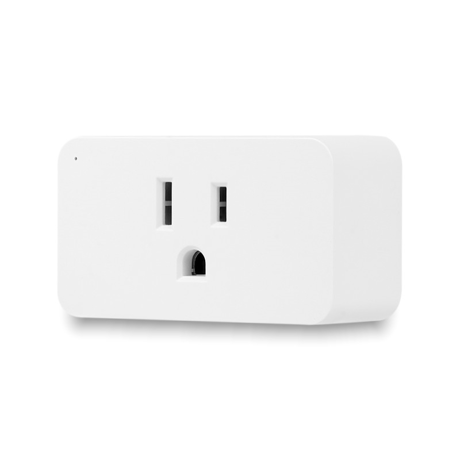
Automate lamps and small appliances with this reliable Z-Wave Long Range Smart Plug.


1 - Reaction of led
Change the reaction of the indicator.Size: 1 byte
Default: 0
Minimum: 0
Maximum: 3
Possible values
| From | To | Desription |
|---|---|---|
| 0 | 0 | 0 |
2 - Auto Turn Off
Minutes for turn off automatically.Size: 4 bytes
Default: 0
Minimum: 0
Maximum: 65535
Possible values
| From | To | Desription |
|---|---|---|
| 0 | 0 | 0 |
3 - Auto Turn On
Minutes for turn on automatically.Size: 4 bytes
Default: 0
Minimum: 0
Maximum: 65535
Possible values
| From | To | Desription |
|---|---|---|
| 0 | 0 | 0 |
4 - Status Restore
Restore status after power failure.Size: 1 byte
Default: 0
Minimum: 0
Maximum: 2
Possible values
| From | To | Desription |
|---|---|---|
| 0 | 0 | 0 |
5 - Report threshold of power
Threshold for power report(W).Size: 1 byte
Default: 5
Minimum: 5
Maximum: 50
Possible values
| From | To | Desription |
|---|---|---|
| 0 | 0 | 0 |
6 - Report frequency of power
Interval minutes after last report of power.Size: 4 bytes
Default: 5
Minimum: 1
Maximum: 65535
Possible values
| From | To | Desription |
|---|---|---|
| 0 | 0 | 0 |
7 - Report threshold of currents
Threshold for currents report(x0.1A).Size: 1 byte
Default: 1
Minimum: 1
Maximum: 10
Possible values
| From | To | Desription |
|---|---|---|
| 0 | 0 | 0 |
8 - Report threshold of electricity
Threshold for electricity report(x0.01KWH).Size: 1 byte
Default: 1
Minimum: 1
Maximum: 100
Possible values
| From | To | Desription |
|---|---|---|
| 0 | 0 | 0 |
9 - Indicator brightness
Setting indicator's brightness.Size: 1 byte
Default: 2
Minimum: 0
Maximum: 2
Possible values
| From | To | Desription |
|---|---|---|
| 0 | 0 | 0 |
10 - Disable power report
Enable or disable power report.Size: 1 byte
Default: 0
Minimum: 0
Maximum: 1
Possible values
| From | To | Desription |
|---|---|---|
| 0 | 0 | 0 |
11 - Disable currents report
Enable or disable currents report.Size: 1 byte
Default: 0
Minimum: 0
Maximum: 1
Possible values
| From | To | Desription |
|---|---|---|
| 0 | 0 | 0 |
12 - Report frequency of currents
Interval minutes after last report of currents.Size: 4 bytes
Default: 60
Minimum: 1
Maximum: 65535
Possible values
| From | To | Desription |
|---|---|---|
| 0 | 0 | 0 |
13 - Report frequency of voltage
Interval minutes after last report of voltage.Size: 4 bytes
Default: 60
Minimum: 0
Maximum: 65535
Possible values
| From | To | Desription |
|---|---|---|
| 0 | 0 | 0 |
Initiate inclusion (pairing) in the app (or web interface). While the hub is looking for new devices, click the Z-Wave™ button 3 times as quickly as possible. The LED indicator will start flashing blue to confirm inclusion mode and turn green for 1 second once inclusion is completed.
1. Bring the plug within direct range of your Z-Wave™ hub. 2. Put the Z-Wave™ hub into exclusion mode (not sure how to do that? [email protected]). 3. Click the Z-Wave™ button 3 times as quickly as possible. 4. Your hub will confirm exclusion and the plug will disappear from your controller''s device list.
When your network’s primary controller is missing or otherwise inoperable, you may need to reset the device to factory settings manually. In order to complete the process, make sure the plug is powered, then click the Z-Wave™ button twice and hold it the third time for 10 seconds. The LED indicator will flash green 3 times to confirm a successful reset. NOTE: All previously recorded activity and custom settings will be erased from the device’s memory.
If you’re using an S2 hub, it will ask you to enter the DSK PIN or scan the QR code printed on the side of the plug to complete SmartStart inclusion.
| Type | Value(s) |
|---|
| Group | Type |
|---|---|
| Power Management |
|