Philips
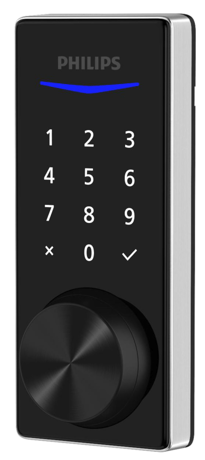
Philips Home Access keyed touchscreen deadbolt
DDL240X-15HZW
Lock DT
HW: 212 FW: 01.18:01.42
EFR32ZG23A
7.18.4
0x021D (541)
0x0903 (2307)
0x00D4 (212)
ZC14-23110364
2023-11-27 09:47:25
N/A
Enhanced End Node 232
Listening Sleeping End Node
Yes
DDL240X-15HZW is a Z-Wave™ Touchscreen Smart Deadbolt from Philips. It can be seamlessly integrated with popular Z-Wave™ systems, allowing you to choose how you want to enter your home and create custom automation routines.


1 - Configure volume level
Configure volume levelSize: 1 byte
Default: 2
Minimum: 0
Maximum: 2
Possible values
| From | To | Desription |
|---|---|---|
| 0 | 0 | silent |
| 1 | 1 | Low volume |
| 2 | 2 | High volume |
2 - Configure led
Enable/disable ledSize: 1 byte
Default: 1
Minimum: 0
Maximum: 1
Possible values
| From | To | Desription |
|---|---|---|
| 0 | 0 | OFF |
| 1 | 1 | ON (blink) |
3 - Timed battery report
Configure timed battery reportSize: 2 bytes
Default: 1440
Minimum: 0
Maximum: 14400
Possible values
| From | To | Desription |
|---|---|---|
| 0 | 0 | Disable timed battery report |
| 1 | 14400 | Enable timed battery report and sets how often battery is reported in minutes. |
4 - Association Group 2 Settings
Configure the Basic Set valueSize: 1 byte
Default: 1
Minimum: 0
Maximum: 6
Possible values
| From | To | Desription |
|---|---|---|
| 0 | 0 | Disable completely. |
| 1 | 1 | Unlocked Status sends Basic SET OxFF, Locked Status sends Basic SET 0x00. |
| 2 | 2 | Unlocked Status sends Basic SET 0x00, Locked Status sends Basic Set OxFF. |
| 3 | 3 | Sends only Basic SET OxFF when Unlocked Status happens. |
| 4 | 4 | Sends only Basic SET 0x00 when Locked Status happens. |
| 5 | 5 | Sends only Basic SET 0x00 when Unlocked Status happens. |
| 6 | 6 | Sends only Basic SET OxFF when Locked Status happens. |
1. Enter master mode(input X + X + Master PIN Code + √) 2. Input "0" to enter "Network settings" 3. Input "1 + √" to enter "Include mode"
1. Enter master mode(input X + X + Master PIN Code + √ ) 2. Input "0" to enter "Network settings" 3. Input "2 + √" to enter "Exclusion mode"
1. Operations on lock 1) Remove one of the batteries. 2) Press and hold the Reset Button. 3) While pressing, insert the removed battery. When you hear the voice prompt, the factory reset is complete. 2. Please use this procedure only when the network primary controller is missing or otherwise inoperable.
You may find the DSK on individual package of each product.
| Type | Value(s) |
|---|
| Group | Type |
|---|---|
| Access Control |
|