Versa
Plug-in Dimmer Outlet
LAMP-ZW2
Multilevel Switch DT
HW: 01 FW: 01.00
EFR32ZG23A
7.19.3
0x0464 (1124)
N/A
0xFF00 (65280)
ZC14-24040421
2024-04-29 16:40:22
N/A
Enhanced End Node 232
Always On End Node
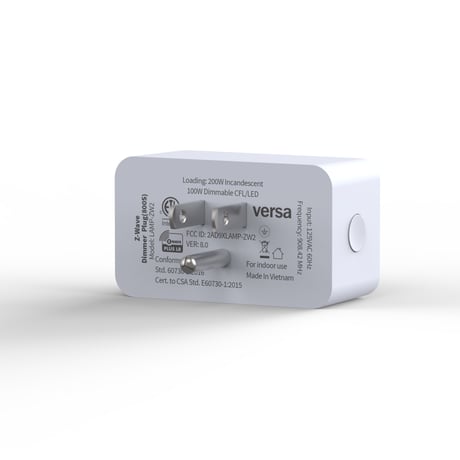
The LAMP-ZW2 is an 800 series Z-Wave plugin dimmer featuring S2 authentication and SmartStart for easy pairing. And with a built-in signal repeater it can extend the wireless coverage of your Z-Wave hub up to 1300 feet.


3 - LED light mode
Set the LED Light Mode.Size: 1 byte
Default: 1
Minimum: 0
Maximum: 3
Possible values
| From | To | Desription |
|---|---|---|
| 0 | 0 | 0 |
16 - Switch Mode
Set control mode: 0= Dim mode,1= Switch mode.Size: 1 byte
Default: 0
Minimum: 0
Maximum: 1
Possible values
| From | To | Desription |
|---|---|---|
| 0 | 0 | 0 |
30 - Minimum Dim Threshold
Minimum Dim Threshold.Size: 1 byte
Default: 1
Minimum: 1
Maximum: 99
Possible values
| From | To | Desription |
|---|---|---|
| 0 | 0 | 0 |
31 - Maximum Brightness Threshold
Maximum Brightness Threshold.Size: 1 byte
Default: 99
Minimum: 1
Maximum: 99
Possible values
| From | To | Desription |
|---|---|---|
| 0 | 0 | 0 |
32 - Starting Brightness Level
Dimmer will turn ON to this level.Size: 1 byte
Default: 0
Minimum: 0
Maximum: 99
Possible values
| From | To | Desription |
|---|---|---|
| 0 | 0 | 0 |
39 - Restore status after power failure
Action in case of power out.Size: 1 byte
Default: 0
Minimum: 0
Maximum: 2
Possible values
| From | To | Desription |
|---|---|---|
| 0 | 0 | 0 |
41 - LED brightness
Set the LED brightness.Size: 1 byte
Default: 0
Minimum: 0
Maximum: 2
Possible values
| From | To | Desription |
|---|---|---|
| 0 | 0 | 0 |
84 - Reset Factory Default
Reset Switch to Factory Defaults.Size: 1 byte
Default: 0
Minimum: 0
Maximum: 1
Possible values
| From | To | Desription |
|---|---|---|
| 0 | 0 | 0 |
The device support two methods of inclusion, When using a Z-Wave Plus® certified controller choose Network Wide Inclusion or SmartStart. TAP the button once times to ADD/INCLUDE the device. Network Wide Inclusion To A Z-Wave® Network TAP the button once times to REMOVE/EXCLUDE the device Refer to your primary controller instructions to process the inclusion / exclusion setup procedure. When prompted by your primary controller, click the Z-Wave button one times . .
The device support two methods of inclusion, When using a Z-Wave Plus® certified controller choose Network Wide Inclusion or SmartStart. TAP the button once times to ADD/INCLUDE the device. Network Wide Inclusion To A Z-Wave® Network TAP the button once times to REMOVE/EXCLUDE the device Refer to your primary controller instructions to process the inclusion / exclusion setup procedure. When prompted by your primary controller, click the Z-Wave button one times . .
2. Factory Reset:Remove the switch from power. Press and hold the manual button, plug the switch in and continue holding the manual button for 3 seconds. Note: Please use this procedure only when the network primary controller is missing or otherwise inoperable.
SCAN THE QR CODE / ENTER THE 5-DIGIT DSK, visual arrow pointing to the DSK PIN code on the switch
| Type | Value(s) |
|---|