Zooz
Toggle Dimmer 800
ZEN74 800LR
Multilevel Switch DT
HW: 04 FW: 04.10
EFR32ZG23A
7.19.2
0x027A (634)
N/A
0x7000 (28672)
ZC14-24060430
2024-06-05 16:57:06
N/A
Enhanced End Node 232
Always On End Node
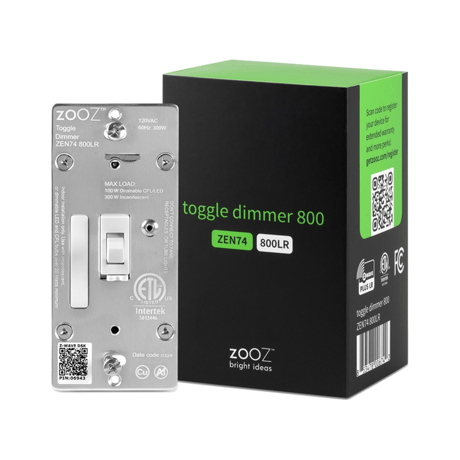
The 800LR S2 Toggle Dimmer takes smart lighting to the next level with faster response time, smooth dimming, and more wireless range than ever.


1 - Locally Button function
Change the function of the up and down key.Size: 1 byte
Default: 0
Minimum: 0
Maximum: 2
Possible values
| From | To | Desription |
|---|---|---|
| 0 | 0 | 0 |
2 - LED Indicator
Indicator behavior.Size: 1 byte
Default: 0
Minimum: 0
Maximum: 3
Possible values
| From | To | Desription |
|---|---|---|
| 0 | 0 | 0 |
3 - Auto Turn-Off Timer
Setting auto off minutes.Size: 4 bytes
Default: 0
Minimum: 0
Maximum: 65535
Possible values
| From | To | Desription |
|---|---|---|
| 0 | 0 | 0 |
5 - Auto Turn-On Timer
Setting auto on minutes.Size: 4 bytes
Default: 0
Minimum: 0
Maximum: 65535
Possible values
| From | To | Desription |
|---|---|---|
| 0 | 0 | 0 |
7 - Association Group Trigger
Select control association group way.Size: 1 byte
Default: 15
Minimum: 0
Maximum: 15
Possible values
| From | To | Desription |
|---|---|---|
| 0 | 0 | 0 |
8 - Restores state
Restore state after power failure.Size: 1 byte
Default: 2
Minimum: 0
Maximum: 2
Possible values
| From | To | Desription |
|---|---|---|
| 0 | 0 | 0 |
9 - Ramp rate for physical on
Rate for manually turn on.Size: 1 byte
Default: 0
Minimum: 0
Maximum: 99
Possible values
| From | To | Desription |
|---|---|---|
| 0 | 0 | 0 |
10 - Multilevel minimum value
Set the maximum brightness value.Size: 1 byte
Default: 1
Minimum: 0
Maximum: 99
Possible values
| From | To | Desription |
|---|---|---|
| 0 | 0 | 0 |
11 - Multilevel maximum value
Set the minimum brightness value.Size: 1 byte
Default: 99
Minimum: 0
Maximum: 100
Possible values
| From | To | Desription |
|---|---|---|
| 0 | 0 | 0 |
12 - Double Tap Behavior
Double Tap behavior.Size: 1 byte
Default: 0
Minimum: 0
Maximum: 3
Possible values
| From | To | Desription |
|---|---|---|
| 0 | 0 | 0 |
13 - Enable or Disable Scene
Enable or disable the center scene.Size: 1 byte
Default: 1
Minimum: 0
Maximum: 1
Possible values
| From | To | Desription |
|---|---|---|
| 0 | 0 | 0 |
15 - Enable or Disable local/Z-Wave control
Disable the output.Size: 1 byte
Default: 1
Minimum: 0
Maximum: 2
Possible values
| From | To | Desription |
|---|---|---|
| 0 | 0 | 0 |
16 - Rate for manually dimming
Ramp rate for local press & hold.Size: 1 byte
Default: 5
Minimum: 1
Maximum: 99
Possible values
| From | To | Desription |
|---|---|---|
| 0 | 0 | 0 |
18 - Custom brightness level
Custom brightness level.Size: 1 byte
Default: 0
Minimum: 0
Maximum: 99
Possible values
| From | To | Desription |
|---|---|---|
| 0 | 0 | 0 |
20 - Association reports
Select the final or each level report type.Size: 1 byte
Default: 2
Minimum: 0
Maximum: 2
Possible values
| From | To | Desription |
|---|---|---|
| 0 | 0 | 0 |
21 - Disabled Relay Behavior
Enable or disable report.Size: 1 byte
Default: 0
Minimum: 0
Maximum: 1
Possible values
| From | To | Desription |
|---|---|---|
| 0 | 0 | 0 |
22 - Night Mode Brightness Level
Set the brightness of night light.Size: 1 byte
Default: 20
Minimum: 0
Maximum: 99
Possible values
| From | To | Desription |
|---|---|---|
| 0 | 0 | 0 |
23 - LED Indicator Color
Setting indicator led's color.Size: 1 byte
Default: 1
Minimum: 0
Maximum: 3
Possible values
| From | To | Desription |
|---|---|---|
| 0 | 0 | 0 |
24 - LED Indicator Brightness
Setting indicator led's brightness.Size: 1 byte
Default: 1
Minimum: 0
Maximum: 2
Possible values
| From | To | Desription |
|---|---|---|
| 0 | 0 | 0 |
25 - Single Tap Behavior
Single tap behavior.Size: 1 byte
Default: 0
Minimum: 0
Maximum: 3
Possible values
| From | To | Desription |
|---|---|---|
| 0 | 0 | 0 |
26 - Disable programming from button
Enable or Disable the local button function.Size: 1 byte
Default: 0
Minimum: 0
Maximum: 1
Possible values
| From | To | Desription |
|---|---|---|
| 0 | 0 | 0 |
27 - Ramp rate for physical off
Rate when turn off by short press the paddle.Size: 1 byte
Default: 0
Minimum: 0
Maximum: 99
Possible values
| From | To | Desription |
|---|---|---|
| 0 | 0 | 0 |
28 - Ramp rate for hub on
Rate when turn on by HUB.Size: 1 byte
Default: 255
Minimum: 0
Maximum: 255
Possible values
| From | To | Desription |
|---|---|---|
| 0 | 0 | 0 |
29 - Ramp rate for hub off
Rate when turn off by HUB.Size: 1 byte
Default: 255
Minimum: 0
Maximum: 255
Possible values
| From | To | Desription |
|---|---|---|
| 0 | 0 | 0 |
30 - Ramp rate for multilevel start
Rate for association group 4.Size: 1 byte
Default: 5
Minimum: 1
Maximum: 99
Possible values
| From | To | Desription |
|---|---|---|
| 0 | 0 | 0 |
32 - Disable LED blinking
Disable LED blinking when a setting is changed.Size: 1 byte
Default: 0
Minimum: 0
Maximum: 1
Possible values
| From | To | Desription |
|---|---|---|
| 0 | 0 | 0 |
1. Initiate inclusion (pairing) in the app (or web interface). 2. TOGGLE UP 3 TIMES QUICKLY if using traditional Z-Wave® inclusion. 3. The LED indicator will blink blue to signal communication and turn green for 3 seconds if inclusion is successful or turn red for 3 seconds if the pairing attempt fails.
1. Bring your Z-Wave® gateway (hub) close to the switch if possible 2. Put the Z-Wave® hub into exclusion mode (not sure how to do that? [email protected]) 3. Tap the lower paddle on the switch 3 times quickly (the LED indicator will start blinking blue) 4. Your hub will confirm exclusion, the LED indicator on the switch will turn green for 3 seconds, and the device will disappear from your controller''s device list reset
If your primary controller is missing or inoperable, you may need to reset the device to factory settings. To reset the switch, hold the toggle DOWN for 10 seconds until the LED indicator starts blinking. Release the toggle, and immediately after, toggle the switch DOWN 5 times to complete the reset. The LED indicator will flash blue 3 times and turn red for 3 seconds to confirm successful reset.
SCAN THE QR CODE / ENTER THE 5-DIGIT DSK + visual indication with arrow pointing to the location of the QR code on the switch
| Type | Value(s) |
|---|