Zooz
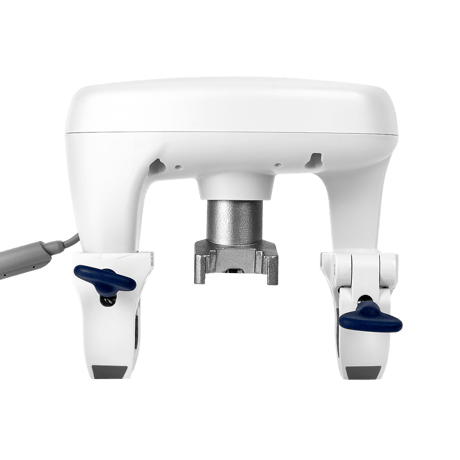
Zooz Z-Wave Long Range Titan Water Valve Actuator
ZAC36LR
Binary Switch DT
HW: 04 FW: 02.00
ZGM130S037HGN2 / ZGM130S037HGN1
7.18.8
0x027A (634)
0x0101 (257)
N/A
ZC14-24070455
2024-07-22 18:08:40
N/A
Enhanced End Node 232
Always On End Node
Use the Z-Wave shut-off valve actuator to shut your main water valve automatically when a leak is detected.


17 - Inverse Water Valve Report
Inverse Switch Binary Report valueSize: 1 byte
Default: 0
Minimum: 0
Maximum: 1
Possible values
| From | To | Desription |
|---|---|---|
| 0 | 0 | 0 |
18 - Association Group 2 SET Value
Valve SET Value when receives 0xFFSize: 1 byte
Default: 1
Minimum: 0
Maximum: 2
Possible values
| From | To | Desription |
|---|---|---|
| 0 | 0 | 0 |
19 - Association Group 2 SET Value
Valve SET Value when receives 0x00Size: 1 byte
Default: 2
Minimum: 0
Maximum: 2
Possible values
| From | To | Desription |
|---|---|---|
| 0 | 0 | 0 |
33 - Temperature Report Unit
Configure reporting temperature unitSize: 1 byte
Default: 2
Minimum: 0
Maximum: 2
Possible values
| From | To | Desription |
|---|---|---|
| 0 | 0 | 0 |
34 - Temperature Threshold Change
Temperature Threshold to auto reportSize: 2 bytes
Default: 260
Minimum: 0
Maximum: 511
Possible values
| From | To | Desription |
|---|---|---|
| 0 | 0 | 0 |
35 - Temperature Sensor Offset
Configure Temperature Report OffsetSize: 2 bytes
Default: 256
Minimum: 0
Maximum: 4607
Possible values
| From | To | Desription |
|---|---|---|
| 0 | 0 | 0 |
36 - Overheat Trigger Value
Configure Overheat Trigger Report ValueSize: 2 bytes
Default: 360
Minimum: 0
Maximum: 511
Possible values
| From | To | Desription |
|---|---|---|
| 0 | 0 | 0 |
37 - Overheat Recover Value
Configure overheat recover report valueSize: 2 bytes
Default: 342
Minimum: 0
Maximum: 511
Possible values
| From | To | Desription |
|---|---|---|
| 0 | 0 | 0 |
38 - Association Group 4 Overheat Trigger
Overheat trigger SET valueSize: 1 byte
Default: 0
Minimum: 0
Maximum: 2
Possible values
| From | To | Desription |
|---|---|---|
| 0 | 0 | 0 |
39 - Association Group 4 Overheat Cancel
Overheat cancellation SET valueSize: 1 byte
Default: 0
Minimum: 0
Maximum: 2
Possible values
| From | To | Desription |
|---|---|---|
| 0 | 0 | 0 |
40 - Freeze Trigger Value
Configure Freeze Trigger Report ValueSize: 2 bytes
Default: 288
Minimum: 0
Maximum: 511
Possible values
| From | To | Desription |
|---|---|---|
| 0 | 0 | 0 |
41 - Freeze Recover Value
Configure Freeze Recover Report ValueSize: 2 bytes
Default: 292
Minimum: 0
Maximum: 511
Possible values
| From | To | Desription |
|---|---|---|
| 0 | 0 | 0 |
42 - Freeze Detection Valve Control
Configure Valve Control during freezeSize: 1 byte
Default: 1
Minimum: 0
Maximum: 1
Possible values
| From | To | Desription |
|---|---|---|
| 0 | 0 | 0 |
43 - Association Group 5 Freeze Trigger
Configure freeze trigger SET valueSize: 1 byte
Default: 0
Minimum: 0
Maximum: 2
Possible values
| From | To | Desription |
|---|---|---|
| 0 | 0 | 0 |
44 - Association Group 5 Freeze Cancel
Freeze cancellation SET valueSize: 1 byte
Default: 0
Minimum: 0
Maximum: 2
Possible values
| From | To | Desription |
|---|---|---|
| 0 | 0 | 0 |
45 - Temperature Auto Report Time Interval Set
Auto Report Time in MinsSize: 1 byte
Default: 15
Minimum: 1
Maximum: 60
Possible values
| From | To | Desription |
|---|---|---|
| 0 | 0 | 0 |
49 - Association Group 3 Water Leak Trigger
Water Leak Trigger SET valueSize: 1 byte
Default: 1
Minimum: 0
Maximum: 2
Possible values
| From | To | Desription |
|---|---|---|
| 0 | 0 | 0 |
50 - Association Group 3 Water Leak Cancel
Water Leak Cancellation SET valueSize: 1 byte
Default: 0
Minimum: 0
Maximum: 2
Possible values
| From | To | Desription |
|---|---|---|
| 0 | 0 | 0 |
51 - Water Leak Detection Valve Control
Enable / Disable Water Leak Valve ControlSize: 1 byte
Default: 1
Minimum: 0
Maximum: 1
Possible values
| From | To | Desription |
|---|---|---|
| 0 | 0 | 0 |
52 - Water Leak Cancellation Time
Report When No Longer TriggerSize: 1 byte
Default: 10
Minimum: 0
Maximum: 60
Possible values
| From | To | Desription |
|---|---|---|
| 0 | 0 | 0 |
65 - Buzzer
Disable/Enable BuzzerSize: 1 byte
Default: 1
Minimum: 0
Maximum: 1
Possible values
| From | To | Desription |
|---|---|---|
| 0 | 0 | 0 |
66 - LED Brightness Level
Configure LED brightness levelSize: 1 byte
Default: 80
Minimum: 0
Maximum: 100
Possible values
| From | To | Desription |
|---|---|---|
| 0 | 0 | 0 |
67 - Touch Keylock Protection
Disable / Enable Touch Keylock ProtectionSize: 1 byte
Default: 0
Minimum: 0
Maximum: 1
Possible values
| From | To | Desription |
|---|---|---|
| 0 | 0 | 0 |
81 - Notification - Water Valve
Disable / Enable Water Valve ReportSize: 1 byte
Default: 1
Minimum: 0
Maximum: 1
Possible values
| From | To | Desription |
|---|---|---|
| 0 | 0 | 0 |
82 - Notification - Overheat
Disable / Enable Overheat ReportSize: 1 byte
Default: 0
Minimum: 0
Maximum: 1
Possible values
| From | To | Desription |
|---|---|---|
| 0 | 0 | 0 |
83 - Notification - Freeze
Disable / Enable Freeze ReportSize: 1 byte
Default: 1
Minimum: 0
Maximum: 1
Possible values
| From | To | Desription |
|---|---|---|
| 0 | 0 | 0 |
84 - Notification - Water Leak
Disable / Enable Water Leak ReportSize: 1 byte
Default: 1
Minimum: 0
Maximum: 1
Possible values
| From | To | Desription |
|---|---|---|
| 0 | 0 | 0 |
85 - Notification - AC Power
Disable / Enable AC Power ReportSize: 1 byte
Default: 1
Minimum: 0
Maximum: 1
Possible values
| From | To | Desription |
|---|---|---|
| 0 | 0 | 0 |
86 - Notification - Battery
Disable / Enable Battery ReportSize: 1 byte
Default: 1
Minimum: 0
Maximum: 1
Possible values
| From | To | Desription |
|---|---|---|
| 0 | 0 | 0 |
97 - Motor Auto Control
Motor Auto ControlSize: 1 byte
Default: 3
Minimum: 0
Maximum: 3
Possible values
| From | To | Desription |
|---|---|---|
| 0 | 0 | 0 |
98 - Motor Auto Control Day
Motor Auto Control DaySize: 1 byte
Default: 14
Minimum: 1
Maximum: 30
Possible values
| From | To | Desription |
|---|---|---|
| 0 | 0 | 0 |
99 - Motor Full Open Offset
Motor Full Open Offset (%)Size: 1 byte
Default: 9
Minimum: 1
Maximum: 10
Possible values
| From | To | Desription |
|---|---|---|
| 0 | 0 | 0 |
100 - Motor Full Close Offset
Motor Full Close Offset (%)Size: 1 byte
Default: 4
Minimum: 1
Maximum: 10
Possible values
| From | To | Desription |
|---|---|---|
| 0 | 0 | 0 |
113 - Battery Threshold Change
Battery Threshold To Auto ReportSize: 1 byte
Default: 10
Minimum: 1
Maximum: 100
Possible values
| From | To | Desription |
|---|---|---|
| 0 | 0 | 0 |
114 - Low Battery Report Level
Low Battery Level to ReportSize: 1 byte
Default: 30
Minimum: 0
Maximum: 100
Possible values
| From | To | Desription |
|---|---|---|
| 0 | 0 | 0 |
115 - Low Battery Detection Valve Control
Water Valve Low Battery ControlSize: 1 byte
Default: 1
Minimum: 0
Maximum: 1
Possible values
| From | To | Desription |
|---|---|---|
| 0 | 0 | 0 |
INCLUSION 1. Initiate inclusion (pairing) in the app (or web interface). 2. TAP THE Z-WAVE® BUTTON 3 TIMES QUICKLY if using traditional Z-Wave® inclusion. 3. The LED indicator will blink to signal communication and turn green for 3 seconds if inclusion is successful.
1. Bring your Titan Valve Actuator close to the Z-Wave® gateway (hub) if possible 2. Put the Z-Wave® hub into exclusion mode (not sure how to do that? Contact us: [email protected]) 3. Tap the Z-Wave® button 3 times quickly (it will flash and beep once each time you tap to confirm communication) 4. Your hub will confirm exclusion, the LED indicator on the actuator will turn green for 3 seconds, and the device will sound 2 short beeps for a successful exclusion. The actuator will disappear from your controller''s device list. The LED indicator on the Titan will go back to the yellow blinking mode.
If your primary controller is missing or inoperable, you may need to reset the device to factory settings. Please make sure that your Z-Wave® button is unlocked before you proceed. To reset the Titan hold the Z-Wave® button until 10 beeps sound. Release the button, and immediately after, tap the Z-Wave® button 5 times. The LED indicator will flash yellow, then it will turn green for 2 seconds and will sound a long beep to confirm a successful reset. NOTE: All previously recorded activity and custom settings will be erased from the device’s memory.
The unique SmartStart QR code is printed on the back of the product and on the side of the packaging.
| Type | Value(s) |
|---|
| Group | Type |
|---|---|
| Heat Alarm |
|
| Water Alarm |
|
| Power Management |
|
| Water Valve |
|
| Sensor type |
|---|
| Air Temperature |