Philio
In Wall Switch (Mini)
PAN33-ANZ
Binary Switch DT
HW: 01 FW: 02.00
ZGM130S037HGN2 / ZGM130S037HGN1
7.15.1
0x013C (316)
0x0001 (1)
0x0082 (130)
ZC14-21110023
2021-11-24 10:41:10
N/A
Enhanced End Node 232
Always On Slave
This product can be operated in any Z-WaveTM network with other Z-WaveTM certified devices from other manufacturers. All mains operated nodes within the network will act as repeaters regardless of vendor to increase reliability of the network. Mini size design let the module can easily hide itself into the wall box and that will be good for the house decoration.
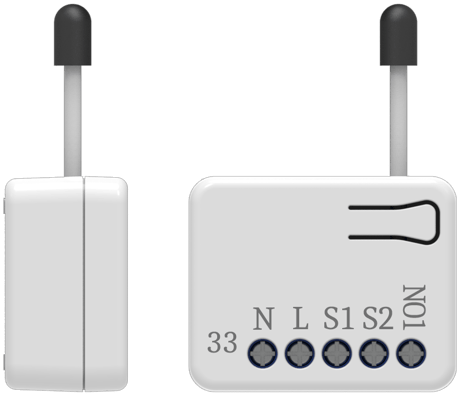


1 - External switch mode
Manual switch S1 and S2 can set to Edge mode or Pulse mode or Edge-Toggle mode, default value is Edge mode.Size: 1 byte
Default: 1
Minimum: 1
Maximum: 3
Possible values
| From | To | Desription |
|---|---|---|
| 1 | 1 | Edge mode |
| 2 | 2 | Pulse mode |
| 3 | 3 | Edge-Toggle mode |
2 - Restore switch state mode
Whenever the AC power return from lost, PAN33 will restore the switch state which could be SWITCH OFF、LAST SWITCH STATE、SWITCH ON. The default setting is LAST SWITCH STATE.Size: 1 byte
Default: 1
Minimum: 0
Maximum: 2
Possible values
| From | To | Desription |
|---|---|---|
| 0 | 0 | Switch off |
| 1 | 1 | Last switch state |
| 2 | 2 | Switch on |
3 - Manual On/Off mode
The On/Off function of S1、S2 and learn switch can be disabled or enabled by this parameter, default value is Enable. But the learning operation won’t be affected. When manual On/Off function is disabled, the RF command can only switch On but not Off. This is useful function for keeping the device in switch on state.Size: 1 byte
Default: 1
Minimum: 0
Maximum: 1
Possible values
| From | To | Desription |
|---|---|---|
| 0 | 0 | Disable manual On/Off |
| 1 | 1 | Enable manual On/Off |
4 - LED indication mode
The setup for different modes of LED indication.Size: 1 byte
Default: 1
Minimum: 1
Maximum: 3
Possible values
| From | To | Desription |
|---|---|---|
| 1 | 1 | Show switch state |
| 2 | 2 | Show night mode |
| 3 | 3 | One flash |
5 - Manual switch report mode
Whenever PAN33 is manually switch on or off, it will send BINARY_SWITCH_REPORT to the node of group1. The default setting is Enable the function.Size: 1 byte
Default: 1
Minimum: 0
Maximum: 1
Possible values
| From | To | Desription |
|---|---|---|
| 0 | 0 | Disable |
| 1 | 1 | Enable |
1.Have Z-Wave Controller entered inclusion mode. 2.Pressing Include button of PAN33 three times within 2 seconds will enter inclusion mode.
1.Have Z-Wave Controller entered exclusion mode. 2.Pressing Include button of PAN33 three times within 2 seconds will enter exclusion mode. 3.Node ID has been excluded.
Please use this procedure only when the network primary controller is missing or otherwise inoperable. 1.Pressing Include button of PAN33 three times within 2 seconds will enter inclusion mode. 2.Within 1 second, press Include button of PAN33 again for
1. To initiate the SmartSart process, please type in the first five digits of DSK string or scan the QR code. The QR Code can be found on PAN33 or in the box. Ex: DSK: 18112-24021-58001-62259-57092- 27453-08187-47408 2. PAN33 is supported with SmartStar
| Type | Value(s) |
|---|
| Group | Type |
|---|---|
| Power Management |
|