Kaadas
Z-Wave Key-Free Touch Deadbolt(KA210-P )
KA210-P
Lock DT
HW: 38 FW: 02.00:50.10:50.10
ZGM130S037HGN2 / ZGM130S037HGN1
7.18.8
0x021D (541)
0x0103 (259)
0x0326 (806)
ZC14-24100476
2024-10-17 12:17:45
N/A
Enhanced End Node 232
Listening Sleeping End Node
Yes
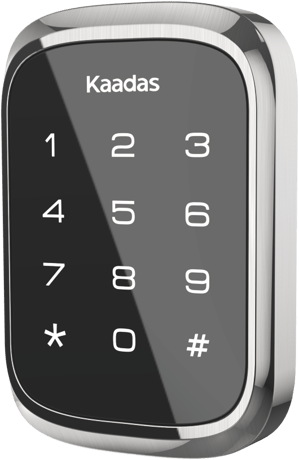
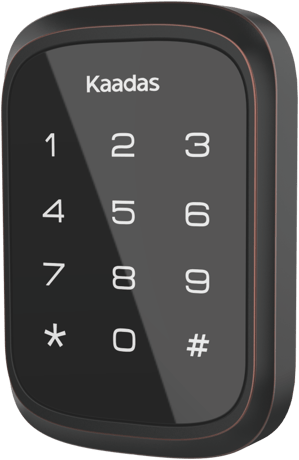
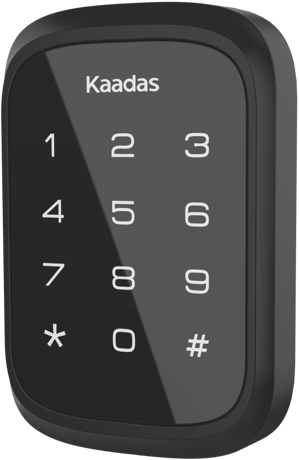
KA210-P is a smart key-free touchsecreen lock with Z-Wave® and Bluetooth communication,and it is available in three colcor finishes:Satin Nickel,Oil Rubbed Bronze and Matte Black.


1 - Configure volume level
Configure volume levelSize: 1 byte
Default: 2
Minimum: 0
Maximum: 2
Possible values
| From | To | Desription |
|---|---|---|
| 0 | 0 | silent |
| 1 | 1 | Low volume |
| 2 | 2 | High volume |
2 - Configure led
LED on the inside of the product.Size: 1 byte
Default: 1
Minimum: 0
Maximum: 1
Possible values
| From | To | Desription |
|---|---|---|
| 0 | 0 | OFF |
| 1 | 1 | ON (blink) |
3 - Timed battery report
Enable/Disable timed battery report and sets how often battery is reported in minutes.Size: 2 bytes
Default: 1440
Minimum: 0
Maximum: 14400
Possible values
| From | To | Desription |
|---|---|---|
| 0 | 0 | Disable timed battery report |
| 1 | 14400 | Enable timed battery report and sets how often battery is reported in minutes. |
4 - Association Group 2 Settings
Determine the Basic Set value to control other Z-Wave devices directly.Size: 1 byte
Default: 1
Minimum: 0
Maximum: 6
Possible values
| From | To | Desription |
|---|---|---|
| 0 | 0 | Disable completely. |
| 1 | 1 | Unlocked Status sends Basic SET OxFF, Locked Status sends Basic SET 0x00. |
| 2 | 2 | Unlocked Status sends Basic SET 0x00, Locked Status sends Basic Set OxFF. |
| 3 | 3 | Sends only Basic SET OxFF when Unlocked Status happens. |
| 4 | 4 | Sends only Basic SET 0x00 when Locked Status happens. |
| 5 | 5 | Sends only Basic SET 0x00 when Unlocked Status happens. |
| 6 | 6 | Sends only Basic SET OxFF when Locked Status happens. |
5 - Check fingerprint
No fingerprint exist/Stored fingerprint.Size: 1 byte
Default: 0
Minimum: 0
Maximum: 1
Possible values
| From | To | Desription |
|---|---|---|
| 0 | 0 | No (No fingerprint exist) |
| 1 | 1 | Yes (Stored fingerprint) |
6 - Enable/Disable One Touch Locking
Enable/Disable One Touch Locking Feature of Lock SideSize: 1 byte
Default: 1
Minimum: 0
Maximum: 1
Possible values
| From | To | Desription |
|---|---|---|
| 0 | 0 | Disable |
| 1 | 1 | Enable |
1. Enter master mode( Press * + * + Master PIN Code + #) 2. Input "0" to enter "Network settings" 3. Input "1 + #" to enter "Include mode"
1. Enter master mode(Press * + * + Master PIN Code + #) 2. Input "0" to enter "Network settings" 3. Input "2 + #" to enter "Exclusion mode"
1. Operations on lock 1) Keep the door open and unlocked. 2) Pull the battery pack upward from the interior assembly. 3) Using the reset tool (L), insert it into the RES hole and hold it therewhile reinserting the battery pack. Keep the reset tool pressed for 5seconds until the lock beeps and the status indicator flashes. 2. Please use this procedure only when the network primary controller is missing or otherwise inoperable.
You can find the QR code when you open the battery box You may also find the QR Code and DSK on individual package of each product. Please do not remove or damage them.
| Type | Value(s) |
|---|
| Group | Type |
|---|---|
| Access Control |
|