Zooz
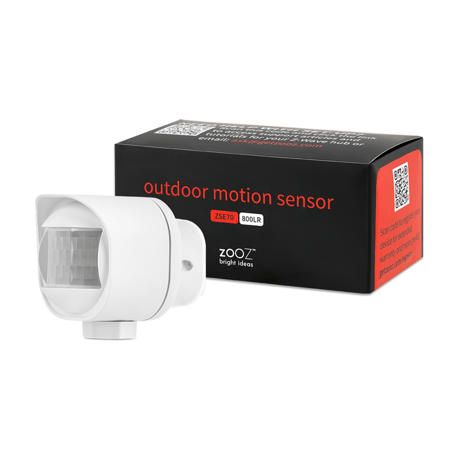
Outdoor Motion Sensor
ZSE70 800LR
Notification Sensor DT
HW: 01 FW: 01.20
EFR32ZG23A
7.19.3
0x027A (634)
0x0004 (4)
0x0006 (6)
ZC14-24110480
2024-11-04 16:12:22
N/A
Enhanced End Node 232
Reporting Sleeping End Node
Yes
The Zooz 800 Series Outdoor Motion Sensor offers reliable motion, temperature, and light detection with Z-Wave Long Range, ideal for hands-free automation and enhanced outdoor security.


1 - Motion sensitivity
Motion sensitivitySize: 1 byte
Default: 6
Minimum: 0
Maximum: 8
Possible values
| From | To | Desription |
|---|---|---|
| 0 | 0 | 0 |
2 - Motion untrigger time
Motion untrigger timeSize: 2 bytes
Default: 30
Minimum: 10
Maximum: 3600
Possible values
| From | To | Desription |
|---|---|---|
| 0 | 0 | 0 |
3 - Motion group control
Motion group controlSize: 1 byte
Default: 7
Minimum: 0
Maximum: 7
Possible values
| From | To | Desription |
|---|---|---|
| 0 | 0 | 0 |
4 - Motion Group Value Setting
Motion Group Value SettingSize: 2 bytes
Default: 65280
Minimum: 0
Maximum: 65535
Possible values
| From | To | Desription |
|---|---|---|
| 0 | 0 | 0 |
5 - Temperature report scale
Temperature report scaleSize: 1 byte
Default: 1
Minimum: 0
Maximum: 1
Possible values
| From | To | Desription |
|---|---|---|
| 0 | 0 | 0 |
6 - LED activity
LED activitySize: 1 byte
Default: 1
Minimum: 0
Maximum: 1
Possible values
| From | To | Desription |
|---|---|---|
| 0 | 0 | 0 |
7 - Low battery threshold
Low battery thresholdSize: 1 byte
Default: 10
Minimum: 10
Maximum: 50
Possible values
| From | To | Desription |
|---|---|---|
| 0 | 0 | 0 |
8 - Battery power checking interval
Battery power checking intervalSize: 2 bytes
Default: 4
Minimum: 0
Maximum: 744
Possible values
| From | To | Desription |
|---|---|---|
| 0 | 0 | 0 |
9 - Temperature Threshold Check Time
Temperature Threshold Check TimeSize: 2 bytes
Default: 30
Minimum: 0
Maximum: 600
Possible values
| From | To | Desription |
|---|---|---|
| 0 | 0 | 0 |
10 - Light Threshold Check Time
Light Threshold Check TimeSize: 2 bytes
Default: 10
Minimum: 0
Maximum: 600
Possible values
| From | To | Desription |
|---|---|---|
| 0 | 0 | 0 |
11 - Battery threshold
Battery thresholdSize: 1 byte
Default: 2
Minimum: 0
Maximum: 50
Possible values
| From | To | Desription |
|---|---|---|
| 0 | 0 | 0 |
12 - Temperature threshold
Temperature thresholdSize: 1 byte
Default: 1
Minimum: 0
Maximum: 144
Possible values
| From | To | Desription |
|---|---|---|
| 0 | 0 | 0 |
13 - Light threshold
Light thresholdSize: 2 bytes
Default: 50
Minimum: 0
Maximum: 30000
Possible values
| From | To | Desription |
|---|---|---|
| 0 | 0 | 0 |
14 - Temperature calibrate offset
Temperature calibrate offsetSize: 1 byte
Default: 100
Minimum: 0
Maximum: 200
Possible values
| From | To | Desription |
|---|---|---|
| 0 | 0 | 0 |
15 - Light calibrate offset
Light calibrate offsetSize: 1 byte
Default: 100
Minimum: 0
Maximum: 200
Possible values
| From | To | Desription |
|---|---|---|
| 0 | 0 | 0 |
16 - Dusk to Dawn
Dusk to DawnSize: 2 bytes
Default: 0
Minimum: 0
Maximum: 30000
Possible values
| From | To | Desription |
|---|---|---|
| 0 | 0 | 0 |
17 - Automatic report interval time for temp
Automatic report interval time for tempSize: 2 bytes
Default: 0
Minimum: 0
Maximum: 43200
Possible values
| From | To | Desription |
|---|---|---|
| 0 | 0 | 0 |
18 - Automatic report interval time for light
Automatic report interval time for lightSize: 2 bytes
Default: 0
Minimum: 0
Maximum: 43200
Possible values
| From | To | Desription |
|---|---|---|
| 0 | 0 | 0 |
Put your Z-Wave® hub into inclusion mode and click the Z-Wave® button 3 times as quickly as possible. The LED indicator will start blinking to confirm inclusion mode and turn off once inclusion is completed.
1. Bring the sensor within direct range of your Z-Wave® gateway (hub). 2. Put the Z-Wave® hub into exclusion mode (not sure how to do that? [email protected]). 3. Click the Z-Wave® button 3 times quickly. 4. Your hub will confirm exclusion and the sensor will disappear from your controller''s device list.
The sensor’s wake-up interval is set to 4 hours by default to save battery life. Use the Wake Up Command Class to adjust the interval (in seconds, working in 3600s intervals, with 3600 as min and 86400 as max values). Click the Z-Wave® button once to wake the sensor up manually. During wake-up, the sensor turns the Z-Wave® radio for 10 seconds to receive communication from the hub. Long wake-up interval will not affect how o
When your network’s primary controller is missing or otherwise inoperable, you may need to reset the device to factory settings manually. In order to complete the process, make sure the sensor is powered, then hold the Z-Wave® button down for at least 10 seconds. The LED indicator will start flashing blue and turn solid blue for a couple of seconds to indicate successful reset. NOTE: All previously recorded activity and custom settings will be erased from the device’s memory.
If you’re using an S2 hub, it will ask you to enter the DSK key or scan the QR code printed on the sticker on the side of the cover to complete SmartStart inclusion.
| Type | Value(s) |
|---|
| Group | Type |
|---|---|
| Home Security |
|
| Power Management |
|
| Sensor type |
|---|
| Air Temperature |
| Illuminance |