Smartwings
SmartWings Window Covering
WM25L/V
Window Covering DT
HW: 01 FW: 01.01:01.00
EFR32ZG23A
7.18.8
0x046A (1130)
0x0004 (4)
0x050B (1291)
ZC14-25010492
2025-01-10 13:46:30
N/A
Enhanced End Node 232
Listening Sleeping End Node
Yes
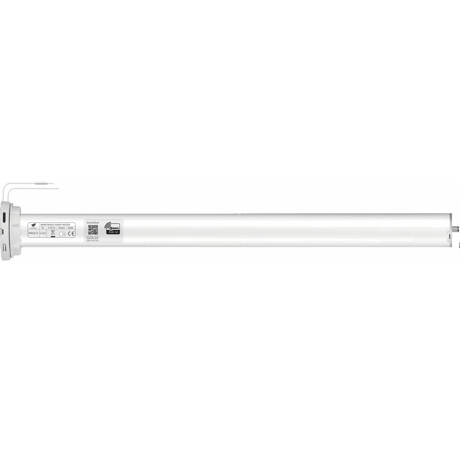
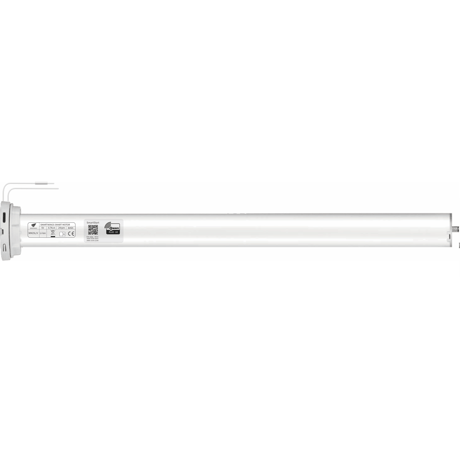
The motor is suitable for motorization of roller blinds.


1 - Enable manual pull-start
This parameter can be used to set the manual pull-start of the motor.Size: 1 byte
Default: 1
Minimum: 0
Maximum: 1
Possible values
| From | To | Desription |
|---|---|---|
| 0 | 0 | Close |
| 1 | 1 | Open |
2 - Set motor direction
This parameter can be used to set the motor rotation direction.Size: 1 byte
Default: 1
Minimum: 1
Maximum: 2
Possible values
| From | To | Desription |
|---|---|---|
| 1 | 1 | forward. |
| 2 | 2 | Reverse |
3 - Manually set open borders
Manually set / cancel open borders.Size: 1 byte
Default: 0
Minimum: 0
Maximum: 1
Possible values
| From | To | Desription |
|---|---|---|
| 0 | 0 | Cancel manually open the border. |
| 1 | 1 | Manually set the open boundary. |
4 - Manually set close borders
Manually set / cancel close borders.Size: 1 byte
Default: 0
Minimum: 0
Maximum: 1
Possible values
| From | To | Desription |
|---|---|---|
| 0 | 0 | Cancel manually close the border. |
| 1 | 1 | Manually set the close boundary |
5 - Set motor status
Set motor status.Size: 1 byte
Default: 3
Minimum: 1
Maximum: 3
Possible values
| From | To | Desription |
|---|---|---|
| 1 | 1 | Open(UP). |
| 2 | 2 | Close(DOWN). |
| 3 | 3 | Stop(STOP). |
6 - Calibration the travel point
Calibration the travel point.Size: 1 byte
Default: 1
Minimum: 1
Maximum: 3
Possible values
| From | To | Desription |
|---|---|---|
| 1 | 1 | Up travel point. |
| 2 | 2 | Down travel point. |
| 3 | 3 | Third travel point. |
7 - Delete the travel point
Delete the travel point.Size: 1 byte
Default: 0
Minimum: 0
Maximum: 3
Possible values
| From | To | Desription |
|---|---|---|
| 0 | 0 | Delete All travel. |
| 1 | 1 | Delete Up travel. |
| 2 | 2 | Delete Down travel. |
| 3 | 3 | Delete Third travel. |
8 - Low battery level alarm threshold
Configure low battery report threshold, sends low battery report via battery report when battery level drops under setting. Unit %.Size: 1 byte
Default: 10
Minimum: 0
Maximum: 50
Possible values
| From | To | Desription |
|---|---|---|
| 0 | 50 | 0% to 50%. |
9 - Battery auto report interval time
Interval time set in seconds. Battery Report will be sent when timeout.Size: 4 bytes
Default: 3600
Minimum: 0
Maximum: 2678400
Possible values
| From | To | Desription |
|---|---|---|
| 0 | 0 | Disable. |
| 1 | 2678400 | 1 to 2678400s. |
10 - Battery change report threshold
Battery change auto report threshold.Size: 1 byte
Default: 5
Minimum: 0
Maximum: 50
Possible values
| From | To | Desription |
|---|---|---|
| 0 | 0 | Disabled. |
| 1 | 50 | 1% to 50%. |
11 - Curtain status report command setting
Which report will be sent to lifeline group when the Curtain status is changed.Size: 1 byte
Default: 6
Minimum: 0
Maximum: 7
Possible values
| From | To | Desription |
|---|---|---|
| 0 | 0 | Send nothing. |
| 1 | 1 | Send Basic Report. |
| 2 | 2 | Send Switch Multilevel Report |
| 3 | 3 | Send Window Covering Report |
| 4 | 4 | Send Basic Report and Switch Multilevel Report. |
| 5 | 5 | Send Basic Report and Window Covering Report. |
| 6 | 6 | Send Switch Multilevel Report and Window Covering Report. |
| 7 | 7 | Send Basic Report and Switch Multilevel Report and Window Covering Report. |
1. Follow the user guide of hub to enter exclusion mode. 2.Press and hold the P1 button on the motor head for 6 seconds. The motor will jog twice, and a red LED light will illuminate, indicating the motor is in pairing mode and ready for app connection.
1. Follow the user guide of hub to enter exclusion mode. 2.Press and hold the P1 button on the motor head for 6 seconds. The motor will jog twice, and a red LED light will illuminate, indicating the motor is in pairing mode and ready for app connection.
1. Please use this procedure only when the network primary controller is missing orotherwise inoperable 2. Remove the back cover of the remote. 3. Briefly press the P button until the motor jogs once. 4. Press the DOWN button until the motor jogs again. 5. Press the P button once more until the motor jogs once.
You can find the QR code on the Curtain. You may also find the QR Code and DSK card in the individual package of each product. Please do not remove or damage them.
| Type | Value(s) |
|---|
| Group | Type |
|---|---|
| Power Management |
|