Yale
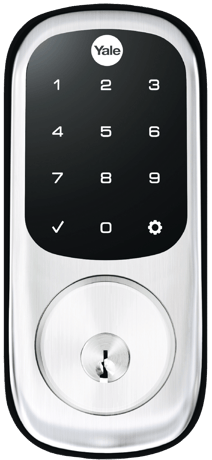
Yale Assure Lock® Keyed
YRD226
Lock DT
HW: 02 FW: 03.09:10.00
ZGM130S037HGN2 / ZGM130S037HGN1
7.20.2
0x0129 (297)
0xE03E (57406)
0x2501 (9473)
ZC14-25020497
2025-02-05 09:55:53
N/A
Enhanced End Node 232
Listening Sleeping End Node
Yes
Never worry about carrying around or losing your house keys again, simply lock and unlock your door with the sleek touchscreen keypad. Create unique pin codes to share with your family and friends for ultimate convenience.


1 - Volume
Set Volume Level to high (1), low (2), or silent (3).Size: 1 byte
Default: 2
Minimum: 1
Maximum: 3
Possible values
| From | To | Desription |
|---|---|---|
| 0 | 0 | 0 |
2 - Auto Relock
Set Auto Relock feature to enable or disable.Size: 1 byte
Default: 0
Minimum: 0
Maximum: 255
Possible values
| From | To | Desription |
|---|---|---|
| 0 | 0 | 0 |
3 - Relock time
Adjust the time your lock will auto relock.Size: 1 byte
Default: 30
Minimum: 10
Maximum: 180
Possible values
| From | To | Desription |
|---|---|---|
| 0 | 0 | 0 |
4 - Wrong Code Entry Limit
Adjust the limit for wrong code entries allowed by your lock.Size: 1 byte
Default: 5
Minimum: 3
Maximum: 10
Possible values
| From | To | Desription |
|---|---|---|
| 0 | 0 | 0 |
5 - Language
Set the language to English (1), Spanish (2), or French (3).Size: 1 byte
Default: 1
Minimum: 1
Maximum: 3
Possible values
| From | To | Desription |
|---|---|---|
| 0 | 0 | 0 |
7 - Shut down time
Adjust the time your lock is shutdown after reaching its wrong code entry limit.Size: 1 byte
Default: 60
Minimum: 10
Maximum: 180
Possible values
| From | To | Desription |
|---|---|---|
| 0 | 0 | 0 |
8 - Operating mode
Set the Operating Mode to normal mode(0), vacation mode(1) or privacy mode(2).Size: 1 byte
Default: 0
Minimum: 0
Maximum: 2
Possible values
| From | To | Desription |
|---|---|---|
| 0 | 0 | 0 |
11 - One Touch Locking
Set One Touch Locking feature to enable or disable.Size: 1 byte
Default: 255
Minimum: 0
Maximum: 255
Possible values
| From | To | Desription |
|---|---|---|
| 0 | 0 | 0 |
12 - Privacy Button
Set Privacy Button feature to enable or disable.Size: 1 byte
Default: 0
Minimum: 0
Maximum: 255
Possible values
| From | To | Desription |
|---|---|---|
| 0 | 0 | 0 |
13 - Lock Status LED
Set Lock Status LED feature to enable or disable.Size: 1 byte
Default: 0
Minimum: 0
Maximum: 255
Possible values
| From | To | Desription |
|---|---|---|
| 0 | 0 | 0 |
28 - Expiring Pin Code Enabled Time
Timeout value used to determine time after first entry an expiring user code will remain enabled.Size: 1 byte
Default: 0
Minimum: 0
Maximum: 255
Possible values
| From | To | Desription |
|---|---|---|
| 0 | 0 | 0 |
How to add (pairing) the product into Z-Wave network 1. Operate on lock following guide below: 1) Enter Master Code-> ‘Gear’ -> ‘7’ -> ‘Gear’ -> ‘1’ -> ‘Gear’
How to remove the product from Z-Wave network 1. Operate on lock following guide below: 1) Enter Master Code-> ‘Gear’ -> ‘7’ -> ‘Gear’ -> ‘3’ -> ‘Gear’
How to factory reset for Z-Wave Note: please use this procedure only when the network primary controller is missing or otherwise inoperable. 1) Press and hold the "factory reset" key after the lock body 2) Power off the lock body for more than 5S, and plug in the battery again 3) Plug in the battery again and wait for 5S to release the "factory reset" key
2.6 Z-Wave DSK Location 2.6.1 How to locate the DSK representation on the product You can find the QR code when you open the battery box 2.6.2 How to access the DSK representation via the UI You may also find the QR Code and DSK on individual package of each product. Please do not remove or damage them.
| Type | Value(s) |
|---|
| Group | Type |
|---|---|
| Access Control |
|
| Power Management |
|